Iva 1c 2026

Get Form
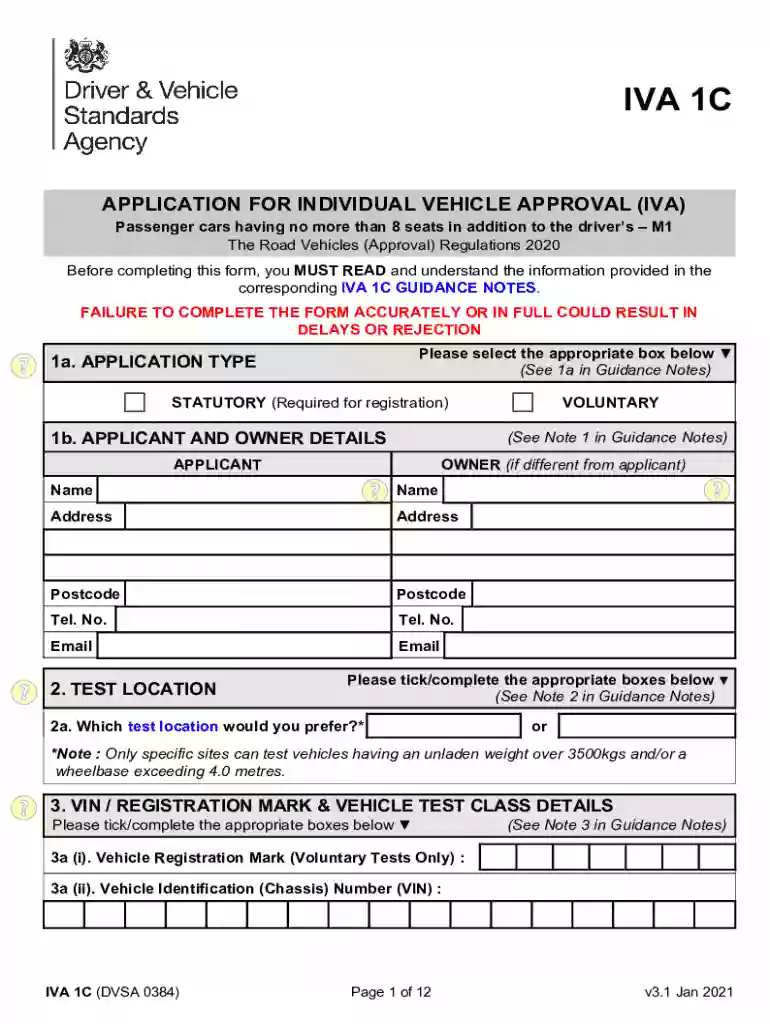
iva 1c form Preview on Page 1

Here's how it works

01. Edit your iva 1c form online
Type text, add images, blackout confidential details, add comments, highlights and more.

02. Sign it in a few clicks
Draw your signature, type it, upload its image, or use your mobile device as a signature pad.

03. Share your form with others
Send iva 1c via email, link, or fax. You can also download it, export it or print it out.

How to use or fill out iva 1c with our platform

Form edit decoration
9.5
Ease of Setup
DocHub User Ratings on G2
9.0
Ease of Use
DocHub User Ratings on G2
  1. Click ‘Get Form’ to open the IVA 1C application in the editor.
  2. Begin by selecting the appropriate application type in section 1a. Ensure you understand whether your application is statutory or voluntary.
  3. In section 1b, fill in your details as the applicant and owner. Include your name, address, postcode, telephone number, and email.
  4. Proceed to section 2 to choose your preferred test location. Make sure to tick the correct box based on your vehicle's specifications.
  5. In section 3, provide the Vehicle Identification Number (VIN) and registration mark if applicable. Tick all relevant vehicle class details that apply to your situation.
  6. Continue filling out vehicle details in section 4, including make, model, date of manufacture, and any modifications made since approval.
  7. Finally, review all sections for accuracy before submitting your completed form through our platform for processing.

Start using our platform today for free to streamline your IVA 1C application process!

See more iva 1c versions

We've got more versions of the iva 1c form. Select the right iva 1c version from the list and start editing it straight away!
Versions Form popularity Fillable & printable
2023 4.3 Satisfied (46 Votes)
2021 4.8 Satisfied (113 Votes)
2021 4.2 Satisfied (60 Votes)
2019 4.4 Satisfied (258 Votes)
2015 4 Satisfied (54 Votes)
be ready to get more

Complete this form in 5 minutes or less

Get form

Got questions?

We have answers to the most popular questions from our customers. If you can't find an answer to your question, please contact us.
Contact us

Yes, electronically drawing your signature is acceptable, but only if you use a tool that complies with industry regulations and policies. Consider DocHub, which guarantees eSignature validity under ESIGN and UETA requirements. All you need to eSign your iva form is an account with DocHub and an internet connection. Once you open your document in our editor, click Sign and choose the Draw option.

You can easily edit fill out your iva application form on any iOS device. Open an internet browser of your choice, visit the DocHub site, authorize or create a new account, upload your file for editing, and make your desired alterations. Our service is mobile-friendly, so utilizing its features on your phone will be a no-brainer, even on the first try.

You need an Individual Vehicle Approval ( IVA ) application form to apply for an inspection.
Basic IVA. Basic IVA involves a visual inspection and other tests to make sure the vehicle meets the necessary standards. You will not normally need to provide any documentary evidence. You can apply if you have a passenger car or light goods vehicle in one of these categories: left-hand drive vehicles.
An IVA (Individual Vehicle Approval) test, which used to be called an SVA (Single Vehicle Approval) test, and a MSVA (Motorcycle Vehicle Approval) test is a legal requirement set by the Department of Transport and one which your car or motorcycle must pass to ensure your vehicle's design (not condition) complies with ...

Security and compliance

At DocHub, your data security is our priority. We follow HIPAA, SOC2, GDPR, and other standards, so you can work on your documents with confidence.

Learn more
ccpa2
pci-dss
gdpr-compliance
hipaa
soc-compliance
be ready to get more

Complete this form in 5 minutes or less

Get form

People also ask

M1 vehicles - passenger cars. M2 and M3 vehicles - buses and coaches. N1 vehicles - light goods vehicles (up to 3,500kgs) N2 and N3 vehicles - heavy goods vehicles (over 3,500kgs)
An M1 license permits motorcyclists to drive any type of motorcycle or motorized scooter (essentially any vehicle with two wheels), while an M2 license only permits drivers to ride a motorized bicycle, moped, or motorized scooter.
Category M1: Means a motor vehicle used for the carriage of passengers, comprising not more than eight seats in addition to the driver's seat.
An IVA (Individual Vehicle Approval) test, which used to be called an SVA (Single Vehicle Approval) test, and a MSVA (Motorcycle Vehicle Approval) test is a legal requirement set by the Department of Transport and one which your car or motorcycle must pass to ensure your vehicle's design (not condition) complies with ...
M1. Vehicles used for carriage of passengers, comprising not more than 9 seats with a Gross. Vehicle Mass (GVM) not exceeding 3500kg.

apply for iva