




Here's how it works



How to use or fill out Internet Application for Replacement Idaho Driver's License or Identification Card with DocHub

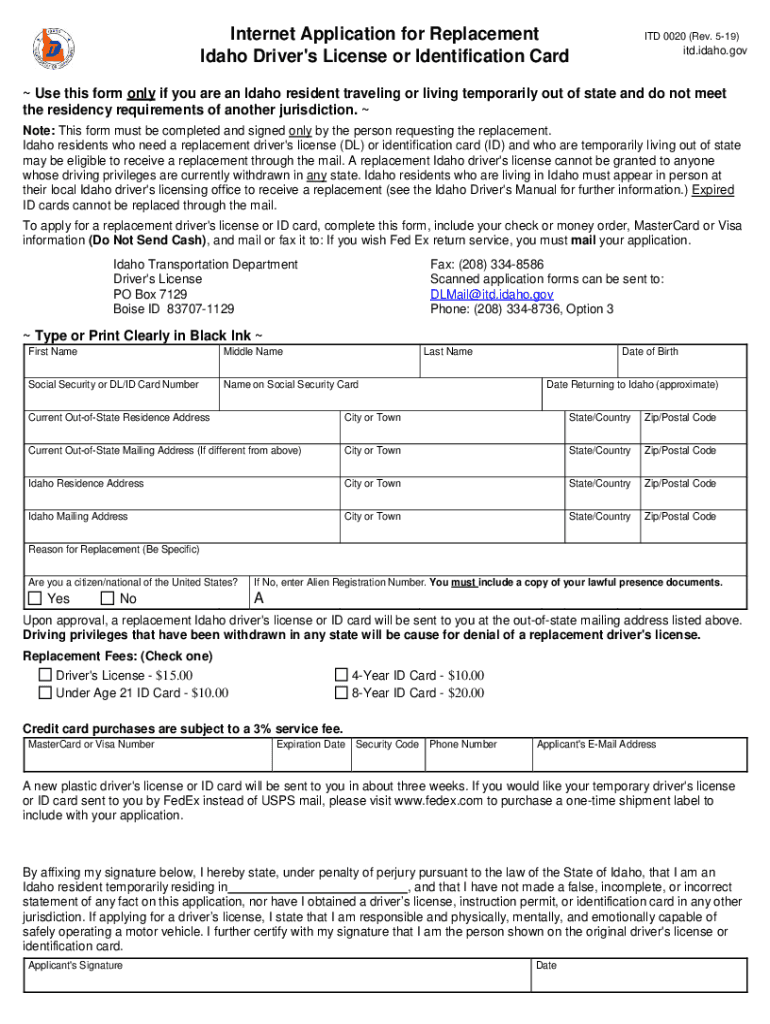
- Click ‘Get Form’ to open the Internet Application for Replacement Idaho Driver's License or Identification Card in our editor.
- Begin by filling in your personal information, including your first name, middle name, last name, and Social Security or DL/ID card number. Ensure that you type clearly to avoid any processing delays.
- Provide your date of birth and the approximate date you plan to return to Idaho. This information is crucial for verifying your residency status.
- Enter your current out-of-state residence address along with the mailing address if it differs. Make sure all details are accurate to ensure proper delivery of your replacement ID.
- Specify the reason for replacement and confirm your citizenship status by selecting 'Yes' or 'No'. If applicable, include your Alien Registration Number and lawful presence documents.
- Select the appropriate replacement fee option and provide payment details. Remember not to send cash; use a check or credit card information instead.
- Finally, affix your signature and date at the bottom of the form, certifying that all provided information is true and complete before submitting it via mail or fax.
Start using our platform today to easily fill out and submit your application for free!
It's free
See more Internet Application for Replacement Idaho Driver's License or Identification Card versions
Got questions?
Can I sign my replacement id card idaho with my phone?
Yes, it is possible with DocHub. This trustworthy and compliant online service has a phone-based signing option. When you log in to your DocHub account and import your replacement id card idaho to our editor, fill out all empty fields and utilize the Sign feature on the upper barf. Click on Create your signature and choose Phone from the available choices. Here, you scan a QR code using your smartphone and draw your signature on your phone screen, as you usually do when signing physical papers. If you access DocHub right from your mobile device, you can eSign your form by drawing your electronic signature, adding its image, or simply with a typed name.
How do you edit dmv idaho gov online services on iOS?
You can easily edit fill out your dmv idaho gov online services on any iOS gadget. Open an internet browser of your liking, visit the DocHub site, authorize or create a new account, add your file for editing, and make your required adjustments. Our service is mobile-friendly, so utilizing its features on your smartphone will be a no-brainer, even on the first try.
How do I get a replacement license in Idaho?
Can I get a new ID Online Idaho?
Can you get a new license online Idaho?
Security and compliance
At DocHub, your data security is our priority. We follow HIPAA, SOC2, GDPR, and other standards, so you can work on your documents with confidence.
Learn more




