




Here's how it works



How to use or fill out 2020-2021 V1 Verification Worksheet - Young Harris College with DocHub

- Click ‘Get Form’ to open the 2020-2021 V1 Verification Worksheet in our editor.
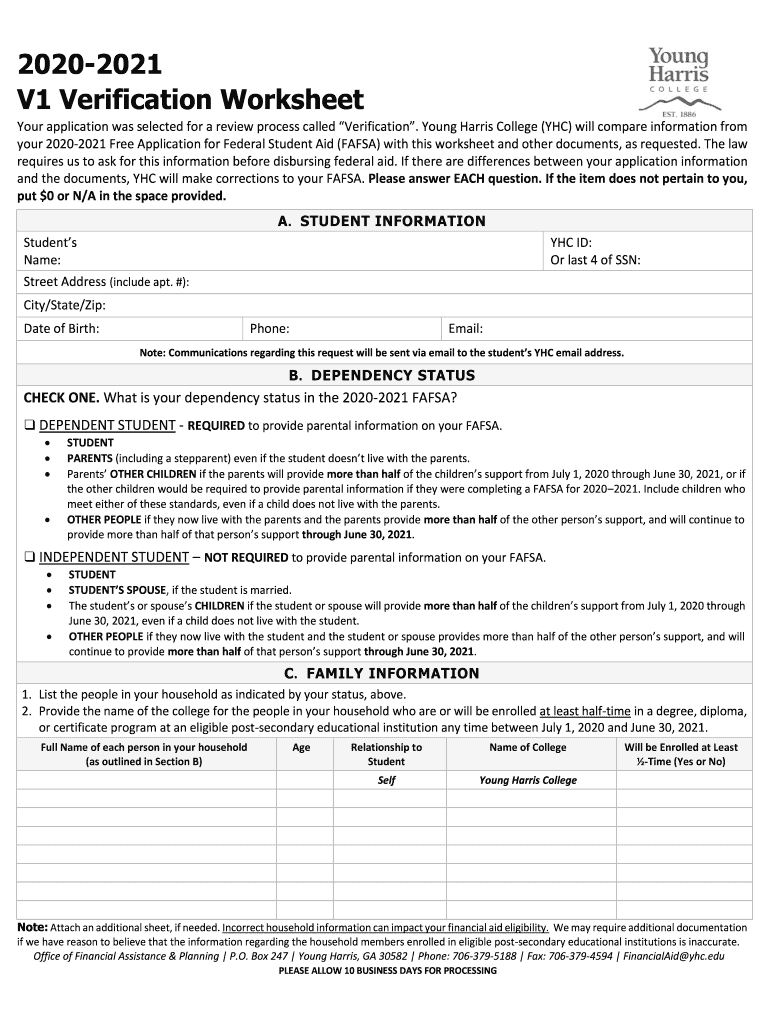
- Begin by filling out Section A, 'STUDENT INFORMATION'. Enter your name, YHC ID or last four digits of your SSN, address, date of birth, phone number, and email. Ensure accuracy as this information is crucial for communication.
- Proceed to Section B, 'DEPENDENCY STATUS'. Select whether you are a dependent or independent student. This choice determines whose information needs to be included in the worksheet.
- In Section C, 'FAMILY INFORMATION', list all household members as per your dependency status. Include their names, ages, relationships to you, and the colleges they attend if applicable.
- Complete Section D, 'INCOME INFORMATION'. Indicate whether you or your parents filed taxes and provide necessary details about income sources. If applicable, attach IRS Tax Return Transcripts.
- Finally, sign and date Section E, 'CERTIFICATION & SIGNATURE(S)'. Remember that electronic signatures are not accepted; ensure all required signatures are present before submission.
Start using our platform today to fill out your verification worksheet easily and for free!
It's free
See more 2020-2021 V1 Verification Worksheet - Young Harris College versions
Got questions?
What is the optimum way to electronically sign my 2020-2021 V1 Verification Worksheet - Young Harris College?
Many software applications are available out there for document modifying and signing. DocHub is one of the most popular online solutions that comply with all security and compliance standards and guarantees your electronically signed paperwork is legally enforceable. All you need to try it out is to register an account, upload your 2020-2021 V1 Verification Worksheet - Young Harris College, provide the necessary details, and click Sign. Generate your electronic signature by typing, drawing it, uploading its image to your form, or scanning a unique QR code.
How to fill out and sign 2020-2021 V1 Verification Worksheet - Young Harris College online?
You can easily fill out, edit, and even eSign your 2020-2021 V1 Verification Worksheet - Young Harris College using DocHub. Create a new profile and start your free trial. After that, you may upload the document with the form and simply make all the needed edits. No need to print on paper or use a third-party application to sign it, as you can put your electronic signature on your document quicker via DocHub.
What is a V1 dependent verification worksheet?
What is a V1 verification worksheet?
What is the independent verification worksheet?
Security and compliance
At DocHub, your data security is our priority. We follow HIPAA, SOC2, GDPR, and other standards, so you can work on your documents with confidence.
Learn more




