Au vodafone financial 2026

Get Form
vodafone financial hardship Preview on Page 1

Here's how it works

01. Edit your vodafone financial hardship online
Type text, add images, blackout confidential details, add comments, highlights and more.

02. Sign it in a few clicks
Draw your signature, type it, upload its image, or use your mobile device as a signature pad.

03. Share your form with others
Send vodafone hardship via email, link, or fax. You can also download it, export it or print it out.

How to use or fill out au vodafone financial with our platform

Form edit decoration
9.5
Ease of Setup
DocHub User Ratings on G2
9.0
Ease of Use
DocHub User Ratings on G2
  1. Click ‘Get Form’ to open the au vodafone financial application in the editor.
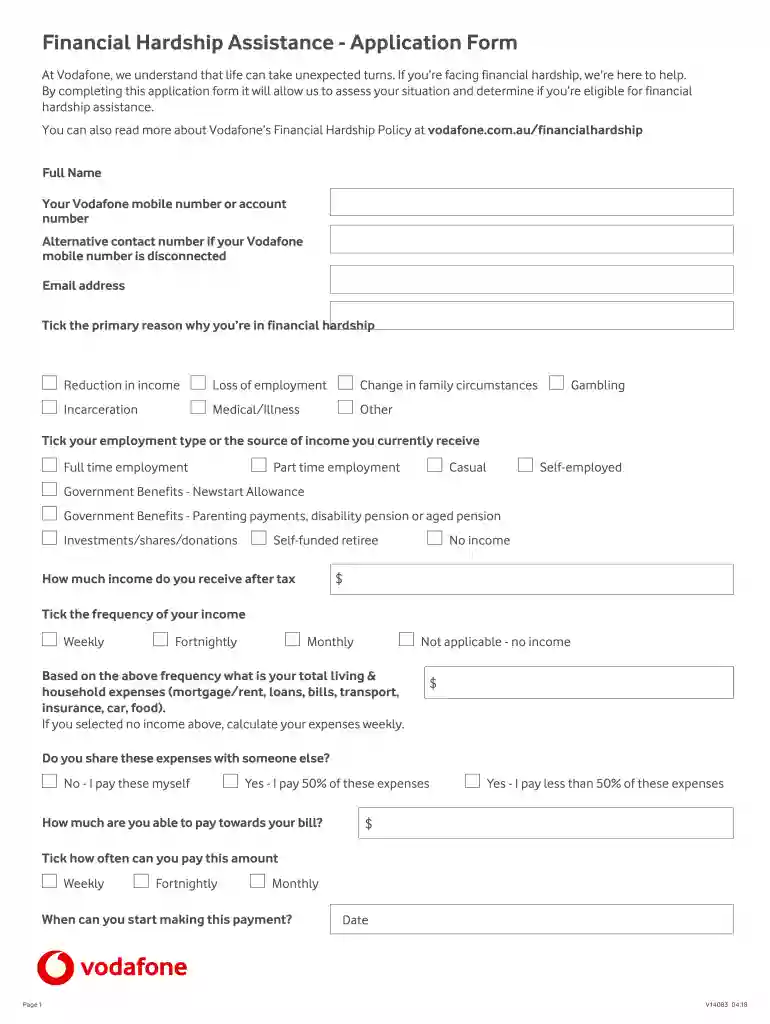
  2. Begin by entering your Full Name and Vodafone mobile number or account number. If your mobile number is disconnected, provide an alternative contact number and your email address.
  3. Select the primary reason for your financial hardship by ticking the appropriate box, such as 'Reduction in income' or 'Loss of employment'.
  4. Indicate your employment type or source of income by selecting from options like 'Full time employment' or 'Government Benefits'.
  5. Enter your after-tax income amount. If you have no income, select 'No income'.
  6. Tick how often you receive this income (Weekly, Fortnightly, Monthly).
  7. Provide details about your total living and household expenses. If you selected no income, calculate these expenses weekly.
  8. Indicate if you share these expenses with someone else and how much you can pay towards your bill.
  9. Specify how often you can make this payment and when you can start.
  10. Add any additional details that may assist in assessing your application.
  11. Finally, declare that the information provided is true by ticking the box and signing at the end of the form.

Start filling out your au vodafone financial application today using our platform for free!

See more au vodafone financial versions

We've got more versions of the au vodafone financial form. Select the right au vodafone financial version from the list and start editing it straight away!
Versions Form popularity Fillable & printable
2018 4.9 Satisfied (44 Votes)
be ready to get more

Complete this form in 5 minutes or less

Get form

Got questions?

We have answers to the most popular questions from our customers. If you can't find an answer to your question, please contact us.
Contact us
Pay over the phone 56677 free from your Vodafone mobile. 0333 3040 191 from any other phone (standard charges apply) +44 7836 191 191 from abroad (charges apply)
The best way to view your prepaid balance is through My Vodafone. Your balance is displayed on the My Vodafone dashboard. You can also get your balance by calling 1512 from your Vodafone phone or by texting BAL to 1511.
Current state of Vis financial troubles The impact GOIs dues has on Vis financials is substantial. As of March 2025, the AGR dues stand at ~INR760bn. Furthermore, the companys deferred spectrum liabilities stand at ~INR1,190bn. This brings the total debt owed to the GOI to ~INR1,949bn as of March 2025.
You can make a one-off payment directly from the My Vodafone app or website using a credit/debit card.
Vodafone Australia is part of the TPG Telecom Group.

Security and compliance

At DocHub, your data security is our priority. We follow HIPAA, SOC2, GDPR, and other standards, so you can work on your documents with confidence.

Learn more
ccpa2
pci-dss
gdpr-compliance
hipaa
soc-compliance
be ready to get more

Complete this form in 5 minutes or less

Get form

People also ask

My Vodafone online Login into your My Vodafone account. Then simply click the Download bill button for the bill you wish to see.
Manage everything in the My Vodafone app Our app lets you easily manage your account, whatever plan youre on. Use it to check your bills and make payments, track your data usage, and get exclusive rewards and discounts.

financial hardship vodafone