




Here's how it works



How to use or fill out blue ltch print with our platform

- Click ‘Get Form’ to open the blue ltch print in the editor.
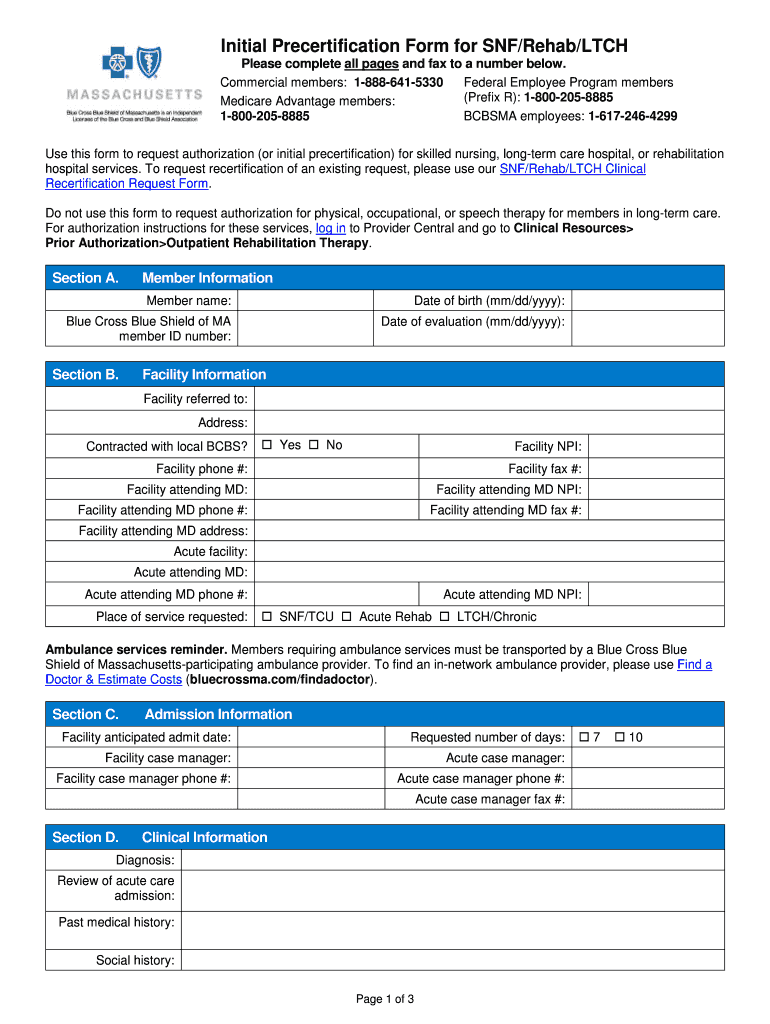
- Begin with Section A, Member Information. Fill in the member's name, date of birth, and Blue Cross Blue Shield of MA member ID number. Ensure accuracy for smooth processing.
- Proceed to Section B, Facility Information. Enter the facility referred to, its address, and confirm if it is contracted with local BCBS by selecting 'Yes' or 'No'. Include the facility's NPI and contact details.
- In Section C, Admission Information, provide the anticipated admit date and requested number of days. Include details for both facility and acute case managers.
- Move to Section D for Clinical Information. Document diagnosis, review of acute care admission, past medical history, and social history as required.
- Complete Sections E through I by detailing clinical status/treatment, labs/diagnostics, current level of function/treatment, prior level of function/treatment, and discharge plan/goals.
Start using our platform today for free to streamline your document editing and form completion!
It's free
Got questions?
Can I type my eSignature on my blue ltch print?
Sure, a typed name is recognized as a legitimate electronic signature when you create it on your paperwork using a compliant solution like DocHub. Simply import your blue ltch print to our editor, click Sign in the top tool pane → Create your signature → Type your name in the proper tab, and decide how it will look on your document.
How do you edit blue ltch print online?
With DocHub, there are several convenient methods to edit your blue ltch print online. You can drag and drop the form and modify it straight at the DocHub site or use our browser extension to fill out your form immediately. On top of that, you can modify your PDF on your phone, as DocHub works with all the accessible mobile platforms.
Security and compliance
At DocHub, your data security is our priority. We follow HIPAA, SOC2, GDPR, and other standards, so you can work on your documents with confidence.
Learn more




