Direct Deposit Form - Betterment 2026

Get Form
betterment form Preview on Page 1

Here's how it works

01. Edit your betterment form online
Type text, add images, blackout confidential details, add comments, highlights and more.

02. Sign it in a few clicks
Draw your signature, type it, upload its image, or use your mobile device as a signature pad.

03. Share your form with others
Send what bank does betterment use via email, link, or fax. You can also download it, export it or print it out.

How to use or fill out Direct Deposit Form - Betterment with our platform

Form edit decoration
9.5
Ease of Setup
DocHub User Ratings on G2
9.0
Ease of Use
DocHub User Ratings on G2
  1. Click ‘Get Form’ to open the Direct Deposit Form in the editor.
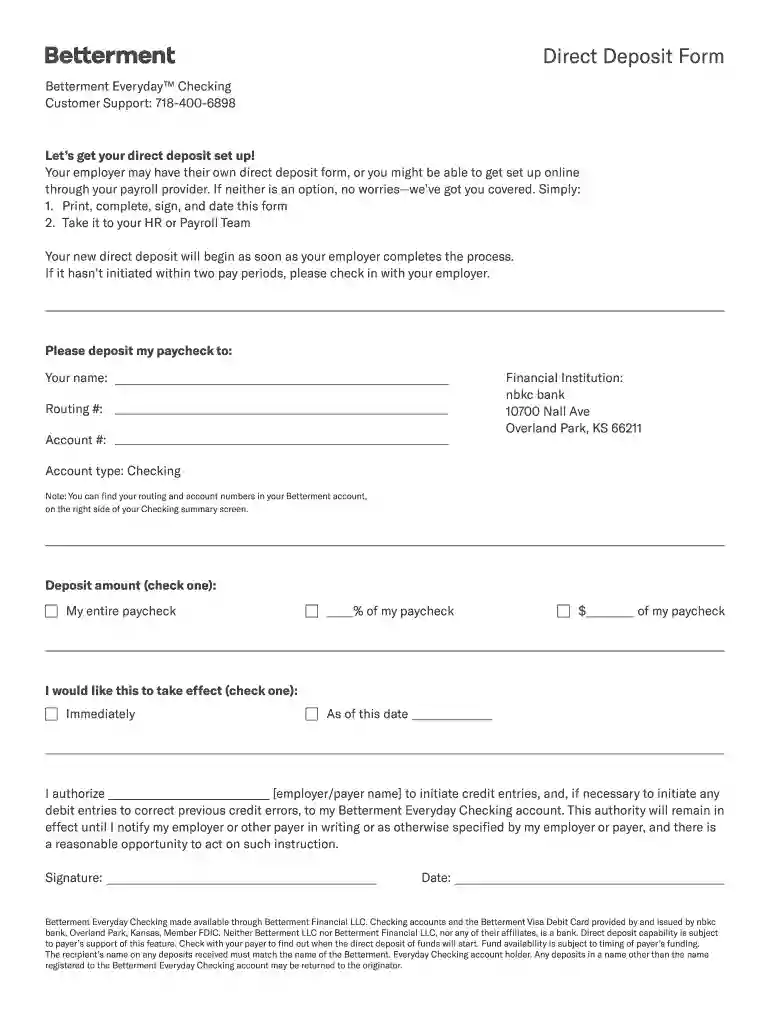
  2. Begin by entering your name in the designated field at the top of the form. This ensures that your paycheck is deposited into the correct account.
  3. Next, fill in the financial institution details. For Betterment, input 'nbkc bank' along with its address: 10700 Nall Ave, Overland Park, KS 66211.
  4. Locate your routing and account numbers from your Betterment account summary screen and enter them in their respective fields.
  5. Choose how much of your paycheck you want to deposit by checking one of the options provided: either 'My entire paycheck', a percentage, or a specific dollar amount.
  6. Indicate when you would like this direct deposit to take effect by selecting either 'Immediately' or specifying a date.
  7. Finally, authorize your employer by signing and dating the form at the bottom before submitting it to your HR or Payroll Team.

Start using our platform today for free to streamline filling out your Direct Deposit Form!

See more Direct Deposit Form - Betterment versions

We've got more versions of the Direct Deposit Form - Betterment form. Select the right Direct Deposit Form - Betterment version from the list and start editing it straight away!
Versions Form popularity Fillable & printable
2020 4.1 Satisfied (47 Votes)
2019 4.3 Satisfied (42 Votes)
be ready to get more

Complete this form in 5 minutes or less

Get form

Got questions?

We have answers to the most popular questions from our customers. If you can't find an answer to your question, please contact us.
Contact us
Download, print or email the form to your employer.
Contact your employer or payor/payee Your employer or payor may need you to complete a form they provide and/or request a voided check to process your direct deposit request.
What is a Direct Deposit Authorization Form? Direct deposit authorization forms authorize employers to send money directly into an individuals bank account. In times past, employers would print out and distribute physical checks on pay day for each employee to deposit into their bank accounts themselves.
Even if you have bank accounts with multiple banks, its easy to print a deposit slip with the right slip templates. Printing deposit slips also allows you to manage your deposits easily for record-keeping. If possible, make it known that you accept other payments besides a check.
Via Mobile App: Log in to your Betterment app. Go to Checking Account Details Set up direct deposit. Copy your account and routing numbers, download the direct deposit form, or both. Via Web Browser: Log in to your Betterment account. Navigate to Checking Account Details Set up direct deposit.

Security and compliance

At DocHub, your data security is our priority. We follow HIPAA, SOC2, GDPR, and other standards, so you can work on your documents with confidence.

Learn more
ccpa2
pci-dss
gdpr-compliance
hipaa
soc-compliance

People also ask

Sign In to Online Banking. Click on any of your accounts. Select View and Print Payroll Direct Deposit from the right navigation. Select the account you want to deposit your payroll to from the dropdown, then click on View and Print and your customized form will be presented to you.
If youre unable to set up direct deposit digitally, you can download our Direct deposit form to fill out. If you receive Social Security, youll need to contact 800-772-1213. Be prepared with your 12-digit account number and routing number. Learn more by visiting our Direct Deposit page.

Related links