




Here's how it works

01. Edit your how to fill out certificate of moral character online
Type text, add images, blackout confidential details, add comments, highlights and more.

02. Sign it in a few clicks
Draw your signature, type it, upload its image, or use your mobile device as a signature pad.

03. Share your form with others
Send moral certificate via email, link, or fax. You can also download it, export it or print it out.
How to use or fill out certificate moral with our platform

- Click ‘Get Form’ to open the certificate moral in the editor.
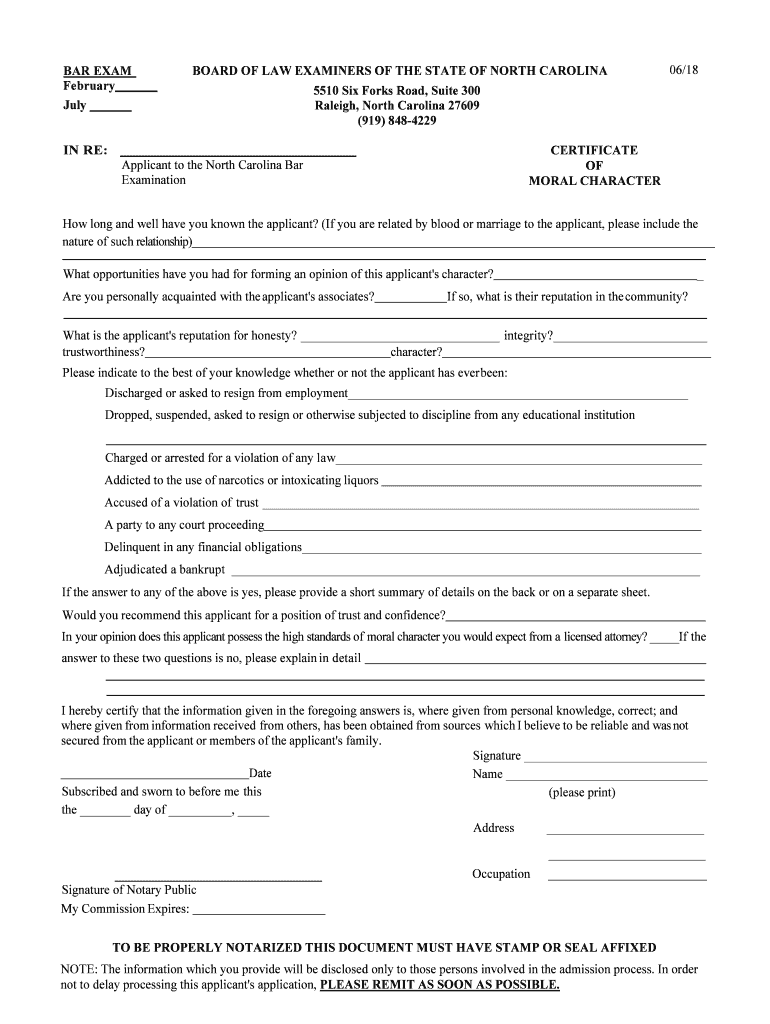
- Begin by filling in your relationship to the applicant in the first section. Specify how long you have known them and any relevant details about your connection.
- In the next field, provide insights into your opportunities for forming an opinion on the applicant's character. Be honest and thorough.
- Answer questions regarding your acquaintance with the applicant's associates and their community reputation. This helps assess the applicant's social environment.
- Evaluate and indicate the applicant's reputation for honesty, integrity, trustworthiness, and overall character in the designated fields.
- Respond to inquiries about any past employment issues, educational discipline, legal charges, or financial delinquencies. If applicable, summarize details on a separate sheet.
- Conclude by answering whether you would recommend this applicant for a position of trust and if they meet high moral standards expected from a licensed attorney.
- Finally, certify your responses by signing and dating the document. Ensure it is notarized with a stamp or seal as required.
Start using our platform today to complete your certificate moral efficiently and for free!
Fill out certificate moral online
It's free
It's free
Security and compliance
At DocHub, your data security is our priority. We follow HIPAA, SOC2, GDPR, and other standards, so you can work on your documents with confidence.
Learn more




