Minnesota divorce records 2026

Get Form
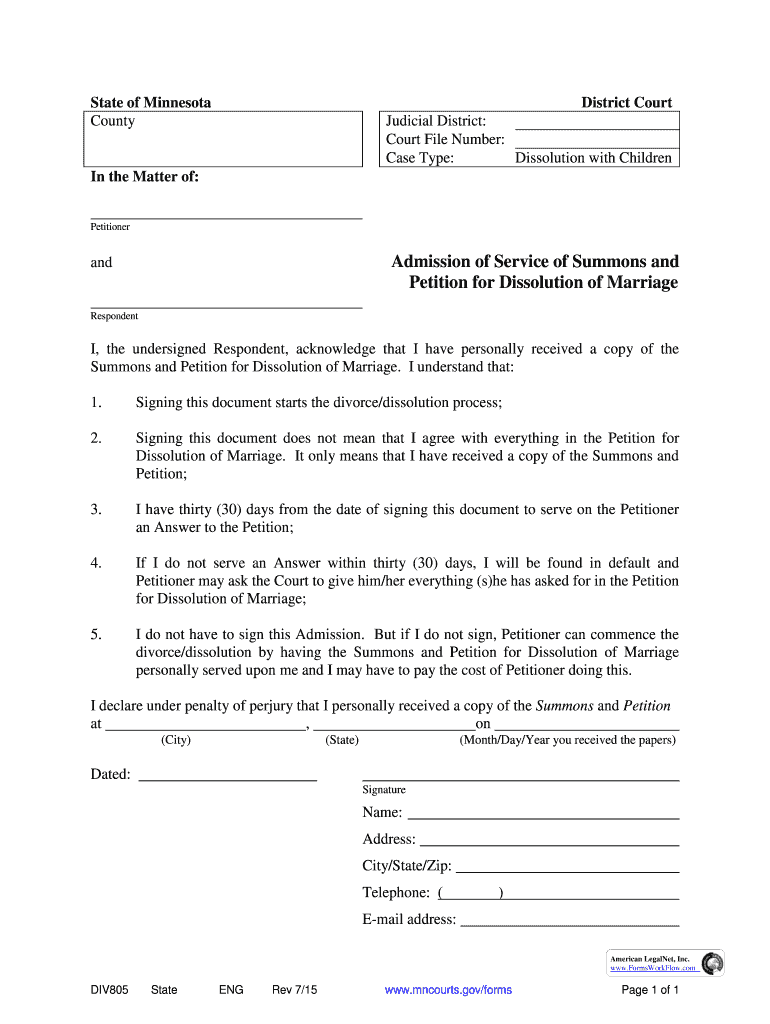
minnesota divorce records Preview on Page 1

Here's how it works

01. Edit your minnesota divorce records online
Type text, add images, blackout confidential details, add comments, highlights and more.
02. Sign it in a few clicks
Draw your signature, type it, upload its image, or use your mobile device as a signature pad.
03. Share your form with others
Send minnesota divorce records online free via email, link, or fax. You can also download it, export it or print it out.

How to use or fill out Minnesota divorce records with our platform

Form edit decoration
9.5
Ease of Setup
DocHub User Ratings on G2
9.0
Ease of Use
DocHub User Ratings on G2
  1. Click ‘Get Form’ to open the Minnesota divorce records in the editor.
  2. Begin by filling in the 'Judicial District' and 'Court File Number' at the top of the form. This information is essential for identifying your case.
  3. Next, indicate the 'Case Type' as 'Dissolution with Children'. This specifies the nature of your filing.
  4. In the section labeled 'In the Matter of:', enter your name as the Petitioner and the Respondent's name accordingly.
  5. Read through the Admission of Service carefully. Ensure you understand each point regarding your rights and responsibilities after signing.
  6. Fill in your personal details including signature, name, address, city/state/zip, telephone number, and email address at the bottom of the form.
  7. Finally, date your signature to confirm when you received a copy of the Summons and Petition.

Start using our platform today to streamline your Minnesota divorce records process for free!

See more minnesota divorce records versions

We've got more versions of the minnesota divorce records form. Select the right minnesota divorce records version from the list and start editing it straight away!
Versions Form popularity Fillable & printable
2015 4.8 Satisfied (262 Votes)
2001 4.4 Satisfied (314 Votes)
be ready to get more

Complete this form in 5 minutes or less

Get form

Got questions?

We have answers to the most popular questions from our customers. If you can't find an answer to your question, please contact us.
Contact us
How to get a copy of a divorce certificate. Contact the state vital records office where the divorce took place to learn if that state issues divorce certificates. They will tell you the cost, what information you need to supply, and how to get a copy online, by mail, or in person.
Generally, divorce documents are part of the public record unless there are specific reasons to seal them. Divorce documents include certificates (providing basic divorce information), decrees (outlining divorce terms), and records (comprehensive files from the proceedings).
Go to the public or vital records website for the state where the divorce took place. If you cant find the page to search for divorce records, check the county records website as well. You can visit the CDCs vital records directory to find your states record offices address.
Check Court Records: Visit the local family court or its website where you live. Many jurisdictions provide online access to court records, allowing you to search for divorce filings by name. Contact the Clerk of Court: You can directly call or visit the clerks office at the family court.
Contact your local courthouse. Most courthouses have a public records computer terminal. You can search by your name or the name of your spouse. Check them carefully and get the right file. Ask the court clerks office for help. The counter clerk can look records up for you and confirm whether a divorce has been filed.

Security and compliance

At DocHub, your data security is our priority. We follow HIPAA, SOC2, GDPR, and other standards, so you can work on your documents with confidence.

Learn more
ccpa2
pci-dss
gdpr-compliance
hipaa
soc-compliance
be ready to get more

Complete this form in 5 minutes or less

Get form