nwosu official transcript Preview on Page 1

Nwosu transcript request 2026

Here's how it works

  • 01. Edit your nwosu official transcript online

    Type text, add images, blackout confidential details, add comments, highlights and more.

  • 02. Sign it in a few clicks

    Draw your signature, type it, upload its image, or use your mobile device as a signature pad.

  • 03. Share your form with others

    Send nwosu transcript request via email, link, or fax. You can also download it, export it or print it out.

How to use or fill out nwosu transcript request with our platform

Form edit decoration
9.5
Ease of Setup
DocHub User Ratings on G2
9.0
Ease of Use
DocHub User Ratings on G2
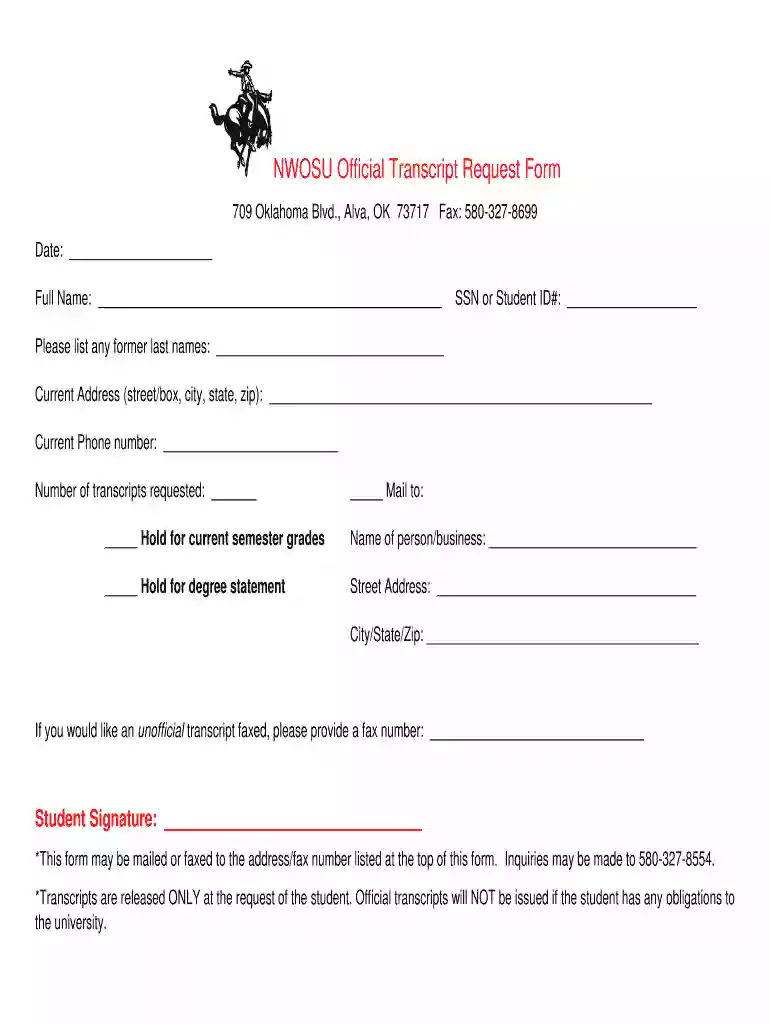
  1. Click ‘Get Form’ to open the NWOSU Official Transcript Request Form in the editor.
  2. Begin by entering the date at the top of the form. This helps track your request.
  3. Fill in your full name, ensuring it matches your records for accurate processing.
  4. Provide your SSN or Student ID# to identify your student record easily.
  5. If applicable, list any former last names to assist in locating your transcripts.
  6. Enter your current address, including street/box, city, state, and zip code for mailing purposes.
  7. Input your current phone number for any follow-up regarding your request.
  8. Indicate the number of transcripts you are requesting and specify where they should be sent.
  9. If you want an unofficial transcript faxed, provide a fax number in the designated field.
  10. Sign the form at the bottom to authorize the release of your transcripts.

Start using our platform today to streamline your NWOSU transcript request process for free!

See more nwosu official transcript versions

We've got more versions of the nwosu official transcript form. Select the right nwosu official transcript version from the list and start editing it straight away!

VersionsForm popularityFillable & printable
20164.8 Satisfied (207 Votes)

be ready to get more

Complete this form in 5 minutes or less

Got questions?

We have answers to the most popular questions from our customers. If you can't find an answer to your question, please contact us.

You can likely view your unofficial transcript on your colleges website, or request it from the registrar at your school.
If you are already graduated and then your college went out of business, then you can contact to university directly, to which your college was affiliated and ask for transcripts. They may help you to get your transcripts .
Visit my.snhu.edu and sign in using your SNHU email address and password. Once youre logged in, select the Request a Transcript link under the Quick Links menu. If you need assistance logging into your mySNHU portal, please contact the IT Service Desk (24/7) at 855.877. 9919.
Contact State Education Agency: Reach out to the states higher education agency or board. They often keep records of universities and may have information on where transcripts are stored.
How Long Do Colleges Keep Transcripts? College transcripts do not expire and schools are obligated to maintain transcripts for all students who have enrolled in and attended their institution regardless of whether or not that student graduated.

Security and compliance

At DocHub, your data security is our priority. We follow HIPAA, SOC2, GDPR, and other standards, so you can work on your documents with confidence.

People also ask

Colleges and universities typically provide two types of academic transcriptsofficial and unofficial. Official transcripts are held by the registrars office and are available either electronically or in print.

Related links

Registry Office

Requests for official and unofficial academic transcripts also are processed through this office. Students who have been at Northwestern since Fall 2019 canRead more

Learn more
IL-7R signaling activates widespread VH and DH gene usage

by A Baizan-Edge 2021 Cited by 16 Transcriptome analysis reveals loss of large-scale antisense intergenic transcripts in both DH and VH regions and reduced expression of keyRead more

Learn more
If you believe that this page should be taken down, please follow our DMCA take down process here