Pedigree chart 2025

Get Form
free pedigree chart maker Preview on Page 1

Here's how it works

01. Edit your free pedigree chart maker online
Type text, add images, blackout confidential details, add comments, highlights and more.
02. Sign it in a few clicks
Draw your signature, type it, upload its image, or use your mobile device as a signature pad.
03. Share your form with others
Send free dog pedigree chart via email, link, or fax. You can also download it, export it or print it out.

How to use or fill out pedigree chart with our platform

Form edit decoration
9.5
Ease of Setup
DocHub User Ratings on G2
9.0
Ease of Use
DocHub User Ratings on G2
  1. Click ‘Get Form’ to open the pedigree chart in the editor.
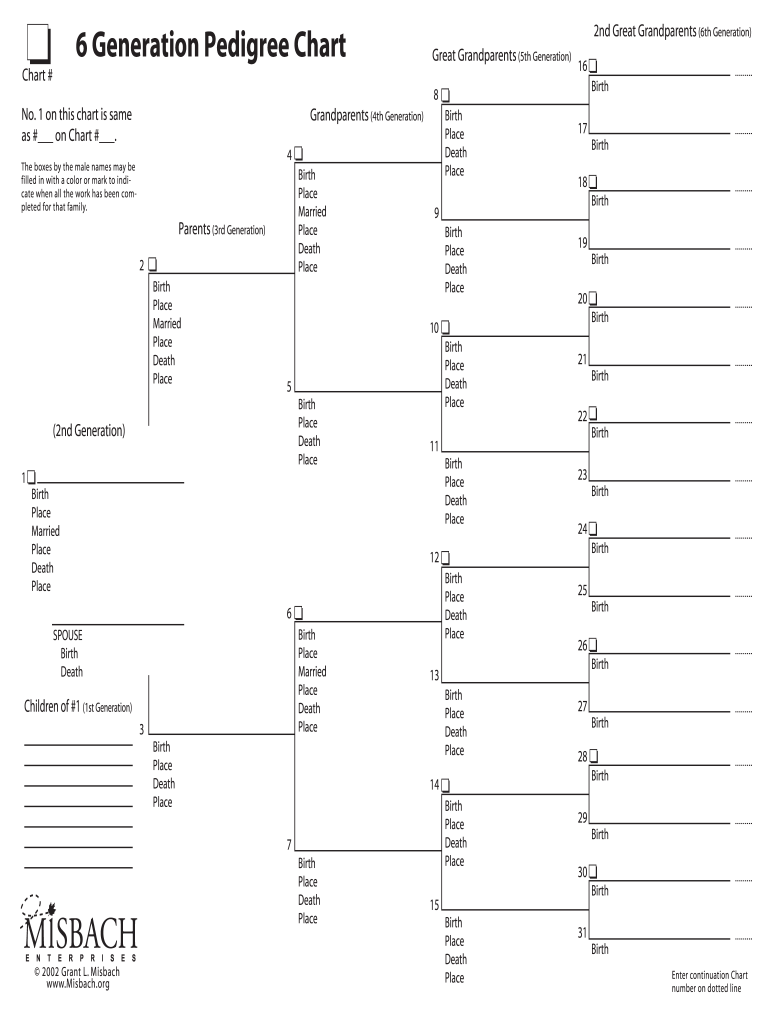
  2. Begin by filling in the names of your 2nd great grandparents in the designated boxes under '6th Generation'. Ensure you include their birth, marriage, and death places where applicable.
  3. Proceed to the '5th Generation' section for your great grandparents. Again, input their details including birth and death places.
  4. In the '4th Generation' area, list your grandparents. Use color or marks in the boxes next to male names to indicate completion for that family.
  5. Continue down to the '3rd Generation' section for parents. Fill out their birth, marriage, and death information as needed.
  6. Finally, document your children in the '1st Generation' section. Make sure all fields are completed accurately for a comprehensive family tree.

Start using our platform today to easily create and manage your pedigree chart online for free!

be ready to get more

Complete this form in 5 minutes or less

Get form

Got questions?

We have answers to the most popular questions from our customers. If you can't find an answer to your question, please contact us.
Contact us
SmartDraw is the worlds best way to make a pedigree chart. A pedigree chart can show the genetic history of a family or animals over several generations. You can use the chart to show genetic disorderss through generations.
Create your own pedigree diagram Add individuals to your pedigree diagram. Go with as many as you can or as many as are relevant. Connect individuals using lines of marriage and descent. Add dates. Use symbols to show which family members have or dont have a specific trait.
It provides robust privacy settings so you can control who can access your pedigree charts. Ancestry. Ancestry is one of the leading names in genealogy research and also offers one of the best pedigree chart makers available. MyHeritage. GenoPro. Legacy Family Tree. RootsMagic. Gramps.
If the trait is dominant, one of the parents must have the trait. Dominant traits will not skip a generation. If the trait is recessive, neither parent is required to have the trait since they can be heterozygous. Determine if the chart shows an autosomal or sex-linked (usually X-linked) trait.
Create a Pedigree Chart on Microsoft Word by following these steps: Step 1: Open Microsoft Word and create a new document. Step 2: Click on Insert and select SmartArt from the toolbar. Step 3: Choose a SmartArt graphic that represents a hierarchy or relationship, such as Organization Chart.

Security and compliance

At DocHub, your data security is our priority. We follow HIPAA, SOC2, GDPR, and other standards, so you can work on your documents with confidence.

Learn more

People also ask

It can be simply called a family tree. Pedigrees use a standardized set of symbols, squares represent males and circles represent females.
Definition. A pedigree, as related to genetics, is a chart that diagrams the inheritance of a trait or health condition through generations of a family.

fillable 6 generation pedigree chart