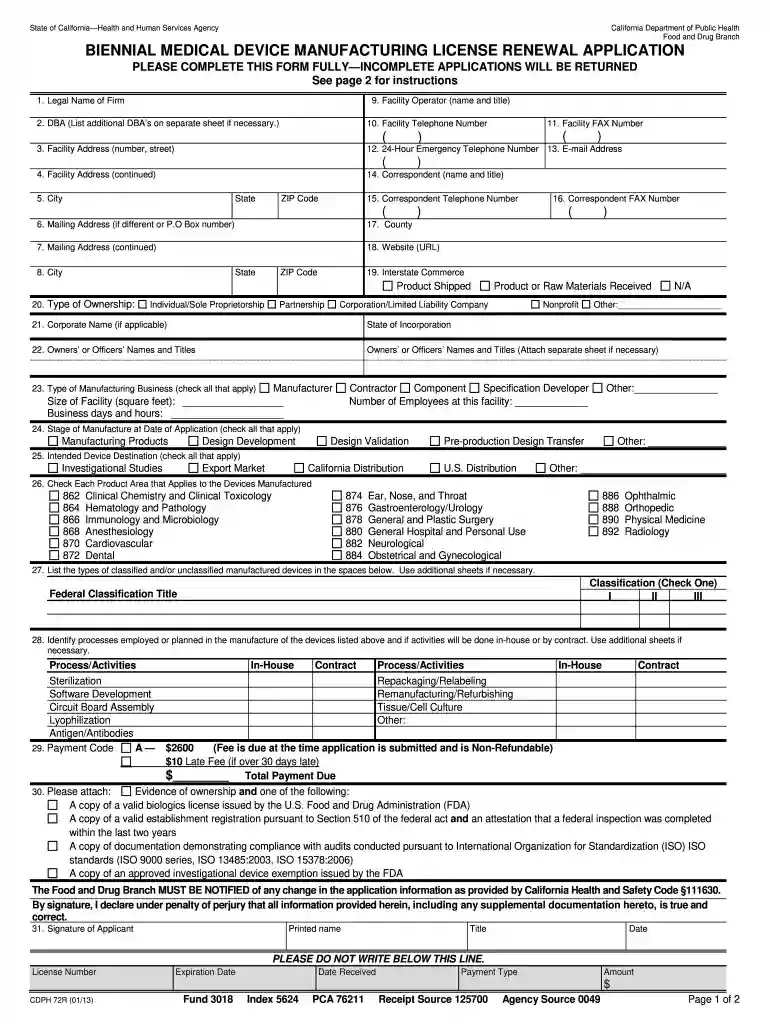
Biennial medical device manufacturing license renewal application 2009 form-2026

Get Form
biennial medical device manufacturing license renewal application 2009 form Preview on Page 1

Here's how it works

01. Edit your form online
Type text, add images, blackout confidential details, add comments, highlights and more.

02. Sign it in a few clicks
Draw your signature, type it, upload its image, or use your mobile device as a signature pad.

03. Share your form with others
Send it via email, link, or fax. You can also download it, export it or print it out.

How to use or fill out biennial medical device manufacturing license renewal application 2009 form with our platform

Form edit decoration
9.5
Ease of Setup
DocHub User Ratings on G2
9.0
Ease of Use
DocHub User Ratings on G2
  1. Click ‘Get Form’ to open the biennial medical device manufacturing license renewal application in the editor.
  2. Begin by entering the 'Legal Name of Firm' and any 'DBA' (Doing Business As) names. Ensure these are accurate as they represent your business identity.
  3. Fill in the 'Facility Address' including street number, city, state, and ZIP code. If your mailing address differs, provide that information in the subsequent fields.
  4. Complete the contact details for the 'Facility Operator', including their name, title, telephone number, and email address. This ensures proper communication regarding your application.
  5. Indicate your type of ownership by checking the appropriate box and list any owners or officers along with their titles. This section is crucial for regulatory compliance.
  6. In the 'Type of Manufacturing Business' section, check all applicable boxes that describe your operations. This helps clarify your business activities to regulators.
  7. Finally, review all sections for completeness before signing and dating the application at the end. Incomplete applications will be returned.

Start using our platform today to streamline your document editing and ensure a smooth submission process!

See more biennial medical device manufacturing license renewal application 2009 form versions

We've got more versions of the biennial medical device manufacturing license renewal application 2009 form form. Select the right biennial medical device manufacturing license renewal application 2009 form version from the list and start editing it straight away!
Versions Form popularity Fillable & printable
2013 4.9 Satisfied (369 Votes)
2009 4 Satisfied (37 Votes)
be ready to get more

Complete this form in 5 minutes or less

Get form

Got questions?

We have answers to the most popular questions from our customers. If you can't find an answer to your question, please contact us.
Contact us

A lot of software solutions are available on the market for document editing and signing. DocHub is one of the most in-demand online solutions that comply with all data protection and compliance requirements and ensures your electronically signed paperwork is legally enforceable. All you need to try it out is to sign up for an account, add your biennial medical device manufacturing license renewal application 2009 form, fill out the necessary details, and click Sign. Create your eSignature by typing, drawing it, uploading its image to your document, or scanning a unique QR code.

You can find and modify your biennial medical device manufacturing license renewal application 2009 form online by using DocHub. Its simple yet feature-rich design enables you to start effective work immediately after you sign up your account. Create your profile and add your file, then our interface will guide you via our stress-free form completion experience.

You may renew a lapsed licenses online by creating an account on our license management system at medboard.mass.gov, linking your account to your license, and viewing your license record. Click on Show details, then click on the Start a Physician Full License - Lapsed Renewal Application link. Renew my Lapsed Physician Full License - Mass.gov Mass.gov how-to renew-my-lapsed-phys Mass.gov how-to renew-my-lapsed-phys
You may renew online by creating an account on our license management system at medboard.mass.gov, linking your account to your license, and viewing your active license.
To get or renew any drivers license, ID card, or learners permit, you need documents and/or proof of your Social Security number, U.S. citizenship or lawful presence, and Massachusetts residency as required by federal and state law.

Security and compliance

At DocHub, your data security is our priority. We follow HIPAA, SOC2, GDPR, and other standards, so you can work on your documents with confidence.

Learn more
ccpa2
pci-dss
gdpr-compliance
hipaa
soc-compliance
be ready to get more

Complete this form in 5 minutes or less

Get form

People also ask

Talk with your employer for directions on how to complete this. STEP 1 Submit DOH Certification Application. STEP 2 Register for Training. STEP 3 Submit Candidate Exam Application. STEP 4 Target Completion of Basic Training. STEP 5 Self Study and Prepare for the Exam. STEP 6 Take Exam. STEP 7 Get Certified. DOH Certification: Follow These Steps for Success myseiubenefits.org DOH-One-Pager myseiubenefits.org DOH-One-Pager
License Fees ItemFee Physician - Renewal of License $600 biennial Physician - Limited License $100 per year Physician - Lapsed License $700 per event Physician - Temporary Registration $250 per 9 months5 more rows

Related links