




Here's how it works



How to use or fill out ccl 029 2011 form with our platform

- Click ‘Get Form’ to open the ccl 029 2011 form in the editor.
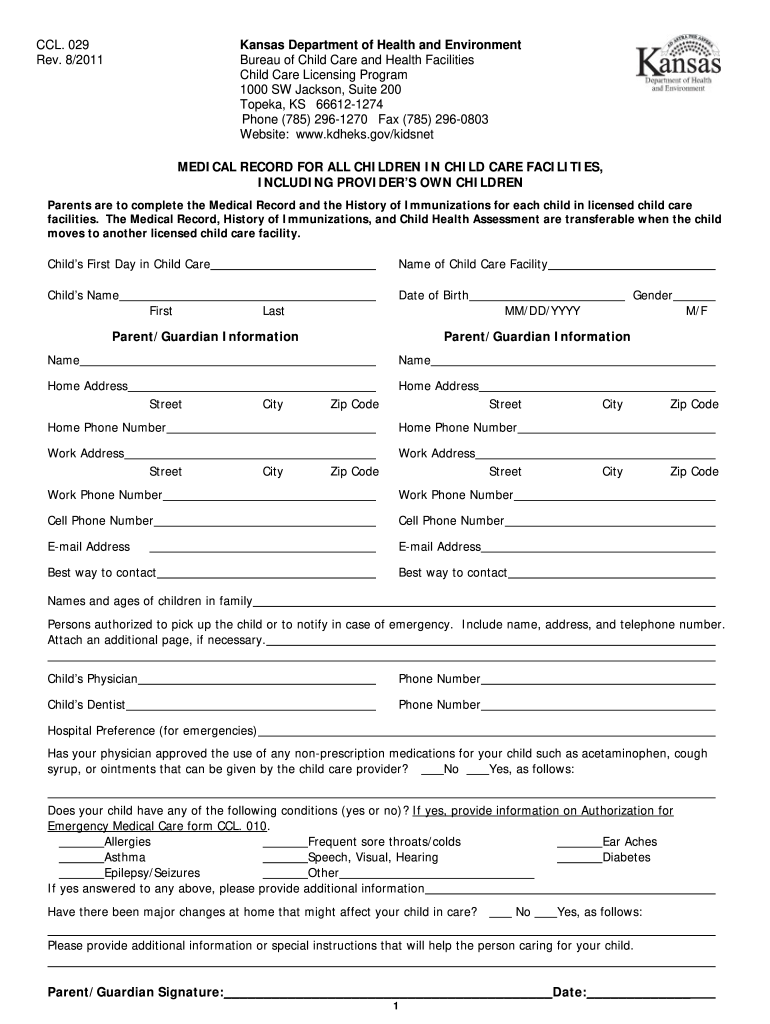
- Begin by entering the child's name and date of birth in the designated fields. Ensure accuracy as this information is crucial for identification.
- Fill out the parent/guardian information, including names, addresses, and contact numbers. This section is vital for emergency contacts and communication.
- Complete the medical history section, indicating any allergies or health conditions. If applicable, provide additional details about your child's health needs.
- In the immunization history section, record each vaccine received along with dates. If using a Kansas Certificate of Immunizations (KCI), attach it to this form.
- Review all entries for completeness and accuracy before signing at the bottom of the form. Your signature confirms that all provided information is correct.
Start filling out your ccl 029 2011 form online for free today!
It's free
See more ccl 029 2011 form versions
Got questions?
How can I eSign my ccl 029 2011 form from Gmail?
With DocHub, it’s pretty simple. The service offers users an add-on called DocHub for Gmail, which you can locate in the Google Workspace Marketplace without being charged. Install it and give it access to your Google account. Open your email with your ccl 029 2011 form attached and click on the add-on button in the right-side panel. Sign in to your DocHub account, and import the form to our editor, where you can fill it out and sign.
What internet browser do I need to edit ccl 029 2011 form online?
If you need to edit your ccl 029 2011 form online quickly, it does not matter what browser you use. DocHub’s straightforward editing tools are accessible using any internet browser. Simply open the appropriate tab within our editor, add your document, and fill it out without stress.
Security and compliance
At DocHub, your data security is our priority. We follow HIPAA, SOC2, GDPR, and other standards, so you can work on your documents with confidence.
Learn more


