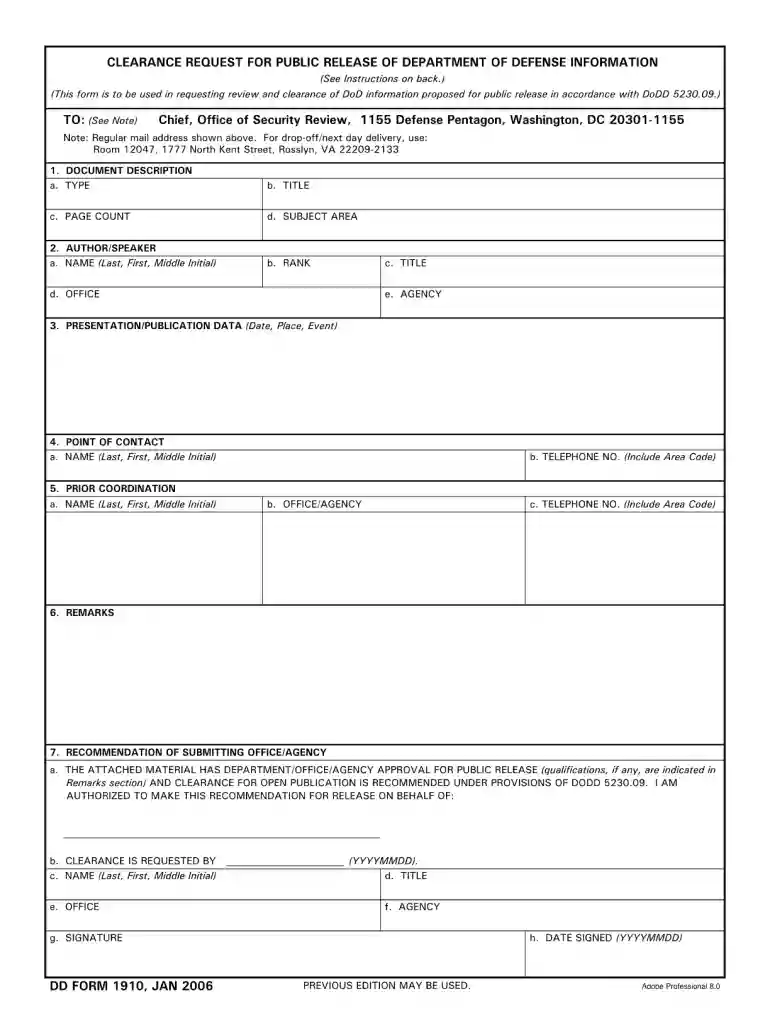
Form 1910-2026

Get Form
dd form 1910 Preview on Page 1

Here's how it works

01. Edit your dd form 1910 online
Type text, add images, blackout confidential details, add comments, highlights and more.

02. Sign it in a few clicks
Draw your signature, type it, upload its image, or use your mobile device as a signature pad.

03. Share your form with others
Send dd 1910 via email, link, or fax. You can also download it, export it or print it out.

How to use or fill out form 1910 with our platform

Form edit decoration
9.5
Ease of Setup
DocHub User Ratings on G2
9.0
Ease of Use
DocHub User Ratings on G2
  1. Click ‘Get Form’ to open form 1910 in the editor.
  2. Begin by entering your personal information in the designated fields, including your name, address, and contact details. Ensure accuracy for seamless processing.
  3. Next, navigate to the section that requires specific data related to the purpose of the form. Fill in all required fields thoroughly, as incomplete submissions may delay processing.
  4. Review any additional sections that may require signatures or dates. Use our platform’s signature feature to sign electronically, ensuring a quick and efficient completion.
  5. Finally, double-check all entries for accuracy before clicking ‘Submit’ to finalize your form submission. You can also save a copy for your records directly from the editor.

Start using our platform today for free and streamline your form filling experience!

See more form 1910 versions

We've got more versions of the form 1910 form. Select the right form 1910 version from the list and start editing it straight away!
Versions Form popularity Fillable & printable
2016 4.9 Satisfied (30 Votes)
2006 4.3 Satisfied (317 Votes)
be ready to get more

Complete this form in 5 minutes or less

Get form

Got questions?

We have answers to the most popular questions from our customers. If you can't find an answer to your question, please contact us.
Contact us
OT = Other races. It was one of the standard categories on the 1910 census, along with W (white), B (Black), Mu (Mulatto), Cn (Chinese), Jp (Japanese), and In (American Indian, aka, Native American).
This section requires employers to establish a program and utilize procedures for affixing appropriate lockout devices or tagout devices to energy isolating devices, and to otherwise disable machines or equipment to prevent unexpected energization, start-up or release of stored energy in order to prevent injury to
OSHA standard 29 CFR 1910.133(a)(6) prohibits the use of photo-grey lenses for safety glasses at inside work locations which have variable lighting conditions, because the variable tint lenses would cause temporary vision impairment when the light changes from bright to dim or vice versa in the work area.
29 CFR 1910.101: This regulation covers general requirements for compressed gases, including storage, handling, and use. It outlines specific requirements for securing cylinders, maintaining proper ventilation, and providing training to employees.
Protective equipment, including personal protective equipment for eyes, face, head, and extremities, protective clothing, respiratory devices, and protective shields and barriers, shall be provided, used, and maintained in a sanitary and reliable condition wherever it is necessary by reason of hazards of processes or

Security and compliance

At DocHub, your data security is our priority. We follow HIPAA, SOC2, GDPR, and other standards, so you can work on your documents with confidence.

Learn more
ccpa2
pci-dss
gdpr-compliance
hipaa
soc-compliance
be ready to get more

Complete this form in 5 minutes or less

Get form