Printable fire drill log DocHub 2026

Get Form
fire and tornado drill log Preview on Page 1

Here's how it works

01. Edit your fire and tornado drill log online
Type text, add images, blackout confidential details, add comments, highlights and more.
02. Sign it in a few clicks
Draw your signature, type it, upload its image, or use your mobile device as a signature pad.
03. Share your form with others
Send fire tornado drill documentation form via email, link, or fax. You can also download it, export it or print it out.

How to use or fill out printable fire drill log DocHub

Form edit decoration
9.5
Ease of Setup
DocHub User Ratings on G2
9.0
Ease of Use
DocHub User Ratings on G2
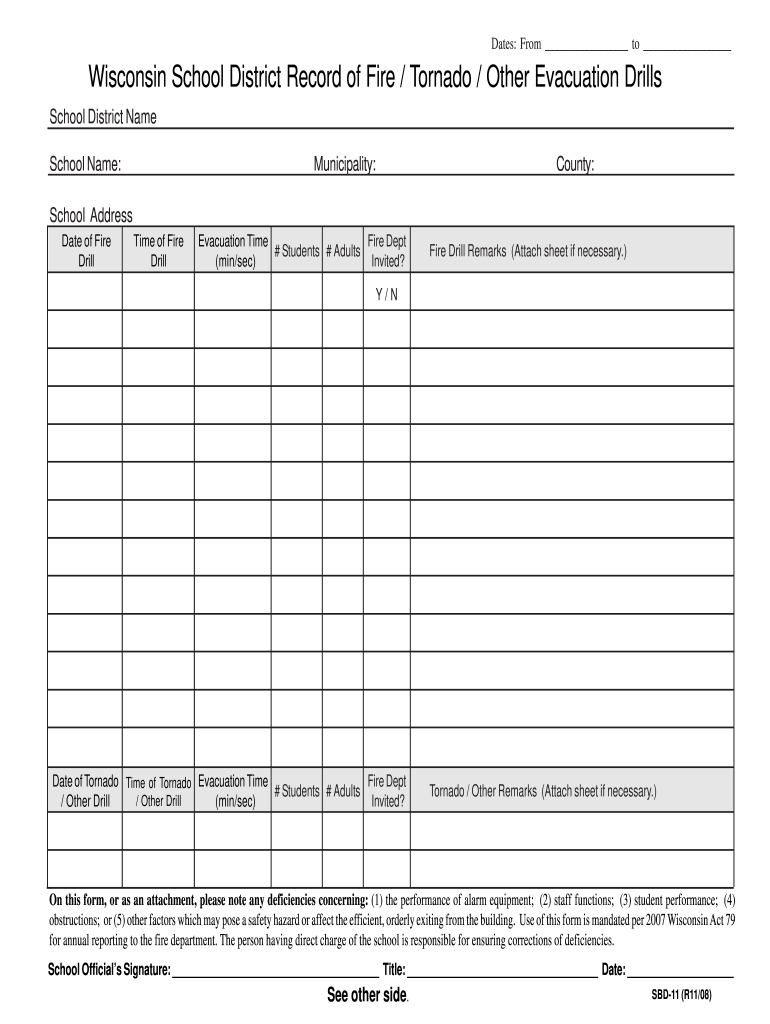
  1. Click ‘Get Form’ to open the printable fire drill log in our editor.
  2. Begin by entering the 'School District Name' and 'School Name' at the top of the form. This identifies the institution conducting the drills.
  3. Fill in the 'Municipality', 'County', and 'School Address' fields to provide location details.
  4. For each drill, record the 'Date of Fire Drill', 'Time of Fire Drill', and 'Evacuation Time'. Ensure you note how long it took for students and adults to evacuate.
  5. Indicate whether participants were invited by marking 'Y' for Yes or 'N' for No in the respective fields.
  6. In the remarks section, document any observations or deficiencies related to alarm equipment, staff functions, or student performance. Attach additional sheets if necessary.
  7. Finally, ensure that a school official signs and dates the form at the bottom before submission.

Start using our platform today to streamline your fire drill documentation process for free!

See more printable fire drill log DocHub versions

We've got more versions of the printable fire drill log DocHub form. Select the right printable fire drill log DocHub version from the list and start editing it straight away!
Versions Form popularity Fillable & printable
2016 4.8 Satisfied (210 Votes)
2012 4.2 Satisfied (42 Votes)
2008 4 Satisfied (46 Votes)
2008 4 Satisfied (49 Votes)
be ready to get more

Complete this form in 5 minutes or less

Get form

Got questions?

We have answers to the most popular questions from our customers. If you can't find an answer to your question, please contact us.
Contact us

You should use only trustworthy software solutions with strong security compliance to sign your paperwork electronically. DocHub is just the type of software you need! It stores data on Amazon Web Servers and complies with all required security requirements and eSignature laws, so it’s a trusted way to electronically sign your printable tornado drill checklist or other documents with this tool.

As a comprehensive document modifying platform, DocHub is accessible on smart phones. Open DocHub in your choice of mobile internet browser and employ our intelligent mobile-friendly toolset to fill out your printable fire tornado drill documentation form.

The California Code of Regulations 70741 (d) requires disaster plans to be rehearsed at least twice per year. 70743 requires fire and internal disaster drills shall be held at least quarterly for each shift of hospital personnel and under varied conditions.
(c) A written fire drill record must include the date, time, the amount of time it took for evacuation, the exit route used, the number of residents in the residence at the time of the drill, the number of residents evacuated, the number of staff persons participating, problems encountered and whether the fire alarm or
It outlines 6 phases of the drill: 1) sounding alarms, 2) responding to signs of fire and smoke, 3) evacuating the building along predetermined routes, 4) assembling at designated areas, 5) taking head counts, and 6) evaluating the drill to identify problems and solutions.

Security and compliance

At DocHub, your data security is our priority. We follow HIPAA, SOC2, GDPR, and other standards, so you can work on your documents with confidence.

Learn more
ccpa2
pci-dss
gdpr-compliance
hipaa
soc-compliance
be ready to get more

Complete this form in 5 minutes or less

Get form

People also ask

An effective fire drill report contains the following sections: Date/Time and Location: When and where the drill occurred. Scenario and Participants: Details of the simulated emergency and involved personnel. Evacuation Time and Procedures: Duration of the evacuation and steps taken.
A professional fire drill report should include the following sections: 4.1. General Information. Date of Drill. 4.2. Alarm System Performance. Alarm activation method (manual or automatic) 4.3. Evacuation Details. 4.4. Roles Responsibilities. 4.5. Observations. 4.6. Corrective Actions. 4.7. Signatures.
Five steps to ensure that your office conducts a safe and successful workplace fire drill: Develop an evacuation plan. Educate all employees. Conduct a fire drill to validate the plan. Motivate to improve. Conduct regular fire drills.
How to Write a Report? Finding a suitable topic. Conducting a research. Gathering all the information. Writing a thesis statement. Preparing an outline. Writing the final report. Reviewing and revising. Editing and proofreading.
We will be conducting a fire drill on [Date] at [Time]. This is a routine safety measure to ensure everyone is familiar with the evacuation procedures. Please follow the instructions provided during the drill and evacuate the building calmly. If you have any questions, contact [Contact Person] at [Contact Information].

Related links