judiciary appointments Preview on Page 1

Information ita listed 2026

Here's how it works

  • 01. Edit your judiciary appointments online

    Type text, add images, blackout confidential details, add comments, highlights and more.

  • 02. Sign it in a few clicks

    Draw your signature, type it, upload its image, or use your mobile device as a signature pad.

  • 03. Share your form with others

    Send form ita via email, link, or fax. You can also download it, export it or print it out.

How to use or fill out information ita listed with our platform

Form edit decoration
9.5
Ease of Setup
DocHub User Ratings on G2
9.0
Ease of Use
DocHub User Ratings on G2
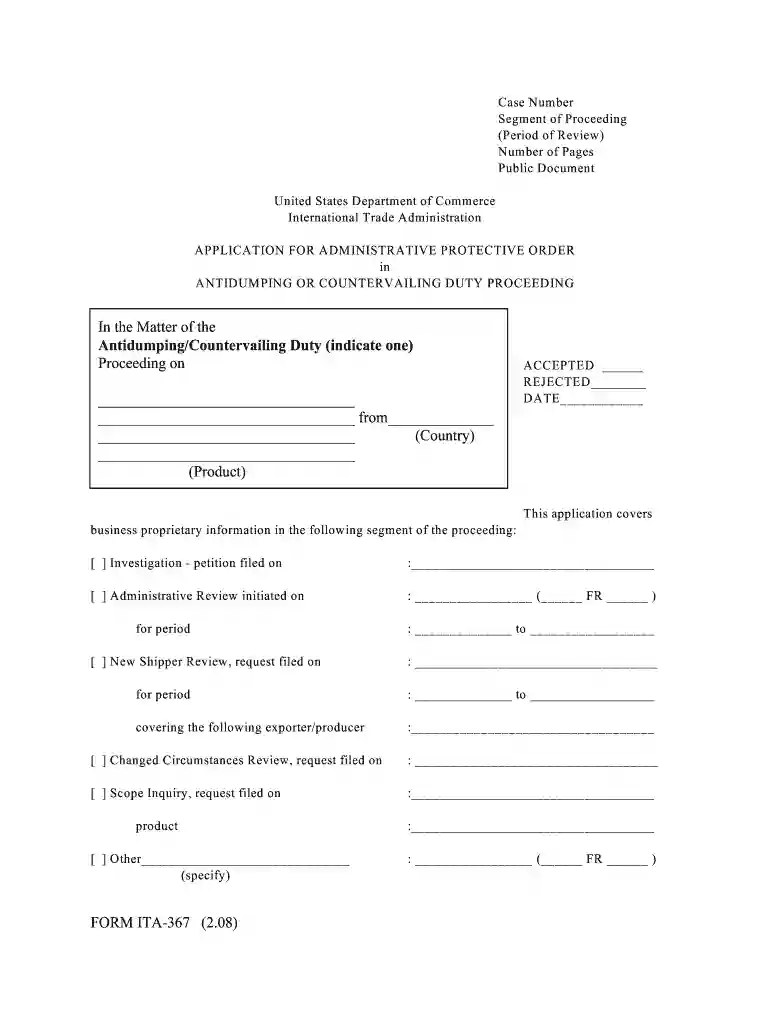
  1. Click ‘Get Form’ to open the Application for Administrative Protective Order in the editor.
  2. Begin by filling in the 'Case Number' and 'Segment of Proceeding' fields. Ensure that you accurately indicate whether this is an Antidumping or Countervailing Duty proceeding.
  3. In the section labeled 'This application covers business proprietary information,' select the appropriate checkboxes for the type of review (Investigation, Administrative Review, etc.) and provide relevant dates.
  4. Complete the 'Representation' section by identifying yourself as an applicant and specifying your relationship to the interested parties involved.
  5. For attorney applicants, answer questions regarding your role and any competitive decision-making activities. Non-attorney applicants should provide their employment details as required.
  6. Finally, review all entries for accuracy, sign where indicated, and submit your application through our platform.

Start using our editor today to streamline your document completion process for free!

See more judiciary appointments versions

We've got more versions of the judiciary appointments form. Select the right judiciary appointments version from the list and start editing it straight away!

VersionsForm popularityFillable & printable
20084.9 Satisfied (452 Votes)

be ready to get more

Complete this form in 5 minutes or less

Security and compliance

At DocHub, your data security is our priority. We follow HIPAA, SOC2, GDPR, and other standards, so you can work on your documents with confidence.

form ita fill

ITA U.S. Exporters Database

Access data tables showing details of U.S. goods exporters, including their size, locations, products, and markets.

Learn more
United States: International Trade Administration (ITA)

This site contains a listing of the services the ITA offers and links to the various data and analysis provided by the ITA. Within the Trade Topics tab, thereRead more

Learn more
server.properties

server.properties is a file that specifies settings for the Minecraft server software. There exists a variant for server.jar in Java Edition.Read more

Learn more
If you believe that this page should be taken down, please follow our DMCA take down process here