Form h1028 2026

Get Form
h1028 rev 03 2021 2 eng Preview on Page 1

Here's how it works

01. Edit your h1028 rev 03 2021 2 eng online
Type text, add images, blackout confidential details, add comments, highlights and more.

02. Sign it in a few clicks
Draw your signature, type it, upload its image, or use your mobile device as a signature pad.

03. Share your form with others
Send form 1028 employment verification via email, link, or fax. You can also download it, export it or print it out.

How to use or fill out form h1028 with our platform

Form edit decoration
9.5
Ease of Setup
DocHub User Ratings on G2
9.0
Ease of Use
DocHub User Ratings on G2
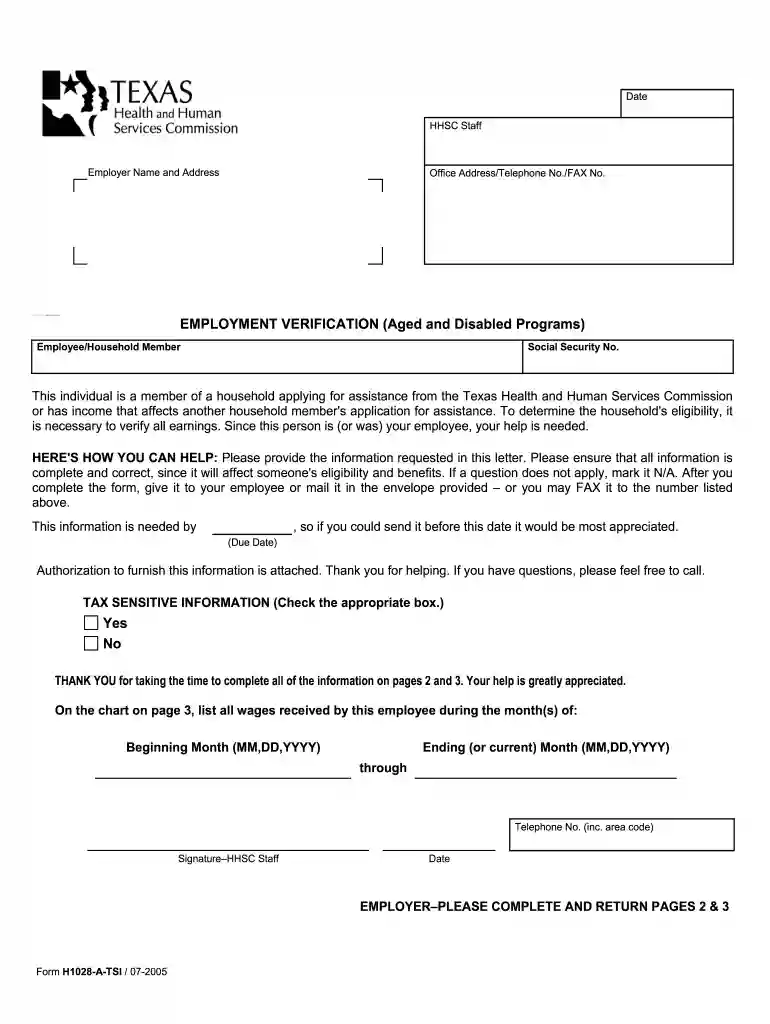
  1. Click ‘Get Form’ to open form h1028 in the editor.
  2. Begin by entering the employer's name and address at the top of the form. Ensure all details are accurate as they are crucial for verification.
  3. Fill in the employee's name and Social Security number. This information is essential for linking the employment verification to the correct individual.
  4. In the employment section, indicate whether the employee is currently employed by selecting 'Yes' or 'No'. If yes, provide details such as date hired and rate of pay.
  5. Complete pages 2 and 3 by listing all wages received during the specified months. Use the provided chart to detail gross pay, actual hours worked, and any additional payments like tips or bonuses.
  6. Once all fields are filled out, review your entries for accuracy. If everything looks good, you can save and send it directly from our platform via email or fax.

Start using our platform today to easily complete form h1028 online for free!

See more form h1028 versions

We've got more versions of the form h1028 form. Select the right form h1028 version from the list and start editing it straight away!
Versions Form popularity Fillable & printable
2005 4.9 Satisfied (56 Votes)
be ready to get more

Complete this form in 5 minutes or less

Get form

Got questions?

We have answers to the most popular questions from our customers. If you can't find an answer to your question, please contact us.
Contact us
Form H1020-A is a Texas Health form designed to assist in gathering proof of age, relationship, and income statements. This document outlines the various types of acceptable proof to ensure eligibility for services.
Typical questions included in an employment verification are: Dates of employment. Ending job title. Ending pay rate. Reason for leaving. Eligibility for re-hire.
SNAP Food Benefits Proof of income from your job Last three pay stubs or paychecks, a statement from your employer or self-employment records. Bank accounts The most current statement for all accounts. Medical costs Bills, receipts or statements from health care providers (doctors, hospitals, drugstores, etc.).
What Should an Employment Verification Letter Include? Employees name. Employees job title and role. Employment start and end dates. Employees salary or pay, including frequency. Employers contact details, including address.
Use manual Form H1028 when TIERS is down and a person cannot furnish sufficient verification of income or mandatory deductions. Send the form to the person to take it to the employer for completion. Document in the households case record the date the form is given to the person.

Security and compliance

At DocHub, your data security is our priority. We follow HIPAA, SOC2, GDPR, and other standards, so you can work on your documents with confidence.

Learn more
ccpa2
pci-dss
gdpr-compliance
hipaa
soc-compliance

People also ask

Basic Employment Verification Letter Sample Dear XYZ, This letter is to docHub income and employment for [insert pronoun], who has been employed at [company] and holds the title of He/She and has been an employee with [company] since. The company is at [insert pronoun].
An employment verification letter is an official document, so it should follow a standard business letter format. If available, use company letterhead and include the date, company name and contact information at the top of the page.
Provide accurate information. Make sure the information is accurate by double-checking any employment dates, pay rates, and hours of work provided. Respond as promptly as possible and retain a copy of the employment verification in the employees personnel file.

1028 form