Type text, add images, blackout confidential details, add comments, highlights and more.
02. Sign it in a few clicks
Draw your signature, type it, upload its image, or use your mobile device as a signature pad.
03. Share your form with others
Send it via email, link, or fax. You can also download it, export it or print it out.
How to use or fill out tngovw form with our platform
Ease of Setup
DocHub User Ratings on G2
Ease of Use
DocHub User Ratings on G2
Click ‘Get Form’ to open the tngovw form in the editor.
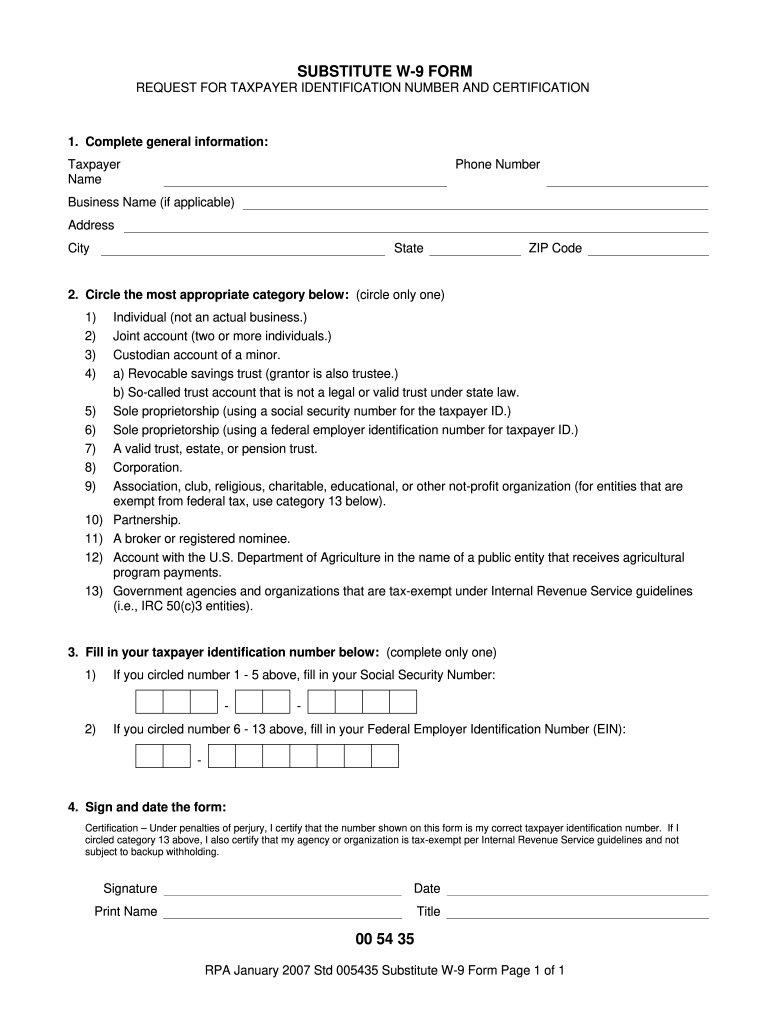
Begin by completing the general information section. Enter your name, phone number, business name (if applicable), and address details including city, state, and ZIP code.
Next, circle the most appropriate category that describes your taxpayer status. Ensure you only select one option from the provided list.
Fill in your taxpayer identification number. If you selected categories 1-5, provide your Social Security Number; if you chose categories 6-13, enter your Federal Employer Identification Number (EIN).
Finally, sign and date the form. Make sure to print your name and title below your signature for clarity.
Start using our platform today to fill out the tngovw form online for free!
Organizations such as nonprofit professional and trade schools, scouts, youth groups, youth athletic and recreational pro- grams, etc., operated exclusively for educational purposes must apply for exempt status authorization from the department and use Form ST3 on qualifying purchases.
How to fill out ST3 form?
How to fill out the Form ST3 Certificate of Exemption Detailed Instructions? Enter the purchasers name and address. Select the reason for exemption by checking the appropriate box. Fill in the sellers information. Sign and date the certificate. Review all entries for accuracy.
How long are ST3 forms good for?
This certificate remains in force as long as the purchaser continues making purchases or until otherwise cancelled by the purchaser.
What is a MN ST 19 form?
Flea Markets are required by the MN Dept of Revenue to have a completed Form ST19 for every Seller. This form provides written documentation showing: Seller has a MN Sales Tax ID Number OR. Seller is not required to have one because the items they are selling are non-taxable OR.
What is an ST3 form in NJ?
Proper Use of Form ST-3 A retail appliance store owner issues a resale certificate when purchasing appliances from a supplier for resale. 2. A furniture manufacturer issues a resale certificate when purchasing lumber to be used in manufacturing furniture for sale.
Related Searches
FMLA form (PDF)Tax form1040 tax formTennessee tax exempt Form PDFTn new hire formW2 formForm FAE 174Tn gov power of Attorney form
Security and compliance
At DocHub, your data security is our priority. We follow HIPAA, SOC2, GDPR, and other standards, so you can work on your documents with confidence.
Form CT-W3 is an annual reconciliation form used to report total wages paid and the taxes withheld from employees paychecks during the year. It summarises the information from W-2 forms and is filed with the Connecticut Department of Revenue Services.
What is a NJ ST 3 form?
Resale Certificate (Form ST-3) Form ST-3 is used by registered sellers to purchase tangible personal property or services. either for resale in its present form or for incorporation into other property held for sale.
What is form 8829 for?
Use Form 8829 to figure the allowable expenses for business use of your home on Schedule C (Form 1040) and any carryover to next year of amounts not deductible this year.
Cookie consent notice
This site uses cookies to enhance site navigation and personalize your experience.
By using this site you agree to our use of cookies as described in our Privacy Notice.
You can modify your selections by visiting our Cookie and Advertising Notice.