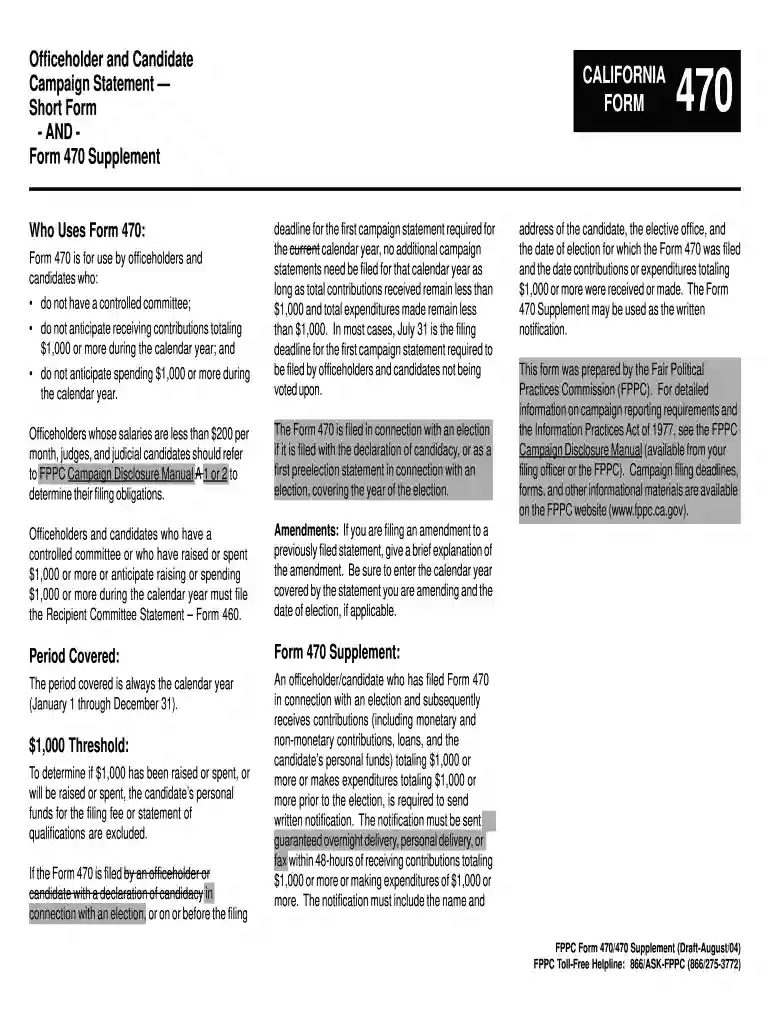
Officeholder and Candidate Campaign StatementShort Form - AND ... 2026

Get Form
Officeholder and Candidate Campaign StatementShort Form - AND ... Preview on Page 1

Here's how it works

01. Edit your form online
Type text, add images, blackout confidential details, add comments, highlights and more.

02. Sign it in a few clicks
Draw your signature, type it, upload its image, or use your mobile device as a signature pad.

03. Share your form with others
Send it via email, link, or fax. You can also download it, export it or print it out.

How to use or fill out Officeholder and Candidate Campaign Statement Short Form - AND ... with our platform

Form edit decoration
9.5
Ease of Setup
DocHub User Ratings on G2
9.0
Ease of Use
DocHub User Ratings on G2
  1. Click ‘Get Form’ to open the Officeholder and Candidate Campaign Statement Short Form in the editor.
  2. Begin by entering the calendar year for which the statement is being filed. This is crucial for accurate record-keeping.
  3. Fill in your name, office sought or held, and contact information including your address and phone number. Ensure all details are correct to avoid any issues.
  4. If applicable, list any committees associated with your candidacy, including their names and addresses. This section helps maintain transparency.
  5. In the verification section, confirm that you anticipate receiving less than $1,000 in contributions and spending less than $1,000 during the calendar year. Sign and date the form to validate your statement.
  6. If you need to file an amendment, provide a brief explanation of changes made along with the relevant dates.

Start using our platform today to easily complete your campaign statements online for free!

See more Officeholder and Candidate Campaign StatementShort Form - AND ... versions

We've got more versions of the Officeholder and Candidate Campaign StatementShort Form - AND ... form. Select the right Officeholder and Candidate Campaign StatementShort Form - AND ... version from the list and start editing it straight away!
Versions Form popularity Fillable & printable
2016 4.8 Satisfied (39 Votes)
2004 4.4 Satisfied (183 Votes)
be ready to get more

Complete this form in 5 minutes or less

Get form

Got questions?

We have answers to the most popular questions from our customers. If you can't find an answer to your question, please contact us.
Contact us

Yes, and it’s really easy! DocHub is a web-based PDF editor with advanced document management capabilities that allow you promptly adjust your forms, fill out empty fields and add new ones for others to fill out, and create eSignatures in several ways. Upload your Officeholder and Candidate Campaign StatementShort Form - AND ..., provide information as requested, and decide how you want to eSign your template - by typing your name, drawing your signature, uploading its picture, or utilizing a QR code.

Apart from a comprehensive toolset for editing PDFs on mobile devices, DocHub enables you to sign your Officeholder and Candidate Campaign StatementShort Form - AND ... along the way. Open our editor in your web browser, make changes using DocHub’s toolset, and finish your editing by eSigning the finished form.

County General Purpose Committee (Major Donor and Independent Expenditure Committees and PACs) Type of FormWhere to fileFiling MethodForm 461 (Major Donor and Independent Expenditure Committee Campaign Statement)County Elections OfficePaper (original and one copy) or Electronically (check with your County)10 more rows
Campaign filing deadlines, forms, and other informational materials are available on the FPPC website (www.fppc.ca.gov). FPPC Form 460 (Jan/2016)) FPPC Advice: advice@fppc.ca.gov (866/275-3772) www.fppc.ca.gov.
Form 700 is the tool used by public officials to disclose their financial interests that may be affected by their public official decisions. This ensures that the public is aware of a public official's financial interests and also reminds the public official of potential conflicts.

Security and compliance

At DocHub, your data security is our priority. We follow HIPAA, SOC2, GDPR, and other standards, so you can work on your documents with confidence.

Learn more
ccpa2
pci-dss
gdpr-compliance
hipaa
soc-compliance
be ready to get more

Complete this form in 5 minutes or less

Get form

People also ask

The Form 470 is filed in connection with an election if it is filed with the declaration of candidacy, or as a first preelection statement in connection with an election, covering the year of the election.
Use this form for: \u27a2 State and local committees making or receiving contribution(s) that total in the aggregate $1,000 or more in the 90 days before an election. \u27a2 Committees reporting contributions of $5,000 or more in connection with a state ballot measure.
tion Reports (Form 497) The Political Reform Act (\u201cAct\u201d) requires primarily formed ballot measure committees to file the Form 497 within 24 hours of receiving contributions totaling $1,000 or more from a single source during the 90 days before an election, including the date of the election.
Form 460. Generally, candidate controlled committees and committees primarily formed to support or oppose a candidate(s) use the Recipient Committee Campaign Statement (Form 460) to report campaign activity for all semi-annual and preelection statements.

Related links