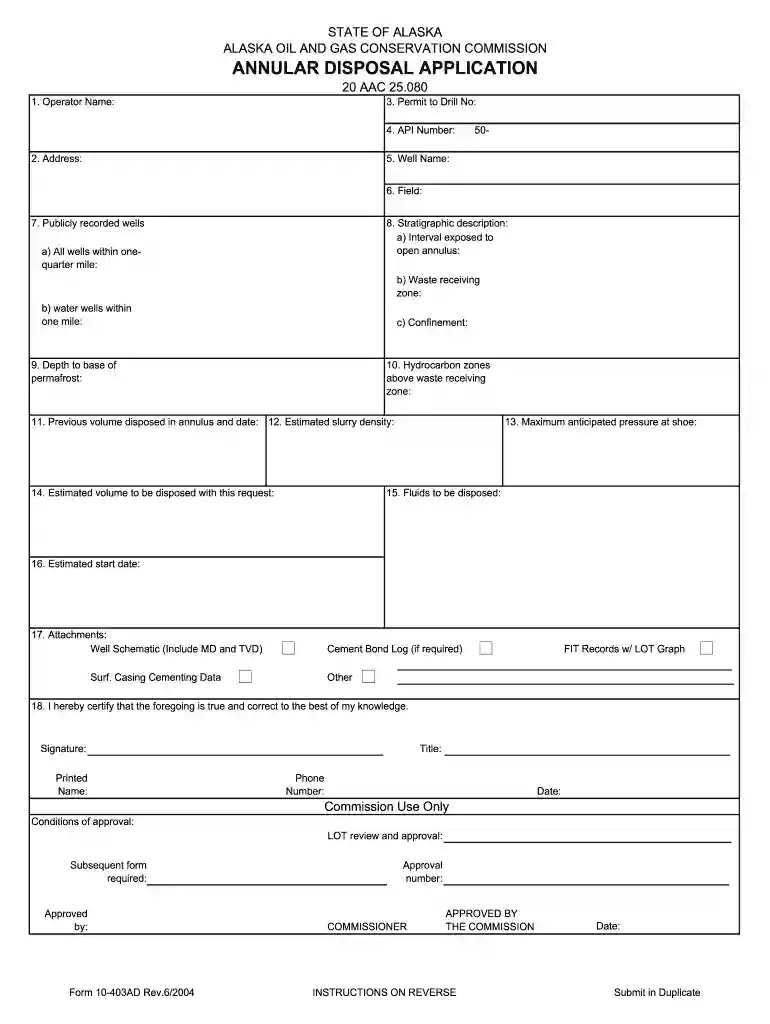
feet alaska Preview on Page 1

Alaska annular 2026

Here's how it works

  • 01. Edit your feet alaska online

    Type text, add images, blackout confidential details, add comments, highlights and more.

  • 02. Sign it in a few clicks

    Draw your signature, type it, upload its image, or use your mobile device as a signature pad.

  • 03. Share your form with others

    Send alaska lease via email, link, or fax. You can also download it, export it or print it out.

How to use or fill out alaska annular with our platform

Form edit decoration
9.5
Ease of Setup
DocHub User Ratings on G2
9.0
Ease of Use
DocHub User Ratings on G2
  1. Click ‘Get Form’ to open the alaska annular application in the editor.
  2. Begin by filling in the Operator Name and Address fields. These are essential for identifying the applicant.
  3. Next, enter the Permit to Drill No and API Number. Ensure these numbers are accurate as they link to your drilling operations.
  4. Complete the Well Name and Field sections. This information helps specify where the disposal will occur.
  5. In section 7, list all publicly recorded wells within one-quarter mile and any water wells within one mile. This is crucial for environmental assessments.
  6. Proceed to fill out details regarding hydrocarbon zones above the waste receiving zone, including depth to base of permafrost and estimated slurry density.
  7. Attach necessary documents such as Well Schematic and Cement Bond Log if required, ensuring all attachments are included before submission.
  8. Finally, certify your application by signing and providing your printed name, title, phone number, and date at the bottom of the form.

Start using our platform today for free to streamline your alaska annular application process!

See more feet alaska versions

We've got more versions of the feet alaska form. Select the right feet alaska version from the list and start editing it straight away!

VersionsForm popularityFillable & printable
20044.9 Satisfied (57 Votes)

be ready to get more

Complete this form in 5 minutes or less

Security and compliance

At DocHub, your data security is our priority. We follow HIPAA, SOC2, GDPR, and other standards, so you can work on your documents with confidence.

wells alaska

10-423.pdf

REPORT OF ANNULAR DISPOSAL. 7. Well Name: 5a. Sundry Number: 10. (h)(1 Submit in PDF format to aogcc.reporting@alaska.gov.Read more

Learn more
The Edge of an Eclipse for Alaska | Geophysical Institute

Apr 28, 1994 When the silhouettes of the peaks touch the edge of the sun at the beginning and end of an annular eclipse, the bright solar rim breaks into aRead more

Learn more
If you believe that this page should be taken down, please follow our DMCA take down process here