Type text, add images, blackout confidential details, add comments, highlights and more.
02. Sign it in a few clicks
Draw your signature, type it, upload its image, or use your mobile device as a signature pad.
03. Share your form with others
Send it via email, link, or fax. You can also download it, export it or print it out.
How to use or fill out ct siren with our platform
Ease of Setup
DocHub User Ratings on G2
Ease of Use
DocHub User Ratings on G2
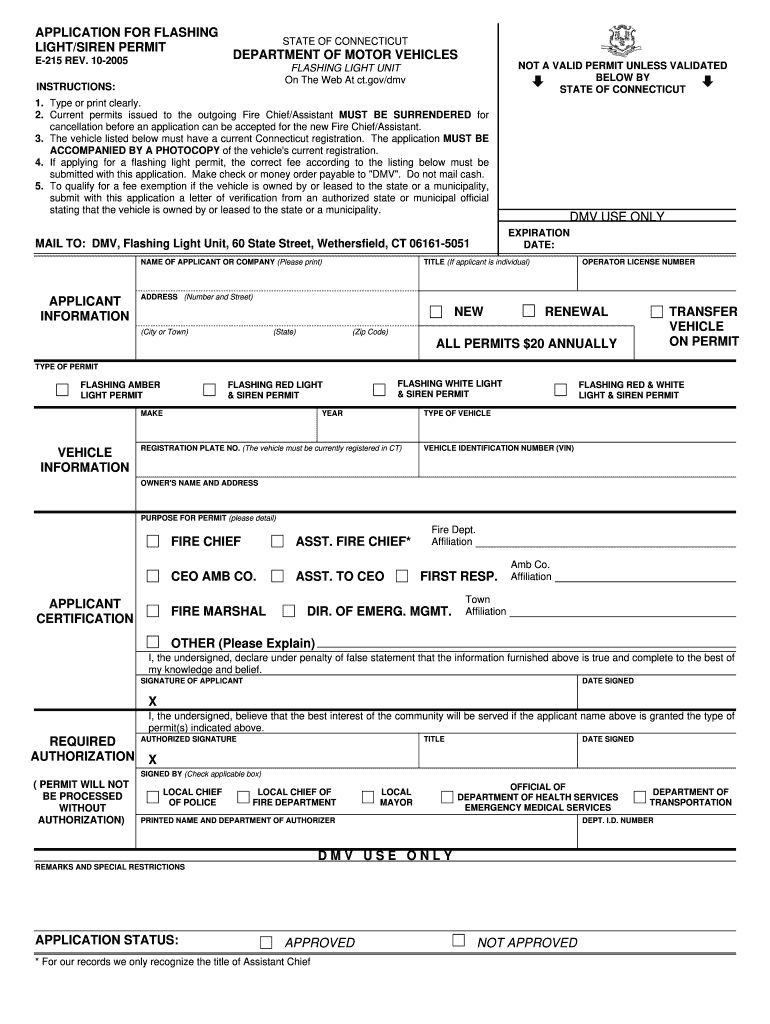
Click ‘Get Form’ to open the ct siren application in the editor.
Begin by entering your name or company name clearly in the designated field. Ensure that all information is accurate.
Fill out the applicant information section, including your title, operator license number, and complete address. Make sure to select whether this is a new application, renewal, or transfer.
In the vehicle information section, specify the type of permit you are applying for by selecting from options such as flashing amber light permit or flashing red & white light & siren permit.
Provide your vehicle's registration plate number and VIN. Confirm that your vehicle has a current Connecticut registration.
Detail the purpose for the permit in the provided space. This helps clarify your need for the flashing light/siren.
Sign and date the application at the bottom. Ensure you have an authorized signature if required for processing.
Start using our platform today to streamline your ct siren application process for free!
CT siren mapCT emergency Alert todayNorwich ct sirenChester ct sirenWhy are sirens going off right nowCT Silver Alert list todayCT AlertNew England siren map
Security and compliance
At DocHub, your data security is our priority. We follow HIPAA, SOC2, GDPR, and other standards, so you can work on your documents with confidence.
The Lights In The Sky Tour took place between July and December 2008 in North America and South America in support of Ghosts I-IV, The Slip, and Year Zero.Read more
The SIREN Evidence Resource Library includes both peer-reviewed publications and other types of resources, such as webinars, presentations, podcasts,Read more
CT Alert - Map. To log in to the Citizens Opt-In Web Page of the CTALERTS Emergency Notification System please select your town from the map or the listRead more
Cookie consent notice
This site uses cookies to enhance site navigation and personalize your experience.
By using this site you agree to our use of cookies as described in our Privacy Notice.
You can modify your selections by visiting our Cookie and Advertising Notice.