Tceq form 10218 2026

Get Form
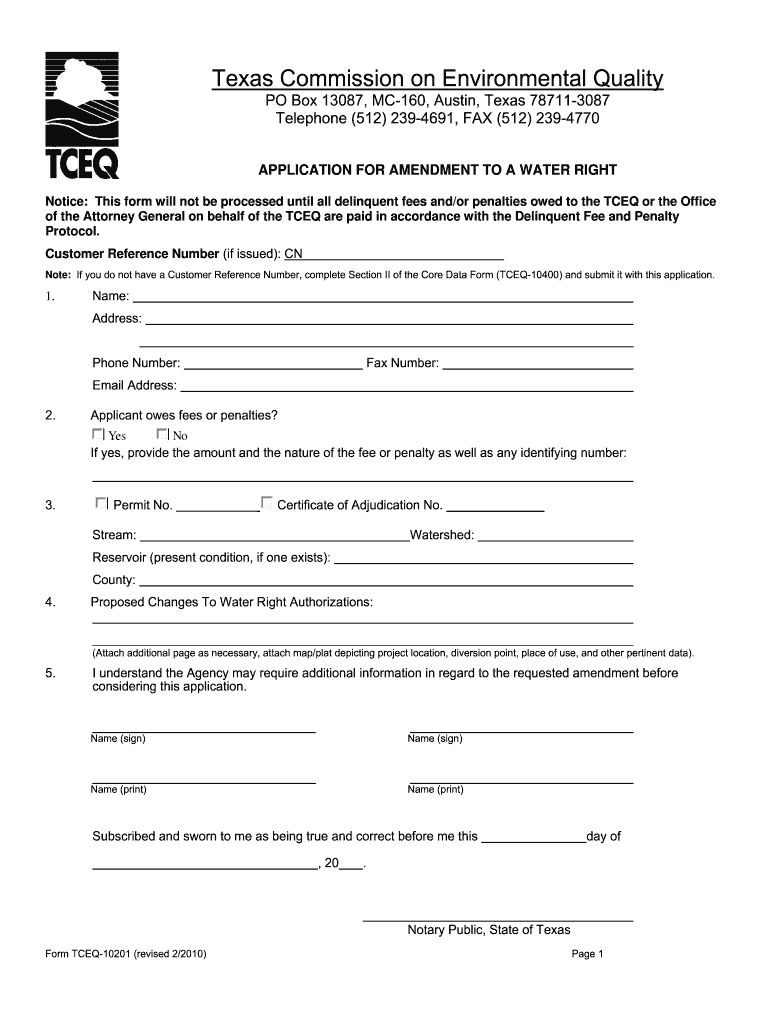
tceq form 10218 Preview on Page 1

Here's how it works

01. Edit your form online
Type text, add images, blackout confidential details, add comments, highlights and more.
02. Sign it in a few clicks
Draw your signature, type it, upload its image, or use your mobile device as a signature pad.
03. Share your form with others
Send it via email, link, or fax. You can also download it, export it or print it out.

How to use or fill out tceq form 10218 with our platform

Form edit decoration
9.5
Ease of Setup
DocHub User Ratings on G2
9.0
Ease of Use
DocHub User Ratings on G2
  1. Click ‘Get Form’ to open it in the editor.
  2. Begin by filling in your personal information in Section 1, including your name, address, phone number, and email address. Ensure all details are accurate for effective communication.
  3. In Section 2, indicate whether you owe any fees or penalties. If applicable, provide the amount and nature of these fees.
  4. Proceed to Section 3 where you will enter your Permit Number and details about the water source such as stream and watershed information.
  5. In Section 4, describe the proposed changes to your water right authorizations. Attach any necessary maps or additional pages as needed.
  6. Finally, complete the signature section in Section 5. Make sure to sign and print your name clearly before submitting the form.

Start using our platform today for free to streamline your TCEQ form completion!

be ready to get more

Complete this form in 5 minutes or less

Get form

Got questions?

We have answers to the most popular questions from our customers. If you can't find an answer to your question, please contact us.
Contact us

You should use only trusted software solutions with strong data protection compliance to sign your documents electronically. DocHub is just the type of software you need! It stores data on Amazon Web Servers and complies with all necessary security requirements and eSignature laws, so it’s a trustworthy way to eSign your tceq form 10218 or other documents using this tool.

If you want to edit your tceq form 10218 on the internet easily, it does not matter what browser you use. DocHub’s straightforward editing tools are available using any internet browser. Simply open the appropriate tab in the editor, add your file, and fill it out without stress.

Customer Reference Numbers (CNs) are used to identify Customers in Central Registry. Each Individual or Organization is issued a unique 11-digit identification number called a CN (e.g. CN123456789). Each Customer should have only one CN based upon their name and SOS/CPA information as applicable.
TCEQs State of Texas Environmental Electronic Reporting System (STEERS) is an existing electronic document receiving system for collecting numerous reports required under the states EPA-authorized programs.
Regulated Entity A Regulated Entity is a person, organization, place, or thing that is of environmental interest to TCEQ where regulatory activities of interest to the Agency occur or have occurred in the past. Examples are a site, facility or license.

Security and compliance

At DocHub, your data security is our priority. We follow HIPAA, SOC2, GDPR, and other standards, so you can work on your documents with confidence.

Learn more
ccpa2
pci-dss
gdpr-compliance
hipaa
soc-compliance
be ready to get more

Complete this form in 5 minutes or less

Get form

People also ask

Where should I report releases? All suspected or confirmed releases should be reported to the TCEQ Remediation Division at 512-239-2200. You may use the PST Incident Report Form 8 (TCEQ 20097) to fulfill this requirement.

Related links