Type text, add images, blackout confidential details, add comments, highlights and more.
02. Sign it in a few clicks
Draw your signature, type it, upload its image, or use your mobile device as a signature pad.
03. Share your form with others
Send cbp 4811 via email, link, or fax. You can also download it, export it or print it out.
How to use or fill out cbp form 4811 with our platform
Ease of Setup
DocHub User Ratings on G2
Ease of Use
DocHub User Ratings on G2
Click ‘Get Form’ to open cbp form 4811 in the editor.
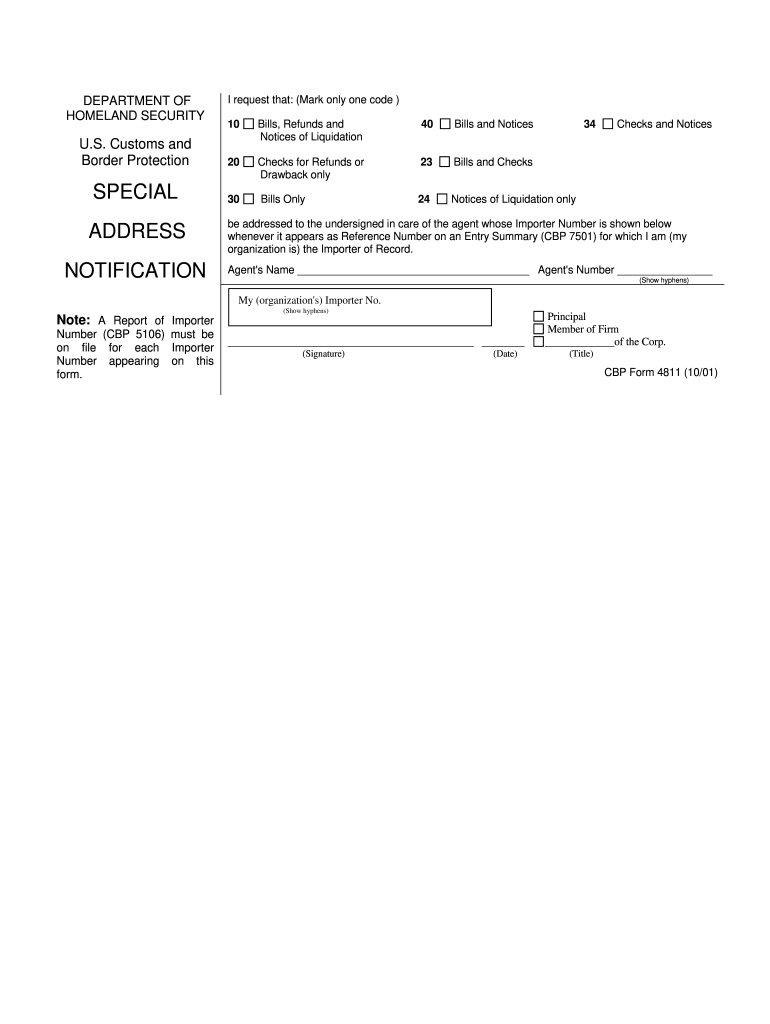
Begin by selecting one of the request codes from the options provided. Mark only one code that applies to your situation, such as Bills and Notices or Checks for Refunds.
In the 'ADDRESS NOTIFICATION' section, enter the agent's name and their Importer Number. Ensure you include hyphens as required.
Next, input your organization’s Importer Number, again ensuring that hyphens are included.
Sign and date the form in the designated areas. Include your title if applicable, indicating your position within the organization.
Start using our platform today to fill out cbp form 4811 online for free!
Jan 2, 2026 The CBP Form 4811, Special Address Notification, is used by importers of record (IOR) to designate an agent, also known as a notify party, toRead more
19 CFR 141.61 - Completion of entry and entry summary
In this case, the importer of record must file, or must have filed previously, through a CBP-approved method, a CBP Form 4811 authorizing the electronicRead more
Cookie consent notice
This site uses cookies to enhance site navigation and personalize your experience.
By using this site you agree to our use of cookies as described in our Privacy Notice.
You can modify your selections by visiting our Cookie and Advertising Notice.