




Here's how it works



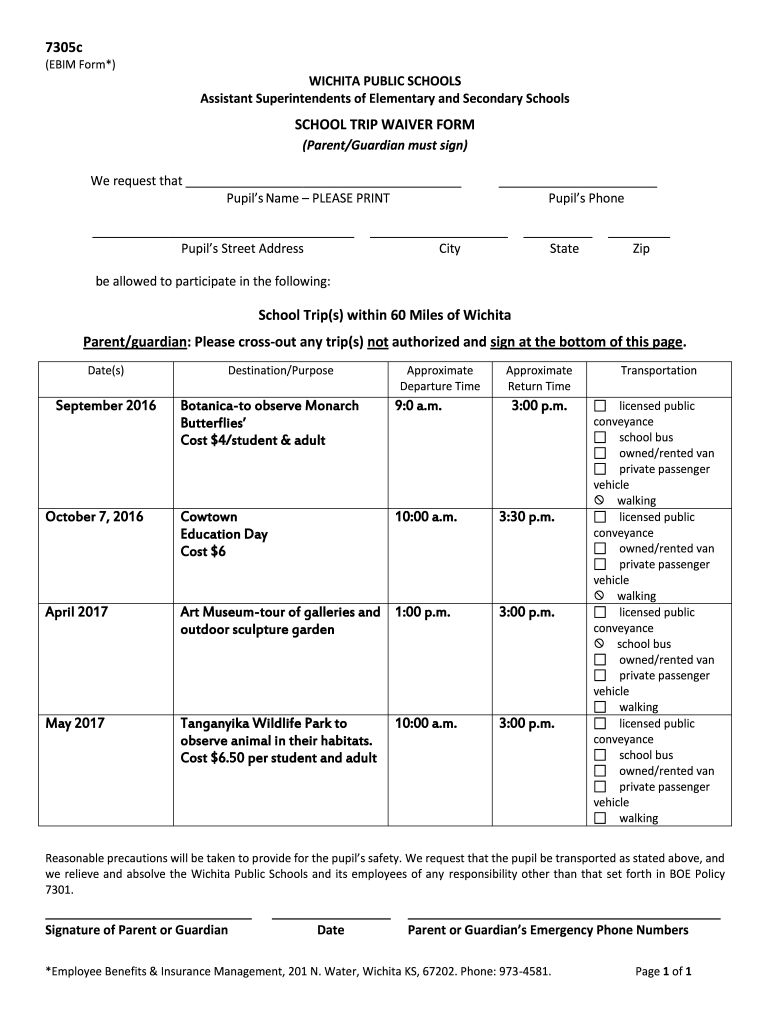
How to use or fill out SCHOOL TRIP WAIVER FORM - usd259.org with our platform

- Click ‘Get Form’ to open it in the editor.
- Begin by entering the pupil’s name in the designated field. Ensure you print clearly for accurate identification.
- Fill in the pupil’s street address, phone number, city, state, and zip code in the respective fields.
- Review the list of school trips provided. Cross out any trip(s) that are not authorized for your child.
- For each trip your child will attend, fill in the date, destination/purpose, approximate departure time, and return time as indicated.
- Select the mode of transportation for each trip by checking the appropriate box next to options like school bus or walking.
- Finally, sign and date the form at the bottom to confirm your authorization and provide emergency contact numbers.
Start using our platform today to easily complete and submit your SCHOOL TRIP WAIVER FORM online for free!
It's free
See more SCHOOL TRIP WAIVER FORM - usd259.org versions
Got questions?
How can I send my SCHOOL TRIP WAIVER FORM - usd259.org for eSignature?
Upload your SCHOOL TRIP WAIVER FORM - usd259.org to DocHub (once you’ve created an account for this). If you need to complete fields in it, use appropriate tools from the upper pane. For instance, drop Signature Fields, assign each to a particular person, and click on Sign → Request signatures from others. Personalize your message for your recipients and click Send Request. You can also send your paperwork by fax or as a Signing link instead of using email (you’ll find these options by navigating to the Menu → Send)
Can I edit SCHOOL TRIP WAIVER FORM - usd259.org on my phone?
As a comprehensive document modifying service, DocHub is available on mobile phones. Open DocHub in your choice of mobile browser and employ our intelligent mobile-friendly toolset to fill out your SCHOOL TRIP WAIVER FORM - usd259.org.
What is the biggest high school in Wichita, KS?
Who is the chief operations officer of Wichita Public Schools?
How much do Wichita Public Schools teachers make?
Security and compliance
At DocHub, your data security is our priority. We follow HIPAA, SOC2, GDPR, and other standards, so you can work on your documents with confidence.
Learn more




