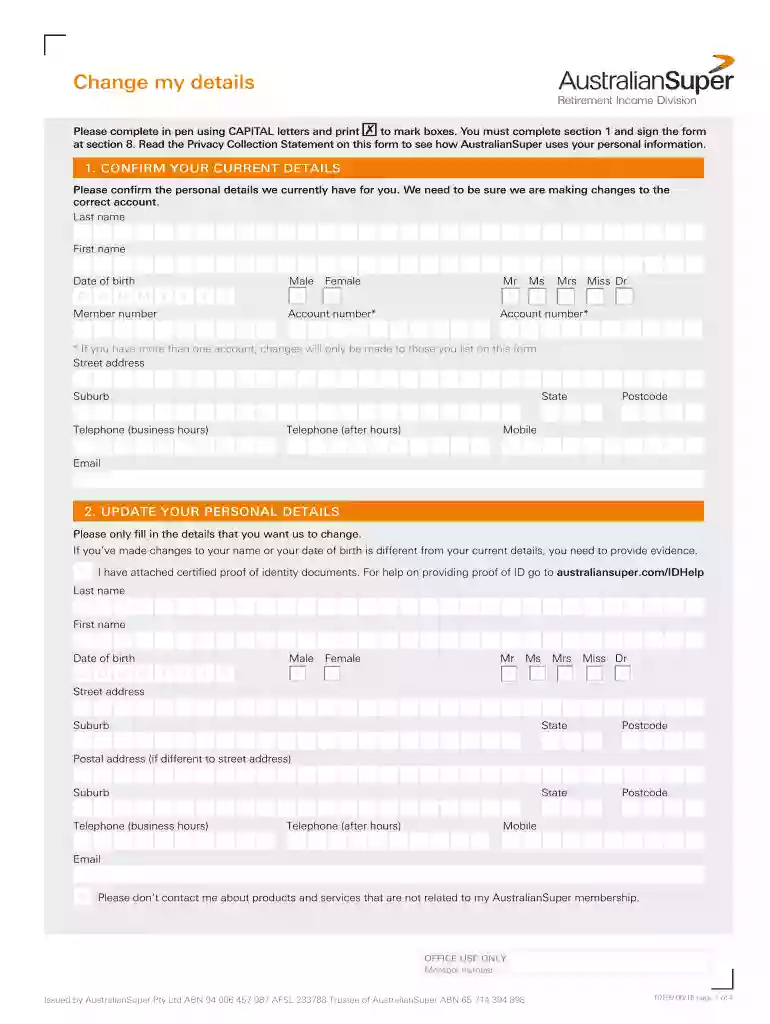
Change my details - australiansuper.com 2026

Get Form
australian super activate account Preview on Page 1

Here's how it works

01. Edit your australian super activate account online
Type text, add images, blackout confidential details, add comments, highlights and more.

02. Sign it in a few clicks
Draw your signature, type it, upload its image, or use your mobile device as a signature pad.

03. Share your form with others
Send australian super change of name online via email, link, or fax. You can also download it, export it or print it out.

How to use or fill out Change my details - australiansuper.com with our platform

Form edit decoration
9.5
Ease of Setup
DocHub User Ratings on G2
9.0
Ease of Use
DocHub User Ratings on G2
  1. Click ‘Get Form’ to open it in the editor.
  2. Begin by confirming your current details in Section 1. Fill in your last name, first name, date of birth, gender, member number, and account number. Ensure all information is accurate to avoid processing delays.
  3. In Section 2, update your personal details as needed. Only fill in the fields you wish to change. If changing your name or date of birth, attach certified proof of identity documents.
  4. Section 3 allows you to nominate beneficiaries. Provide their full names and relationships to ensure they receive benefits upon your passing.
  5. In Section 4, enter new bank account details if applicable. Include the bank's name, BSB number, account name, and account number.
  6. Specify how much you want to receive annually in Section 5 and choose the frequency of payments in Section 6.
  7. Complete Section 7 by providing proof of identity through one of the options listed. This step is crucial for security purposes.
  8. Finally, sign the form in Section 8 and date it before submitting it back to AustralianSuper.

Start using our platform today for free to streamline your document editing and submission process!

See more Change my details - australiansuper.com versions

We've got more versions of the Change my details - australiansuper.com form. Select the right Change my details - australiansuper.com version from the list and start editing it straight away!
Versions Form popularity Fillable & printable
2019 4.9 Satisfied (52 Votes)
2018 4.4 Satisfied (184 Votes)
2016 4 Satisfied (36 Votes)
be ready to get more

Complete this form in 5 minutes or less

Get form

Got questions?

We have answers to the most popular questions from our customers. If you can't find an answer to your question, please contact us.
Contact us
Maintain Log into your Employment Hero Payroll platform. Click the Employees button. Select the employee you would like to edit. Click the Super Funds button. Update the Super Fund Member Number and the Pay Into this Fund fields. Click the name of the super fund.
If you require assistance with your Member Direct account you can contact us by phone, email or post.
Changing from one super fund to another is pretty easy. Most of the time you can do this online usually through the website of the new super fund you are joining.
Even if you move overseas, your superannuation will typically stay in Australia. If you move to New Zealand, you may be able to transfer your super to a KiwiSaver account. Temporary residents returning home after visiting Australia can apply for a Departing Australia Superannuation Payment.
Manage your account on the go Download the app from the App Store or Google play and login with your account user name and password then set up a PIN, Touch ID or Face ID to make logging in even easier. To protect your account, we will never link you to a login page from your email.

Security and compliance

At DocHub, your data security is our priority. We follow HIPAA, SOC2, GDPR, and other standards, so you can work on your documents with confidence.

Learn more
ccpa2
pci-dss
gdpr-compliance
hipaa
soc-compliance
be ready to get more

Complete this form in 5 minutes or less

Get form

People also ask

To avoid your super being lost in future, make sure your super funds and the ATO have your correct contact details. You can update your contact details in myGov by following these steps: Sign in to myGov and select My account then Profile. Select Contact details and then Edit on the details you want to update.
Log on to ATO online services through myGov . From the top menu, select Super. Then select either: Fund details to check for lost super if you want to keep your super with the same fund, contact them directly to update your details.
Sign in to myGov and select Australian Taxation Office. Select Super. Select from the Information and manage options. You can check your super balances, find lost super, compare super products, choose a new super fund and transfer your super.

australiansuper login username