Movistar contrato servicio 2026

Get Form
contratos movistar Preview on Page 1

Here's how it works

01. Edit your contratos movistar online
Type text, add images, blackout confidential details, add comments, highlights and more.

02. Sign it in a few clicks
Draw your signature, type it, upload its image, or use your mobile device as a signature pad.

03. Share your form with others
Send tarifa plana movistar via email, link, or fax. You can also download it, export it or print it out.

How to use or fill out movistar contrato servicio with our platform

Form edit decoration
9.5
Ease of Setup
DocHub User Ratings on G2
9.0
Ease of Use
DocHub User Ratings on G2
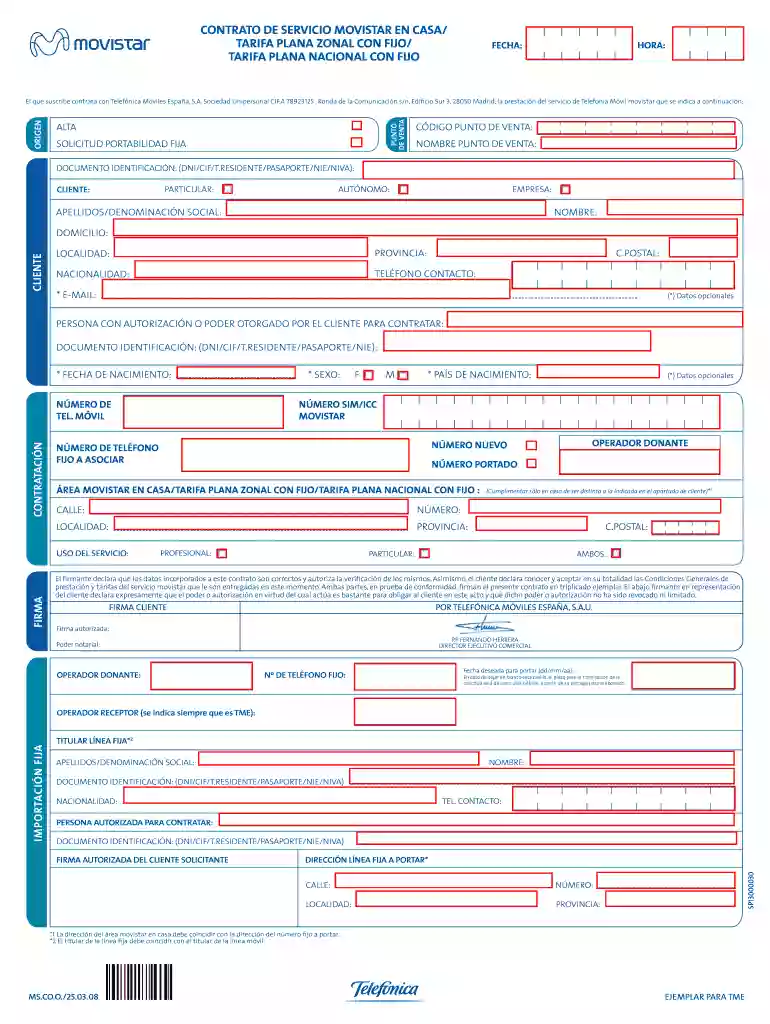
  1. Click ‘Get Form’ to open the movistar contrato servicio in the editor.
  2. Begin by filling in the 'HORA' and 'FECHA' fields at the top of the form. This information is essential for processing your contract.
  3. In the 'PUNTO DE VENTA' section, enter the 'CÓDIGO PUNTO DE VENTA' and 'NOMBRE PUNTO DE VENTA'. These details identify where you are signing up for services.
  4. Complete your identification details under 'DOCUMENTO IDENTIFICACIÓN', selecting from options like DNI or PASAPORTE. Specify if you are an AUTÓNOMO, PARTICULAR, CLIENTE, or EMPRESA.
  5. Fill in your personal information including 'APELLIDOS/DENOMINACIÓN SOCIAL', 'NOMBRE', and contact details such as 'TELÉFONO CONTACTO' and optional 'E-MAIL'.
  6. If applicable, provide details for any authorized person contracting on your behalf, including their identification document.
  7. Proceed to fill out the service details including your mobile number and associated fixed line number. Ensure all fields are accurately completed before submission.
  8. Finally, review all entered information for accuracy and sign the document electronically using our platform's signature feature.

Start filling out your movistar contrato servicio today for free with our platform!

See more movistar contrato servicio versions

We've got more versions of the movistar contrato servicio form. Select the right movistar contrato servicio version from the list and start editing it straight away!
Versions Form popularity Fillable & printable
2008 4.8 Satisfied (110 Votes)
be ready to get more

Complete this form in 5 minutes or less

Get form

Got questions?

We have answers to the most popular questions from our customers. If you can't find an answer to your question, please contact us.
Contact us
0:02 0:39 Suggested clip 34 seconds
Mi Movistar Ingresa a la pagina web de Mi Movistar aqu y accede con tu correo electrnico. Busca en Consultas la opcin de Contrato Digital. Te aparecer el historial de contratos.
Para conocer qu plan tienes contratado puedes ingresar con tu usuario y clave a tu App Mi Movistar o Sucursal Virtual y conocer el detalle de tu plan, adems de otra informacin de tus servicios.
Dnde puedo cancelar mi lnea? Puedes acudir a cualquiera de nuestros centros de atencin y ventas o llamar al *611 desde tu Movistar.
Movistar tiene diferentes ofertas para contratar lneas mviles con contrato. La ms barata en estos momentos es Movistar Mvil 20 GB, por 18,00 /mes. A nivel precio, las siguientes ms interesantes son Movistar Mvil 50 GB con coste de 29,00 /mes y Movistar Mvil con GB Ilimitados por 38,00 /mes.

Security and compliance

At DocHub, your data security is our priority. We follow HIPAA, SOC2, GDPR, and other standards, so you can work on your documents with confidence.

Learn more
ccpa2
pci-dss
gdpr-compliance
hipaa
soc-compliance
be ready to get more

Complete this form in 5 minutes or less

Get form