Type text, add images, blackout confidential details, add comments, highlights and more.
02. Sign it in a few clicks
Draw your signature, type it, upload its image, or use your mobile device as a signature pad.
03. Share your form with others
Send cpsp eportal login via email, link, or fax. You can also download it, export it or print it out.
How to use or fill out fcps form with our platform
Ease of Setup
DocHub User Ratings on G2
Ease of Use
DocHub User Ratings on G2
Click ‘Get Form’ to open the FCPS Student Registration Form in the editor.
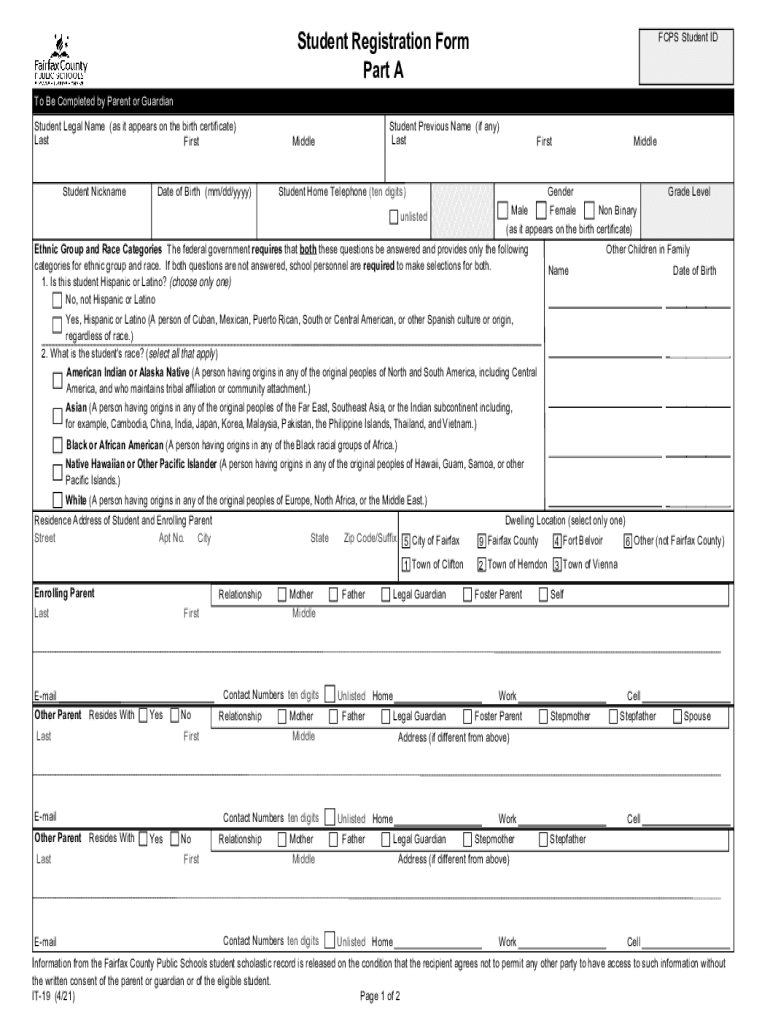
Begin with Part A, entering the FCPS Student ID and the student's legal name as it appears on their birth certificate. Fill in the date of birth and any previous names if applicable.
Provide contact information, including the student’s home telephone number and gender. Ensure you select the appropriate ethnic group and race categories as required by federal guidelines.
Complete the residence address section for both the student and enrolling parent, ensuring all fields are filled accurately.
In Part B, indicate how many years the student has previously been in K-12 education and whether they have received services from FCPS before. Include details about their last school attended.
Finally, review all entered information for accuracy, sign where indicated, and submit your completed form through our platform.
Start using our platform today to easily fill out your FCPS forms online for free!
Fcps form pdfFcps form onlineFCPS Registration formsFCPS medication formFCPS direct deposit formFCPS emergency Care formFCPS health formsFairfax County Public Schools enrollment numbers
Security and compliance
At DocHub, your data security is our priority. We follow HIPAA, SOC2, GDPR, and other standards, so you can work on your documents with confidence.
FCPS ID. FCPS School. Date of Enrollment. Grade Placement. Position. Agency Information. Agency Name. Agency Address. Name of Agency Contact. Phone Number.Read more
This General Registration Enrollment Forms Bundle consists of the following forms: Student Registration, Health Information, Emergency Care, Home LanguageRead more
The FCPS-24F is a compact, cost-effective, remote power supply and battery charger. This remote power supply consists of a filtered 24 VDC output that may beRead more
Cookie consent notice
This site uses cookies to enhance site navigation and personalize your experience.
By using this site you agree to our use of cookies as described in our Privacy Notice.
You can modify your selections by visiting our Cookie and Advertising Notice.