Type text, add images, blackout confidential details, add comments, highlights and more.
02. Sign it in a few clicks
Draw your signature, type it, upload its image, or use your mobile device as a signature pad.
03. Share your form with others
Send mypethealth com via email, link, or fax. You can also download it, export it or print it out.
How to use or fill out mypethealth with our platform
Ease of Setup
DocHub User Ratings on G2
Ease of Use
DocHub User Ratings on G2
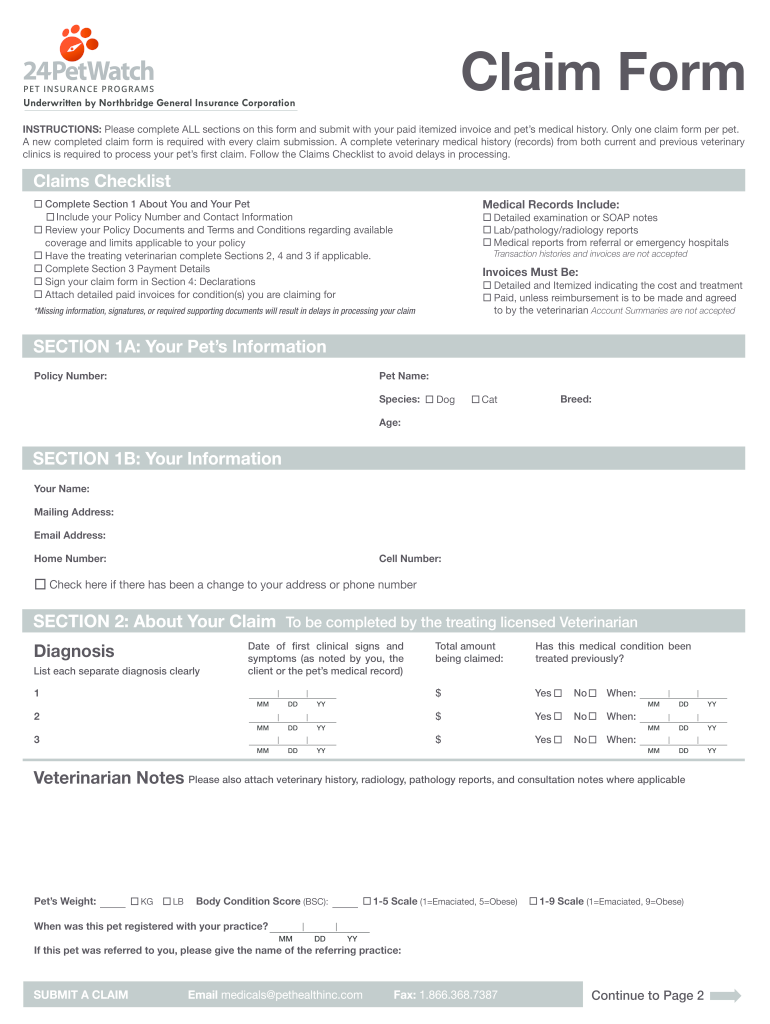
Click ‘Get Form’ to open the mypethealth claim form in the editor.
Begin with Section 1A, providing your pet’s information including Policy Number, Pet Name, Species, Breed, and Age. Ensure all fields are filled accurately.
Proceed to Section 1B to enter your personal details such as Your Name, Mailing Address, Email Address, Home Number, and Cell Number. If there are any changes in your contact information, check the provided box.
In Section 2, have your treating veterinarian complete the necessary details regarding your claim. This includes dates of treatment and any previous medical conditions.
Complete Section 3 for Payment Details if you prefer direct deposit. Fill in the required bank account information and select your payment preference.
Finally, sign in Section 4: Declarations. Both you and your veterinarian must provide signatures and dates to validate the claim.
Start filling out your mypethealth claim form today for free using our platform!
Fact: Veterinary clinical trials are designed to find new and better ways to treat your pet for a disease they develop naturally. Getting involved in aRead more
Cookie consent notice
This site uses cookies to enhance site navigation and personalize your experience.
By using this site you agree to our use of cookies as described in our Privacy Notice.
You can modify your selections by visiting our Cookie and Advertising Notice.