Travel declaration form singapore 2026

Get Form
travel declaration form Preview on Page 1

Here's how it works

01. Edit your travel declaration form online
Type text, add images, blackout confidential details, add comments, highlights and more.

02. Sign it in a few clicks
Draw your signature, type it, upload its image, or use your mobile device as a signature pad.

03. Share your form with others
Send declaration form singapore via email, link, or fax. You can also download it, export it or print it out.

How to use or fill out travel declaration form Singapore with DocHub

Form edit decoration
9.5
Ease of Setup
DocHub User Ratings on G2
9.0
Ease of Use
DocHub User Ratings on G2
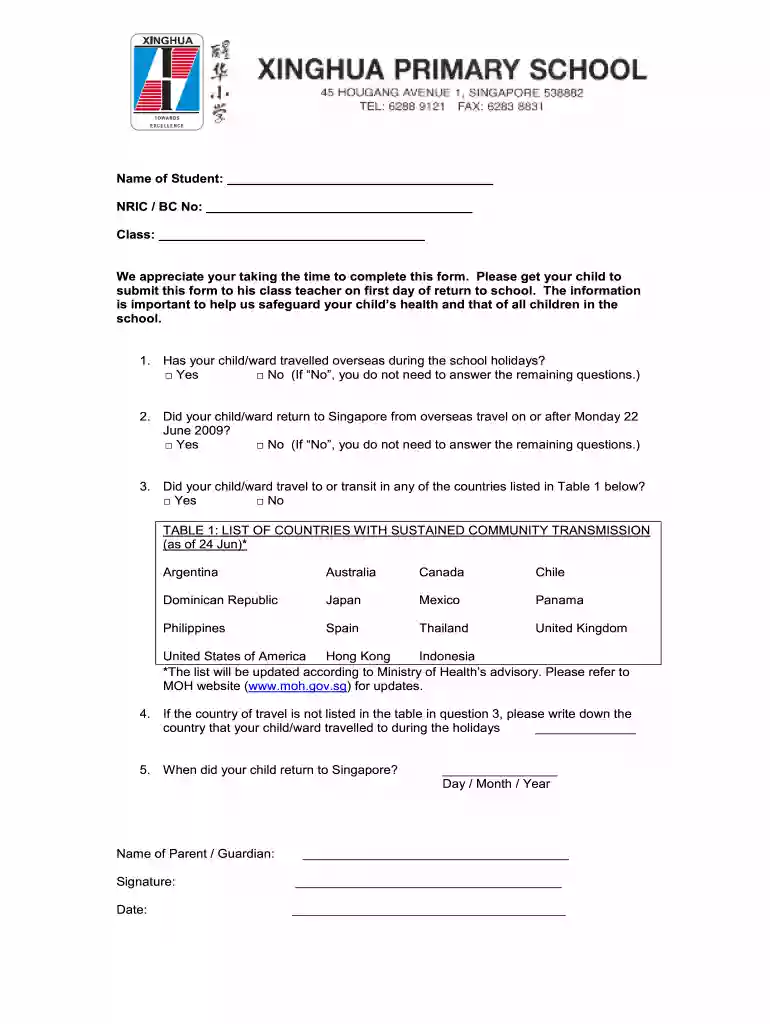
  1. Click ‘Get Form’ to open the travel declaration form in our editor.
  2. Begin by entering the student's name in the designated field, followed by their NRIC/BC number and class information.
  3. Answer the first question regarding overseas travel during the school holidays by selecting either 'Yes' or 'No'. If 'No', you can skip to the signature section.
  4. For those who answered 'Yes', proceed to indicate if your child returned to Singapore on or after June 22, 2009. Again, select 'Yes' or 'No'.
  5. Next, check if your child traveled to any countries listed in Table 1. If applicable, select 'Yes' or 'No'.
  6. If your child's travel destination is not listed, write down the country they visited in the provided space.
  7. Finally, fill in the date of return and provide your name, signature, and date at the bottom of the form before submission.

Start using our platform today for free to complete your travel declaration form effortlessly!

See more travel declaration form singapore versions

We've got more versions of the travel declaration form singapore form. Select the right travel declaration form singapore version from the list and start editing it straight away!
Versions Form popularity Fillable & printable
2009 4.1 Satisfied (31 Votes)
be ready to get more

Complete this form in 5 minutes or less

Get form

Got questions?

We have answers to the most popular questions from our customers. If you can't find an answer to your question, please contact us.
Contact us
All travellers must submit their SG Arrival Card (SGAC) within three days before arrival. Submission of the SG Arrival Card (SGAC) is free of charge and should only be done via ICAs official channels (ICAs SGAC e-Service or MyICA Mobile app). For more information, please refer to ICAs website.
A passport that is valid for at least six months. Sufficient funds for the length of your intended stay. A submitted Electronic Arrival Card (Beta) or a completed Disembarkation/Embarkation Card (D/E Card) A valid Singapore visa (to check whether you need a visa, see Visa Requirements)
What to declare? Under Singapores laws, arriving travellers are required to declare and pay the duty and Goods and Services Tax (GST) to bring in dutiable and taxable goods exceeding their duty-free concession and GST relief. This is applicable whether the goods were purchased overseas or in Singapore.
You must complete an electronic SG Arrival Card in the 3 days before you arrive in Singapore. This online form asks for travel details and a health declaration. It is illegal to submit a false declaration.
Before arriving in Singapore, you must complete an electronic Singapore Arrival Card (SGAC). There is no charge for this.

Security and compliance

At DocHub, your data security is our priority. We follow HIPAA, SOC2, GDPR, and other standards, so you can work on your documents with confidence.

Learn more
ccpa2
pci-dss
gdpr-compliance
hipaa
soc-compliance
be ready to get more

Complete this form in 5 minutes or less

Get form

People also ask

All travelers are required to submit the SG Arrival Card (SGAC) with Electronic Health Declaration no more than three days (including the day of arrival) before arriving in Singapore, except: those transiting/transferring through Singapore without seeking immigration clearance; and residents travelling through the land

singapore declaration form