




Here's how it works



How to use or fill out Student Letter Exchange Adult Pen Pal Directory Order Form with DocHub

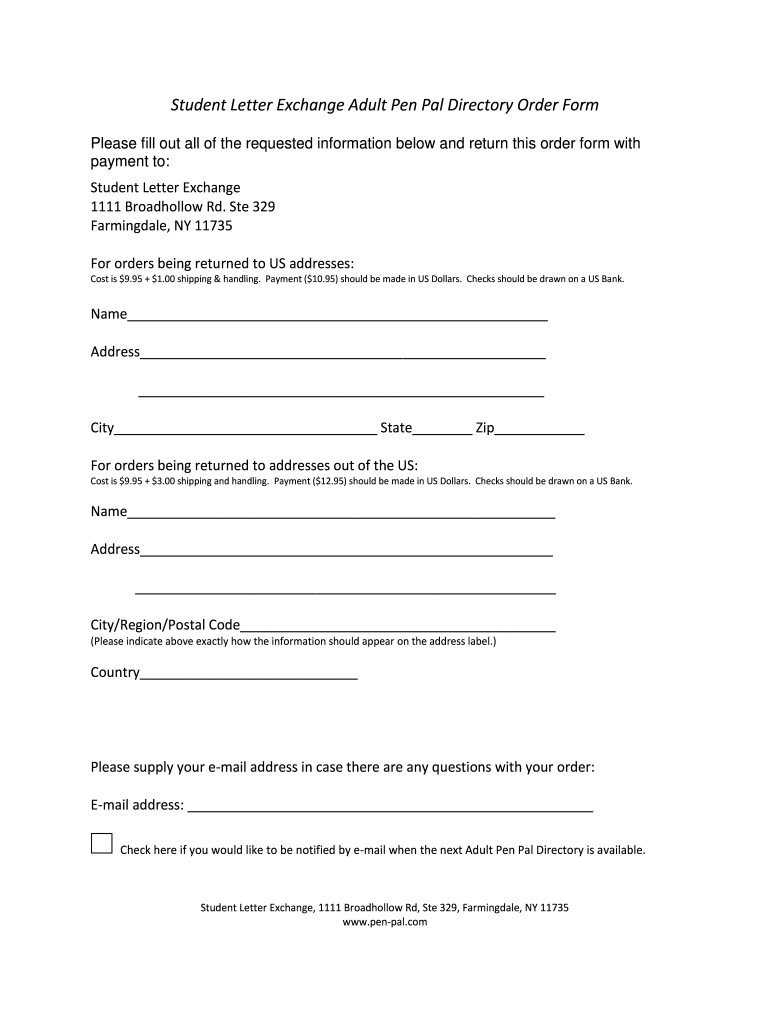
- Click ‘Get Form’ to open the Student Letter Exchange Adult Pen Pal Directory Order Form in our platform's editor.
- Begin by entering your name in the designated field at the top of the form. Ensure that it is clearly legible for processing.
- Next, fill in your address details. Include street address, city, state, and zip code for US orders. For international orders, provide your city/region and postal code.
- Indicate whether your order is being sent to a US address or an international address by selecting the appropriate section. This will automatically calculate shipping costs.
- Provide your email address in case there are any questions regarding your order. This ensures you stay informed about your submission.
- Lastly, check the box if you wish to receive notifications via email when the next Adult Pen Pal Directory becomes available.
Start using our platform today to easily complete and submit your order form for free!
It's free
See more Student Letter Exchange Adult Pen Pal Directory Order Form versions
| Versions | Form popularity | Fillable & printable |
|---|---|---|
| 2011 | 4 Satisfied (34 Votes) |
Got questions?
Can I draw my eSignature to sign my Student Letter Exchange Adult Pen Pal Directory Order Form?
Yes, electronically drawing your signature is acceptable, but only if you utilize a tool that complies with industry regulations and policies. Consider DocHub, which guarantees eSignature validity under ESIGN and UETA requirements. All you need to approve your Student Letter Exchange Adult Pen Pal Directory Order Form electronically is an account with DocHub and an internet connection. When you open your file in our editor, click Sign and choose the Draw tool.
How do you edit Student Letter Exchange Adult Pen Pal Directory Order Form on Android?
Document editing with DocHub is equally convenient on desktop and mobile devices. You only need an internet browser to revise your Student Letter Exchange Adult Pen Pal Directory Order Form on Android. Open our website and sign in to access the instruments you require. Add your file and introduce your intended modifications. Next, you can keep your form in your file storage or send it out immediately.
Security and compliance
At DocHub, your data security is our priority. We follow HIPAA, SOC2, GDPR, and other standards, so you can work on your documents with confidence.
Learn more




