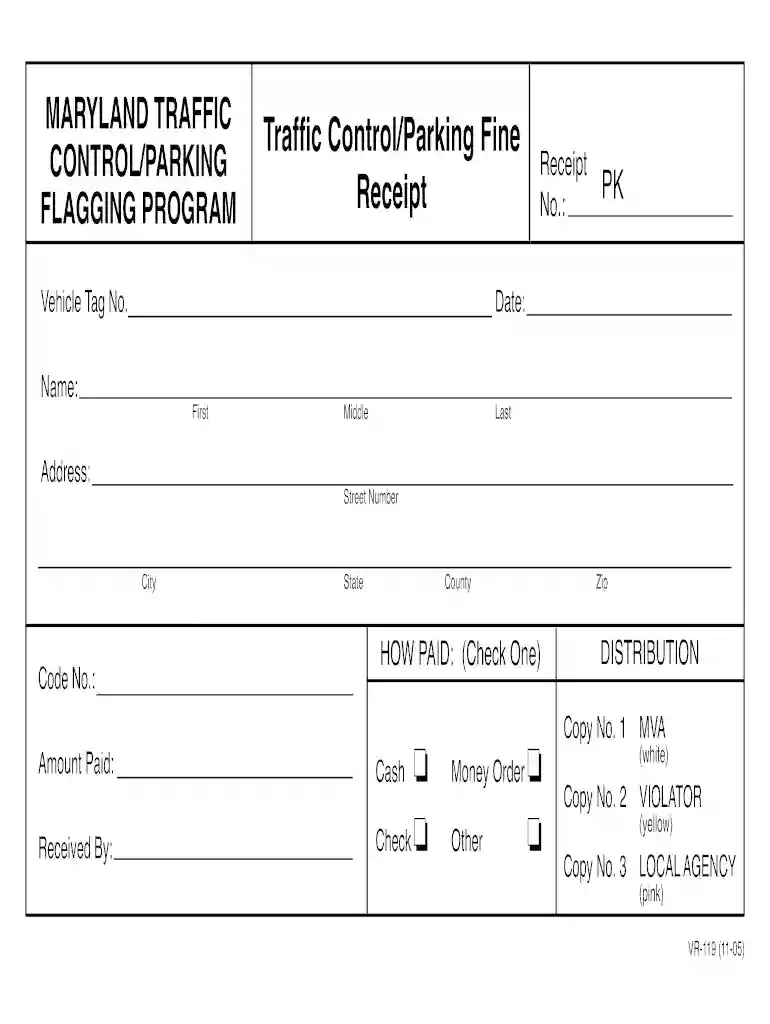
Traffic fine receipt download 2026

Get Form
traffic fine payment receipt download Preview on Page 1

Here's how it works

01. Edit your traffic fine payment receipt download online
Type text, add images, blackout confidential details, add comments, highlights and more.

02. Sign it in a few clicks
Draw your signature, type it, upload its image, or use your mobile device as a signature pad.

03. Share your form with others
Send fine receipt format via email, link, or fax. You can also download it, export it or print it out.

How to use or fill out traffic fine receipt download with our platform

Form edit decoration
9.5
Ease of Setup
DocHub User Ratings on G2
9.0
Ease of Use
DocHub User Ratings on G2
  1. Click ‘Get Form’ to open the traffic fine receipt in the editor.
  2. Begin by entering the Vehicle Tag Number in the designated field. This is crucial for identifying the vehicle associated with the fine.
  3. Fill in your address details, including Street Number, City, State, County, and Zip Code. Ensure accuracy to avoid any issues with processing.
  4. In the 'Received By' section, input your name as it appears on your identification. Include First, Middle, and Last names.
  5. Specify the Amount Paid in the corresponding field. This should reflect the total amount of the fine being settled.
  6. Select how you paid by checking one of the options: Check, Cash, Money Order, or Other. This helps in tracking payment methods.
  7. Finally, review all entered information for accuracy before saving or printing your completed receipt.

Start using our platform today to easily fill out and manage your traffic fine receipts for free!

See more traffic fine receipt download versions

We've got more versions of the traffic fine receipt download form. Select the right traffic fine receipt download version from the list and start editing it straight away!
Versions Form popularity Fillable & printable
2005 4.8 Satisfied (141 Votes)
be ready to get more

Complete this form in 5 minutes or less

Get form

Got questions?

We have answers to the most popular questions from our customers. If you can't find an answer to your question, please contact us.
Contact us
Your traffic ticket or the notice you got in the mail from the court has information on how to plead guilty (or no contest) and pay. You can usually do this online, by mail, or in person. If your ticket or notice says mandatory appearance, it means you will have to go to court.
Traffic court trials generally last 1-3 hours depending on evidence, witnesses, and arguments presented before the ruling.
How Long a Speeding Ticket Stays on Your Record in Each State StateLength of time a speeding ticket stays on your driving record California Three years and three months Colorado Seven years (Two years for license suspension) Connecticut Three years Delaware Two years47 more rows Dec 19, 2024
In California, the Traffic Division of the Superior Court handles traffic tickets. To look up a traffic ticket, visit the website of the Superior Court of California in the county where the ticket was issued.

Security and compliance

At DocHub, your data security is our priority. We follow HIPAA, SOC2, GDPR, and other standards, so you can work on your documents with confidence.

Learn more
ccpa2
pci-dss
gdpr-compliance
hipaa
soc-compliance