Type text, add images, blackout confidential details, add comments, highlights and more.
02. Sign it in a few clicks
Draw your signature, type it, upload its image, or use your mobile device as a signature pad.
03. Share your form with others
Send dss 1678 form via email, link, or fax. You can also download it, export it or print it out.
How to use or fill out DSS-1678. Replacement Affidavit - info dhhs state nc with our platform
Ease of Setup
DocHub User Ratings on G2
Ease of Use
DocHub User Ratings on G2
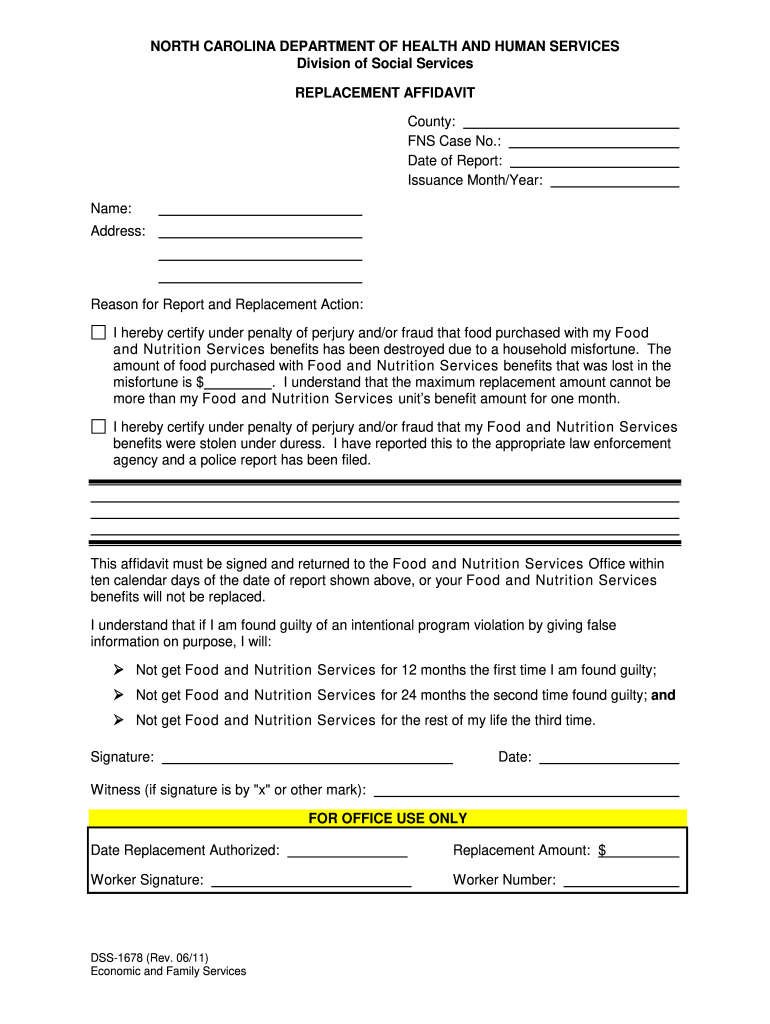
Click ‘Get Form’ to open the DSS-1678 in the editor.
Begin by entering your county and FNS case number at the top of the form. This information is crucial for processing your request.
Fill in the date of report and issuance month/year to provide context for your affidavit.
Complete your personal details, including your name and address, ensuring accuracy for correspondence.
In the 'Reason for Report and Replacement Action' section, clearly indicate whether food was destroyed or stolen. If applicable, specify the amount lost.
Review the certification statement carefully, acknowledging the penalties for providing false information before signing.
If necessary, have a witness sign if you are marking with an 'x' or other mark.
Finally, ensure all fields are completed before submitting it back to the Food and Nutrition Services Office within ten calendar days.
Start using our platform today to fill out your DSS-1678 form online for free!
Fill out DSS-1678. Replacement Affidavit - info dhhs state nc online It's free
See more DSS-1678. Replacement Affidavit - info dhhs state nc versions
We've got more versions of the DSS-1678. Replacement Affidavit - info dhhs state nc form. Select the right DSS-1678. Replacement Affidavit - info dhhs state nc version from the list and start editing it straight away!
Sep 28, 2023 Form DSS-1678 Replacement Affidavit must be completed, signed, and retained in the North Carolina Families Accessing Services through.Read more
Cookie consent notice
This site uses cookies to enhance site navigation and personalize your experience.
By using this site you agree to our use of cookies as described in our Privacy Notice.
You can modify your selections by visiting our Cookie and Advertising Notice.