




Here's how it works

01. Edit your private job application form online
Type text, add images, blackout confidential details, add comments, highlights and more.

02. Sign it in a few clicks
Draw your signature, type it, upload its image, or use your mobile device as a signature pad.

03. Share your form with others
Send it via email, link, or fax. You can also download it, export it or print it out.
How to use or fill out Private and confidential JOB APPLICATION FORM H - job-application co with our platform

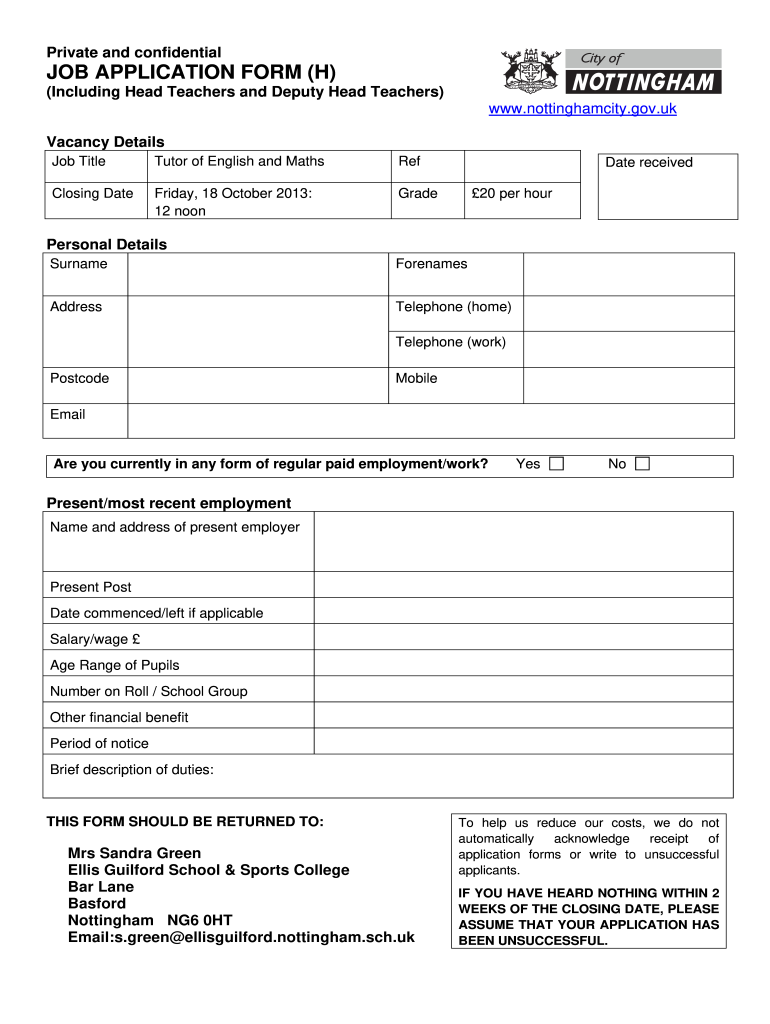
- Click ‘Get Form’ to open the Private and confidential JOB APPLICATION FORM H in the editor.
- Begin by filling out the 'Vacancy Details' section, including the job title, reference number, and closing date. Ensure accuracy as this information is crucial for your application.
- Proceed to the 'Personal Details' section. Enter your surname, forenames, address, telephone numbers, mobile number, and email. Double-check for any typos to ensure you can be contacted easily.
- In the 'Present/most recent employment' section, provide details about your current or last job. Include employer name, position held, salary, and a brief description of your duties.
- Continue with 'Previous employment', listing all relevant jobs in reverse chronological order. Be sure to include reasons for leaving each position.
- Fill out the 'Education' section with details of schools and qualifications. Attach proof if required during interviews.
- Complete sections on professional memberships and training courses relevant to the position you are applying for.
- Provide information in support of your application by detailing how your skills and experiences align with the job requirements.
- List two referees as instructed; one must be from your current or last employer.
- Finally, review all sections for completeness before submitting through our platform. Ensure that you have signed and dated the declaration at the end of the form.
Start using our platform today to fill out your application form quickly and efficiently!
Fill out Private and confidential bJOBb bAPPLICATIONb FORM H - job-application co online
It's free
It's free
See more Private and confidential bJOBb bAPPLICATIONb FORM H - job-application co versions
We've got more versions of the Private and confidential bJOBb bAPPLICATIONb FORM H - job-application co form. Select the right Private and confidential bJOBb bAPPLICATIONb FORM H - job-application co version from the list and start editing it straight away!
| Versions | Form popularity | Fillable & printable |
|---|---|---|
| 2013 | 4.5 Satisfied (48 Votes) |
Security and compliance
At DocHub, your data security is our priority. We follow HIPAA, SOC2, GDPR, and other standards, so you can work on your documents with confidence.
Learn more




