



Here's how it works



How to use or fill out online baseball lineup card with our platform

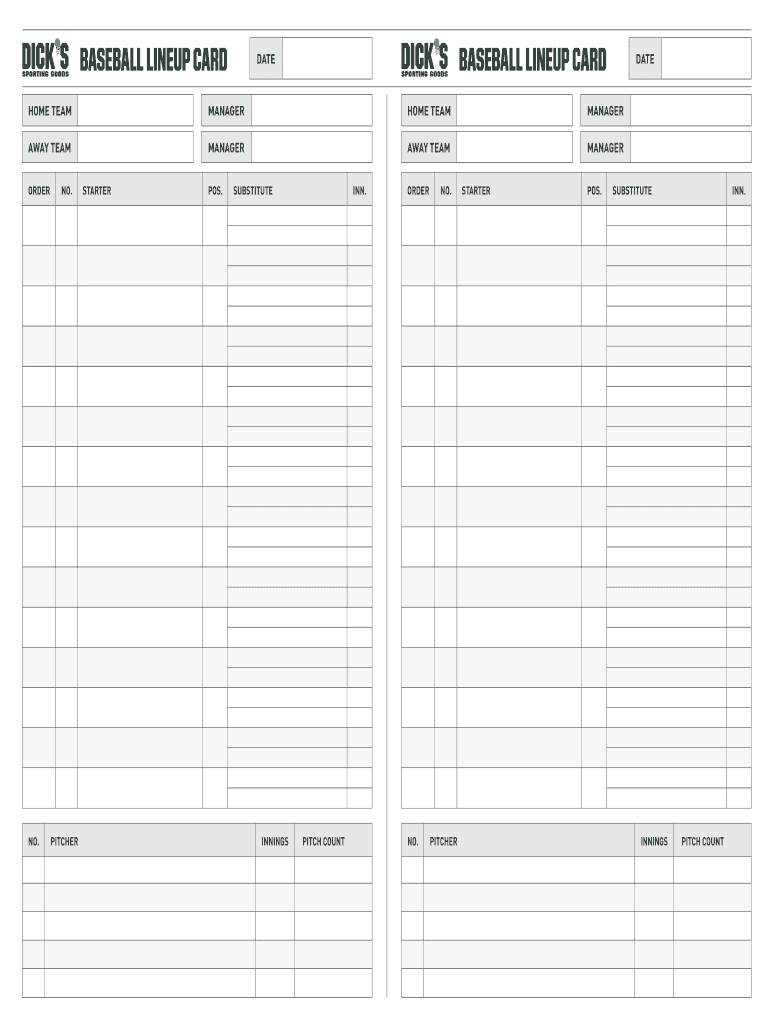
- Click ‘Get Form’ to open the online baseball lineup card in the editor.
- Begin by entering the date at the top of the form. This helps keep track of when the game is scheduled.
- Fill in the home team and manager's names in their respective fields. This identifies your team and its leadership.
- Next, input the away team and manager's details similarly to ensure clarity on both sides.
- In the order section, list each player's number, name, position (POS), and whether they are a starter or substitute. This organizes your lineup effectively.
- For pitchers, record innings and pitch count to monitor performance throughout the game.
Start using our platform today for free to streamline your baseball lineup management!
It's free
Got questions?
How can I generate an electronic signature on my editable baseball lineup card from Google Chrome?
Managing your forms with DocHub this way is very simple once you have downloaded its extension for Google Chrome. Navigate to the Chrome Web Store and install DocHub - Sign PDF from Gmail to get it. Give our tool access to your Google account, and then open an email containing editable baseball lineup card as an attachment and point to the file with your cursor - the DocHub extension button will automatically appear there. Click on it to open your file in our editor. Make any required edits, complete the blanks, and click Sign to create your legally-binding eSignature.
How do you fill out baseball lineup card fillable online?
You can find and modify your baseball lineup card fillable online by using DocHub. Its straightforward yet feature-rich design allows you to start productive work right after you register your account. Create your profile and add your document, and then our user interface will guide you via our stress-free form completion experience.
How are baseball positions numbered?
What is the new DH rule in high school baseball?
Can you courtesy run for a DH?
Security and compliance
At DocHub, your data security is our priority. We follow HIPAA, SOC2, GDPR, and other standards, so you can work on your documents with confidence.
Learn more


Related forms