Type text, add images, blackout confidential details, add comments, highlights and more.
02. Sign it in a few clicks
Draw your signature, type it, upload its image, or use your mobile device as a signature pad.
03. Share your form with others
Send it via email, link, or fax. You can also download it, export it or print it out.
How to use or fill out Gewerbe-Anmeldung.doc with our platform
Ease of Setup
DocHub User Ratings on G2
Ease of Use
DocHub User Ratings on G2
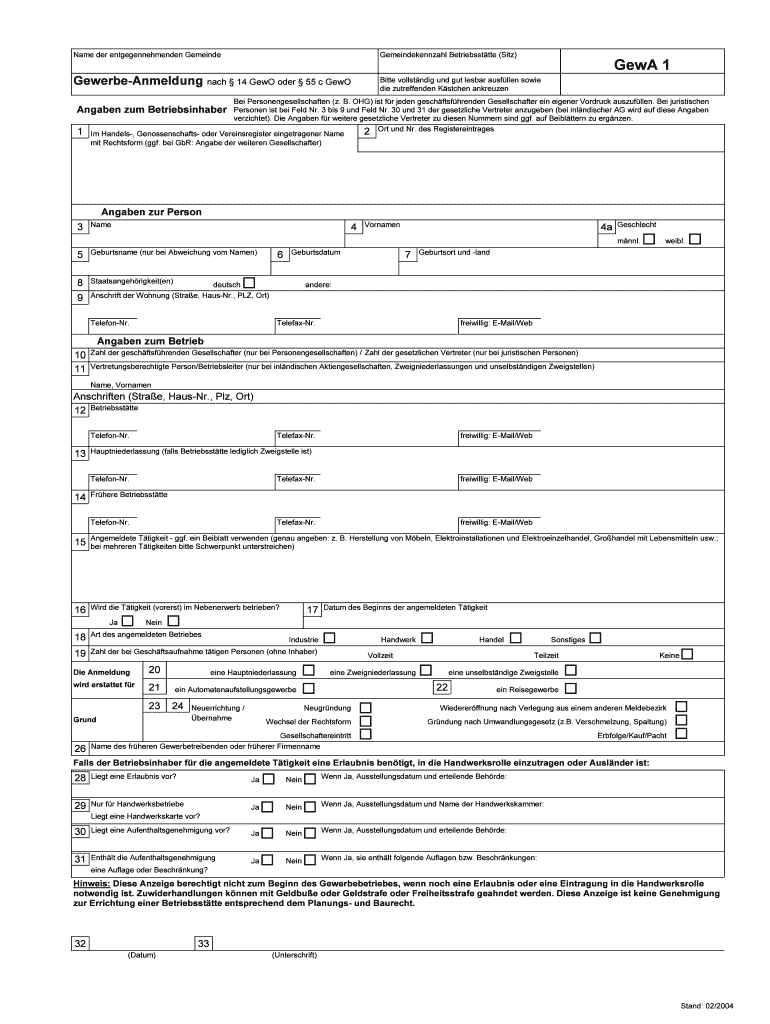
Click ‘Get Form’ to open Gewerbe-Anmeldung.doc in the editor.
Begin by entering the name of the municipality where you are registering your business. This is crucial for proper processing.
Fill in your personal details, including your full name, birth name (if applicable), nationality, and date of birth. Ensure all information is clear and legible.
Provide your residential address, including street, house number, postal code, and city. Include a contact number for any follow-up inquiries.
In the section regarding business details, specify the nature of your business activities. If necessary, use an additional sheet to elaborate on multiple activities.
Indicate whether this business will be operated as a side activity or full-time. Select the appropriate boxes for business type and structure.
Finally, don’t forget to sign and date the form before submission. This step is essential for validating your application.
Start using our platform today to fill out Gewerbe-Anmeldung.doc easily and for free!
We've got more versions of the Gewerbe-Anmeldung.doc form. Select the right Gewerbe-Anmeldung.doc version from the list and start editing it straight away!
50 Jahre Nelkenrevolution: Geschichten hinter der Geschichte
Apr 22, 2024 Anmeldung und Residncia Die Reallhne der Arbeiter im verarbeitenden Gewerbe stiegen zwischen 1958 und 1968 jhrlich um etwa vier Prozent.Read more
You will need the following information to submit your business registration application: Your Social Security Number (SSN) or Federal Employer IdentificationRead more
Cookie consent notice
This site uses cookies to enhance site navigation and personalize your experience.
By using this site you agree to our use of cookies as described in our Privacy Notice.
You can modify your selections by visiting our Cookie and Advertising Notice.