5 Early Childhood Pre-K Health Record Supplement 2026

Get Form
student health record form 14 Preview on Page 1

Here's how it works

01. Edit your student health record form 14 online
Type text, add images, blackout confidential details, add comments, highlights and more.
02. Sign it in a few clicks
Draw your signature, type it, upload its image, or use your mobile device as a signature pad.
03. Share your form with others
Send it via email, link, or fax. You can also download it, export it or print it out.

How to use or fill out 5 Early Childhood Pre-K Health Record Supplement

Form edit decoration
9.5
Ease of Setup
DocHub User Ratings on G2
9.0
Ease of Use
DocHub User Ratings on G2
  1. Click ‘Get Form’ to open it in the editor.
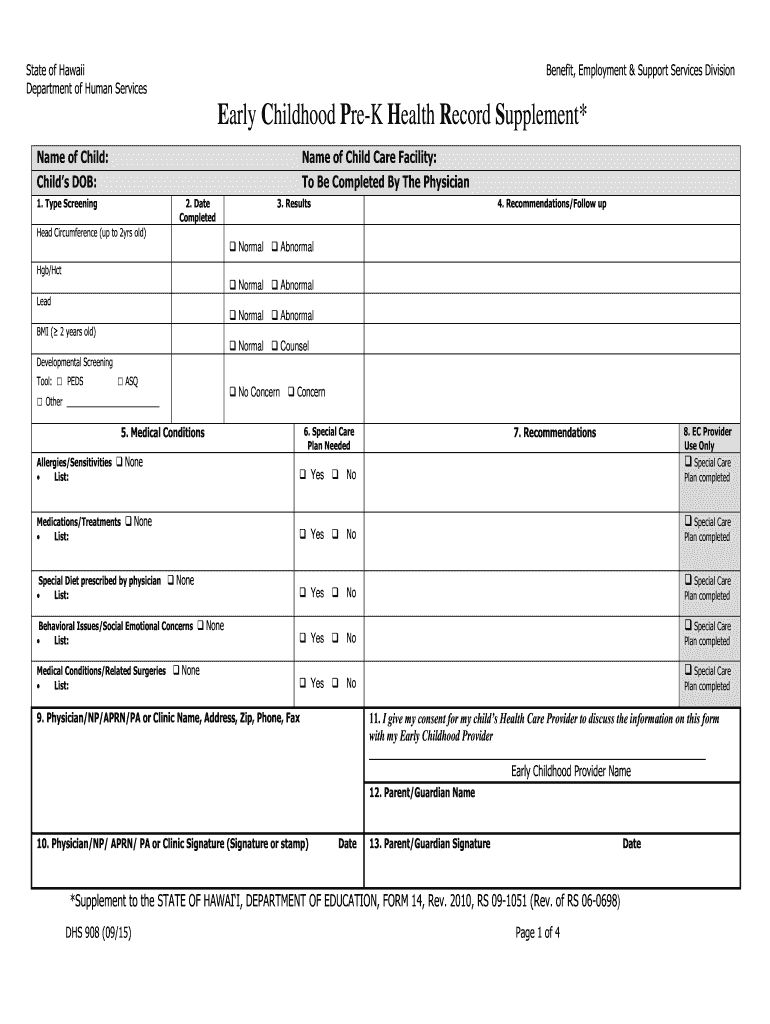
  2. Begin by entering the child's name and date of birth at the top of the form. This information is essential for identifying the child.
  3. In the 'Type Screening' section, check all applicable screenings such as Head Circumference, Hgb/Hct, Lead, and BMI. Ensure you select the appropriate developmental screening tool used.
  4. Fill in the 'Date Completed' field with the date when the screenings were performed, formatted as mm/dd/yyyy.
  5. For 'Results', mark whether each screening result is Normal or Abnormal. If any results are marked Abnormal, provide detailed recommendations in the 'Recommendations/Follow up' section.
  6. Complete sections on medical conditions and special care plans as necessary. Indicate if there are any allergies, medications, or special diets prescribed by a physician.
  7. Finally, ensure that both parent/guardian and physician signatures are obtained along with their respective dates to validate the document.

Start using our platform today to easily complete your Early Childhood Pre-K Health Record Supplement for free!

be ready to get more

Complete this form in 5 minutes or less

Get form

Got questions?

We have answers to the most popular questions from our customers. If you can't find an answer to your question, please contact us.
Contact us
1. Progress reports track your childs growth in every area. Assessments and progress reports provide a record of your childs growth in all developmental areas: cognitive, physical, and motor development, language, social-emotional skills, and approaches to learning.
Examples of informal assessment methods in preschool settings include: Observing childrens social interactions during free play. Documenting childrens linguistic development through conversations and storytelling. Analyzing childrens artwork to assess fine motor skills and creativity.
Pre-K Progress Report: When to send them home Some programs may require a progress report to be sent home at certain times of the year and others have no requirements at all. A progress report is most effective when its sent home every two or four weeks to keep parents informed of their childs progress.
A preschool report card covers a childs progress in the main developmental areas of language and literacy, physical skills, social-emotional development, and cognitive skills. Monitoring these skills will help support childrens development into well-rounded individuals and successful learners.
Families with four-year-old children can choose which pre-K program to enroll them in, but TK is the only option that will be universally available, and free of cost, for all four-year-old children as part of Californias public education system.

Security and compliance

At DocHub, your data security is our priority. We follow HIPAA, SOC2, GDPR, and other standards, so you can work on your documents with confidence.

Learn more
ccpa2
pci-dss
gdpr-compliance
hipaa
soc-compliance