Type text, add images, blackout confidential details, add comments, highlights and more.
02. Sign it in a few clicks
Draw your signature, type it, upload its image, or use your mobile device as a signature pad.
03. Share your form with others
Send rendita stiftungen ch online via email, link, or fax. You can also download it, export it or print it out.
How to use or fill out rendita stiftungen ch online
Ease of Setup
DocHub User Ratings on G2
Ease of Use
DocHub User Ratings on G2
Click ‘Get Form’ to open it in the editor.
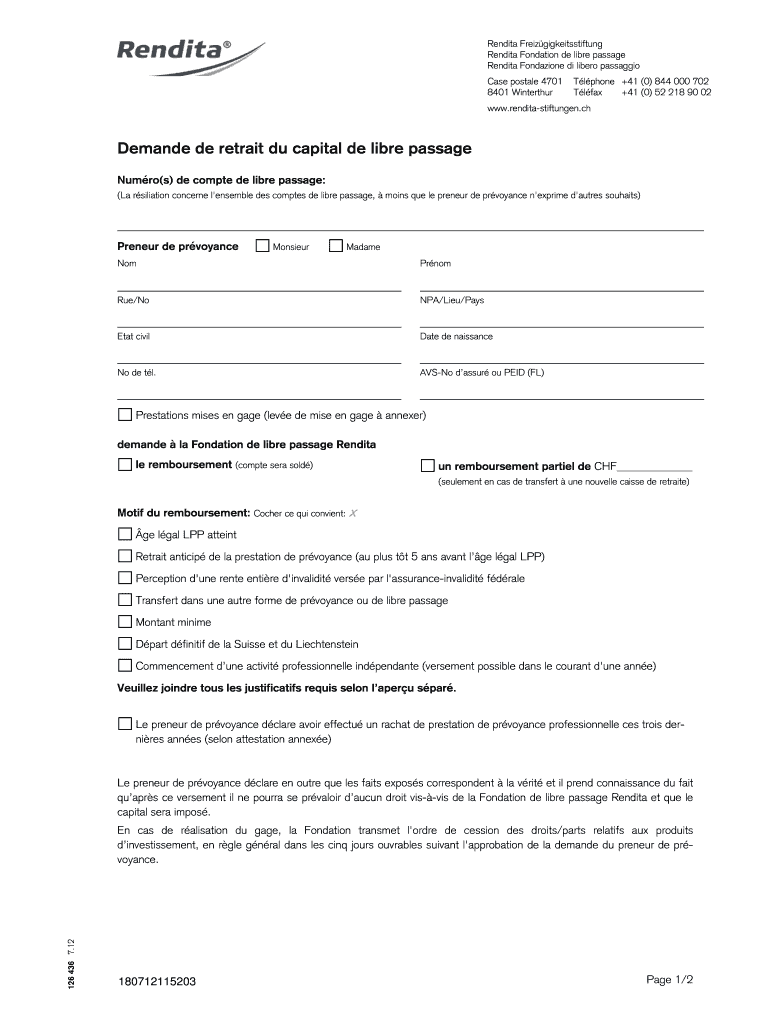
Begin by entering your account number(s) for the capital withdrawal in the designated field. Ensure accuracy as this is crucial for processing your request.
Select your title (Monsieur or Madame) and fill in your full name, address, civil status, date of birth, and telephone number. This information helps verify your identity.
Indicate whether you are requesting a full or partial refund by checking the appropriate box. If opting for a partial refund, specify the amount.
Choose the reason for your withdrawal from the provided options. Make sure to attach any required documentation as indicated.
Complete the payment details section with your financial institution's information, including account numbers and holder's address.
Finally, sign and date the form. If applicable, ensure that your spouse or registered partner also signs where required.
Start filling out your rendita stiftungen ch form today using our platform for free!
Fill out rendita stiftungen ch online online It's free
We've got more versions of the rendita stiftungen ch online form. Select the right rendita stiftungen ch online version from the list and start editing it straight away!
Enrico Artifoni (Universit di Torino). Giorgio Chittolini (Universit di Milano). William J. Connell (Seton Hall University). Pietro Corrao (Universit diRead more
Cookie consent notice
This site uses cookies to enhance site navigation and personalize your experience.
By using this site you agree to our use of cookies as described in our Privacy Notice.
You can modify your selections by visiting our Cookie and Advertising Notice.