18002259916 2026

Get Form
18002259916 Preview on Page 1

Here's how it works

01. Edit your form online
Type text, add images, blackout confidential details, add comments, highlights and more.
02. Sign it in a few clicks
Draw your signature, type it, upload its image, or use your mobile device as a signature pad.
03. Share your form with others
Send it via email, link, or fax. You can also download it, export it or print it out.

How to use or fill out 18002259916 with our platform

Form edit decoration
9.5
Ease of Setup
DocHub User Ratings on G2
9.0
Ease of Use
DocHub User Ratings on G2
  1. Click ‘Get Form’ to open the 18002259916 in the editor.
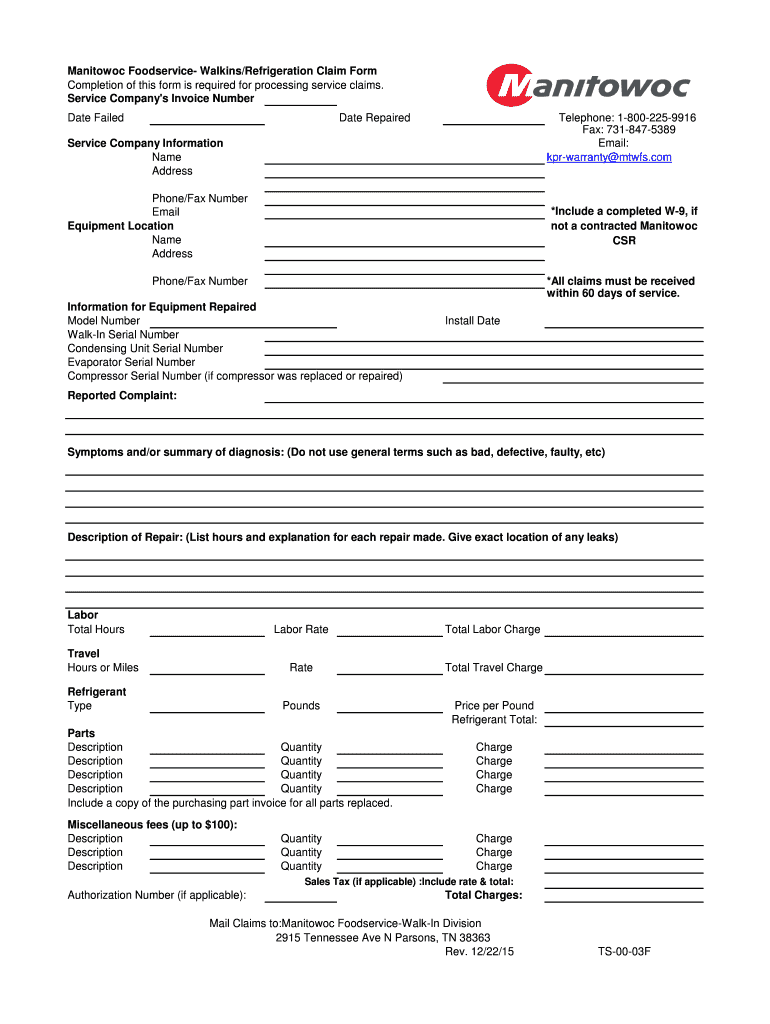
  2. Begin by entering the Service Company's Invoice Number, Date Failed, and Date Repaired in the designated fields. Ensure accuracy for processing.
  3. Fill in your contact information under 'Service Company Information', including Name, Address, Phone/Fax Number, and Email.
  4. Provide details about the Equipment Location by entering the Name and Address of where the equipment is situated.
  5. If applicable, attach a completed W-9 form if you are not a contracted Manitowoc CSR.
  6. In the 'Information for Equipment Repaired' section, input Model Number, Serial Numbers for various components, and Install Date.
  7. Describe the Reported Complaint and Symptoms clearly without using vague terms. Include a detailed Description of Repair with hours worked and any leaks found.
  8. List all Labor charges including Total Hours and Travel details. Specify Refrigerant Type and associated costs.
  9. Detail Parts replaced with their Description and Quantity. Attach purchasing part invoices as required.
  10. Include any Miscellaneous fees up to $100 along with Sales Tax if applicable. Finally, calculate Total Charges accurately before submission.

Start filling out your claim form online for free today!

See more 18002259916 versions

We've got more versions of the 18002259916 form. Select the right 18002259916 version from the list and start editing it straight away!
Versions Form popularity Fillable & printable
2015 4 Satisfied (33 Votes)
be ready to get more

Complete this form in 5 minutes or less

Get form

Got questions?

We have answers to the most popular questions from our customers. If you can't find an answer to your question, please contact us.
Contact us

Of course, electronically drawing your signature is appropriate, but only if you use a tool that complies with industry laws and regulations. Consider DocHub, which guarantees eSignature validity under ESIGN and UETA requirements. All you need to eSign your 18002259916 is an account with DocHub and an internet connection. Once you open your file in our editor, click Sign and select the Draw option.

In addition to a comprehensive toolset for editing PDFs on mobile devices, DocHub enables you to sign your 18002259916 along the way. Open our editor in your browser, make changes using DocHub’s toolset, and finish your editing by eSigning the completed form.

Security and compliance

At DocHub, your data security is our priority. We follow HIPAA, SOC2, GDPR, and other standards, so you can work on your documents with confidence.

Learn more
ccpa2
pci-dss
gdpr-compliance
hipaa
soc-compliance
be ready to get more

Complete this form in 5 minutes or less

Get form