




Here's how it works



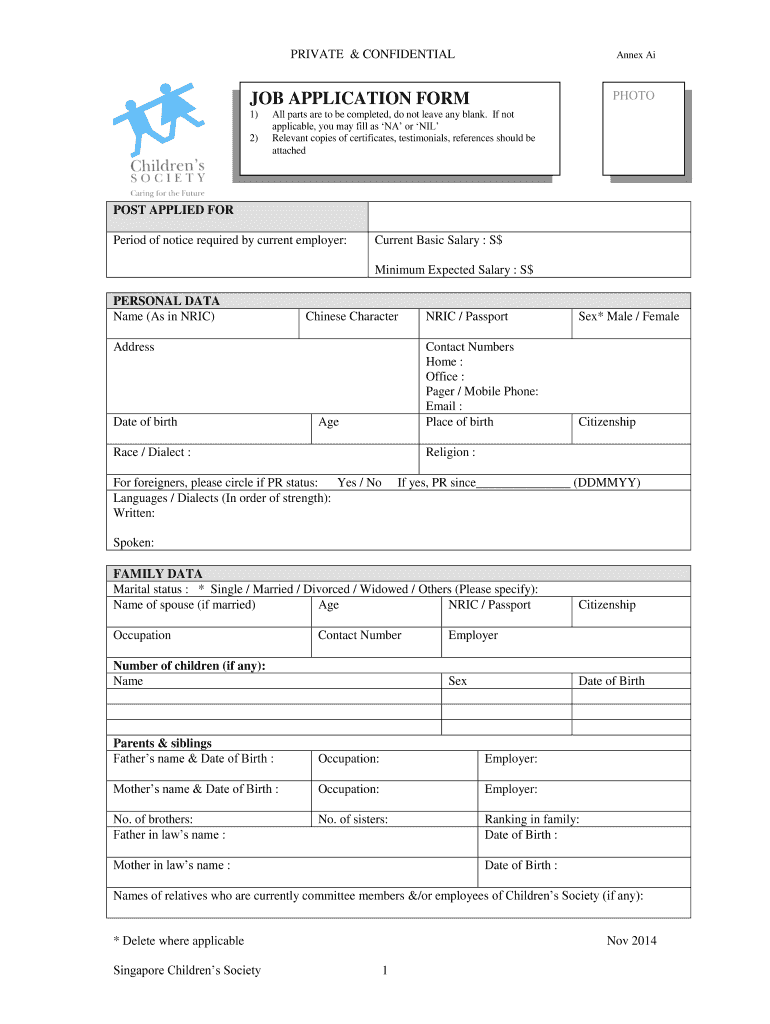
How to use or fill out JOB APPLICATION FORM PHOTO - Singapore Childrens Society with our platform

- Click ‘Get Form’ to open it in the editor.
- Begin by filling out the 'POST APPLIED FOR' section, including your current salary and notice period.
- In the 'PERSONAL DATA' section, provide your name, contact information, and other personal details. Ensure all fields are completed; if not applicable, enter 'NA' or 'NIL'.
- Complete the 'FAMILY DATA' section with details about your marital status and family members.
- Fill in your educational qualifications under the 'QUALIFICATION' section, attaching any necessary certificates.
- Document your employment history chronologically in the 'EMPLOYMENT HISTORY' section, starting from your most recent job.
- Finally, review all sections for accuracy before signing at the bottom of the form to confirm that all information is true.
Start using our platform today to complete your application effortlessly and for free!
It's free
See more JOB APPLICATION FORM PHOTO - Singapore Childrens Society versions
| Versions | Form popularity | Fillable & printable |
|---|---|---|
| 2014 | 4.8 Satisfied (126 Votes) |
Got questions?
How can I eSign my job application form template singapore word from Gmail?
With DocHub, it’s quite simple. The platform offers users an add-on called DocHub for Gmail, which you can locate in the Google Workspace Marketplace free of charge. Set it up and give it access to your Google account. Open your email with your job application form template singapore word attached and click on the add-on button in the right-side panel. Log in to your DocHub account, and upload the file to our editor, where you can fill it out and sign.
How do you edit singapore job application form on Android?
Document editing with DocHub is equally convenient on desktop and mobile devices. You only need an internet browser to edit your singapore job application form on Android. Open our website and sign in to access the tools you need. Add your file and introduce your intended changes. After that, you can keep your form in your file storage or send it out immediately.
Security and compliance
At DocHub, your data security is our priority. We follow HIPAA, SOC2, GDPR, and other standards, so you can work on your documents with confidence.
Learn more




