Email timesheetsestio - estiohealthcare co 2025

Get Form
Email timesheetsestio - estiohealthcare co Preview on Page 1

Here's how it works

01. Edit your form online
Type text, add images, blackout confidential details, add comments, highlights and more.
02. Sign it in a few clicks
Draw your signature, type it, upload its image, or use your mobile device as a signature pad.
03. Share your form with others
Send it via email, link, or fax. You can also download it, export it or print it out.

How to use or fill out Email timesheetsestio - estiohealthcare co with our platform

Form edit decoration
9.5
Ease of Setup
DocHub User Ratings on G2
9.0
Ease of Use
DocHub User Ratings on G2
  1. Click ‘Get Form’ to open the Email timesheetsestio - estiohealthcare co in the editor.
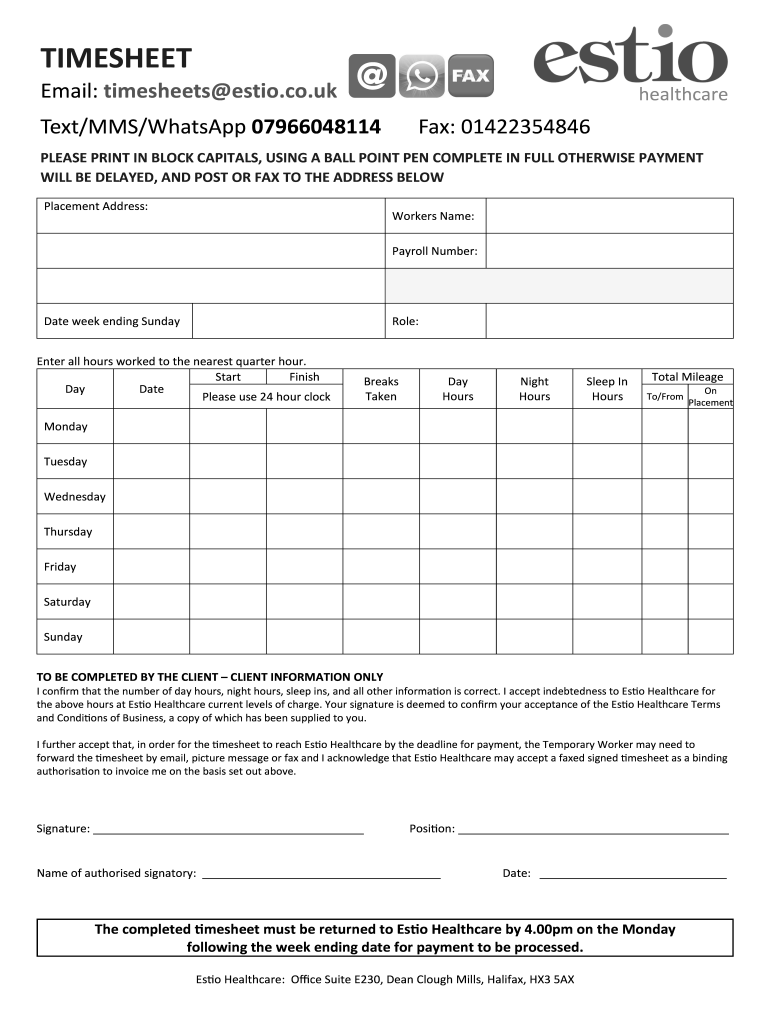
  2. Begin by filling in your Placement Address, Workers Name, and Payroll Number at the top of the form. Ensure all details are accurate to avoid payment delays.
  3. Enter the Date for the week ending Sunday and specify your Role clearly.
  4. Record all hours worked in the designated sections. Use a 24-hour clock format for Start and Finish times, and indicate any Breaks Taken.
  5. Fill in the total hours for Day, Night, and Sleep In shifts as well as Total Mileage To/From On Placement for each day of the week.
  6. The client must complete their section by confirming accuracy with a signature, position title, name of authorized signatory, and date.
  7. Once completed, save your document and send it via email or fax to ensure it reaches Es.o Healthcare by the deadline for payment processing.

Start using our platform today to streamline your timesheet submission process effortlessly!

See more Email timesheetsestio - estiohealthcare co versions

We've got more versions of the Email timesheetsestio - estiohealthcare co form. Select the right Email timesheetsestio - estiohealthcare co version from the list and start editing it straight away!
Versions Form popularity Fillable & printable
2015 4 Satisfied (21 Votes)
be ready to get more

Complete this form in 5 minutes or less

Get form

Got questions?

We have answers to the most popular questions from our customers. If you can't find an answer to your question, please contact us.
Contact us

With DocHub, you can quickly sign your Email timesheetsestio - estiohealthcare co or any other paperwork on iOS, even without setting up additional applications. You can access your DocHub account from any web-connected browser and fill out and sign your form in any preferred method with just a few clicks.

If your go-to electronic mail service is Gmail, you can easily incorporate your DocHub editor in your work. Edit your Email timesheetsestio - estiohealthcare co with DocHub instruments and attach it to your drafts in Gmail. See how straightforward it is to exchange documents and collaborate with a swift PDF editing solution at hand.

Get straight to the point. Your email should have one job. Clearly state the action required (submit timesheet), the deadline, and include a direct link to where they can do it. Nothing more, nothing less.
Be direct. Dont bury your working hours in a long paragraph. State them clearly and upfront in your email signature or autoresponder so theres no room for confusion. Manage response expectations.
Use something direct like Timesheet Submission for [Pay Period] so your team knows exactly whats needed just from a glance. Get straight to the point. Your email should have one job. Clearly state the action required (submit timesheet), the deadline, and include a direct link to where they can do it.
be ready to get more

Complete this form in 5 minutes or less

Get form

People also ask

Sharing Timesheets Select Your Timesheet. Click on the share icon. Enter Recipient Email Addresses. You can add one or more email addresses of the recipients you want to share the timesheet with. Choose Sharing Method.
7 Ideas to Encourage Employees to Submit Complete Timesheets Encourage Personal Habits. Use Automation. Create Incentives. Impose Consequences. Make It Part of Your Annual Review Process. Simplify Your Time Tracking Process. Show the Benefits of Accurate, Complete Timesheets.

Related links