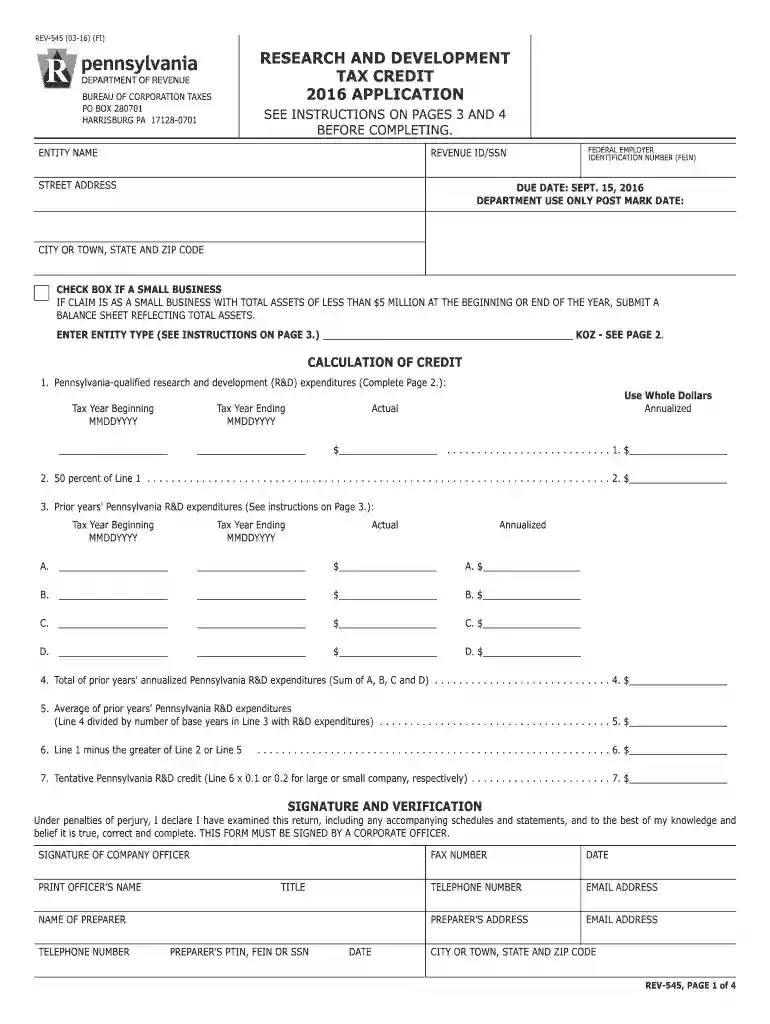
form 545 Preview on Page 1

2016 Research and Development Tax Credit Application REV-545 FormsPublications-2026

Here's how it works

  • 01. Edit your form 545 online

    Type text, add images, blackout confidential details, add comments, highlights and more.

  • 02. Sign it in a few clicks

    Draw your signature, type it, upload its image, or use your mobile device as a signature pad.

  • 03. Share your form with others

    Send it via email, link, or fax. You can also download it, export it or print it out.

How to use or fill out 2016 Research and Development Tax Credit Application REV-545 FormsPublications with DocHub

Form edit decoration
9.5
Ease of Setup
DocHub User Ratings on G2
9.0
Ease of Use
DocHub User Ratings on G2
  1. Click ‘Get Form’ to open the 2016 Research and Development Tax Credit Application REV-545 in our editor.
  2. Begin by entering your entity name, Federal Employer Identification Number (FEIN), and Revenue ID/SSN in the designated fields on Page 1.
  3. Complete the address section, ensuring accuracy as this will be used for mailing purposes. Check the box if you qualify as a small business.
  4. Proceed to calculate your Pennsylvania-qualified R&D expenditures. Fill in the actual amounts for the tax year beginning and ending dates, ensuring to use whole dollars.
  5. Continue filling out prior years' R&D expenditures on Page 1, providing annualized amounts where necessary. Follow instructions carefully for each line.
  6. On Page 2, break down R&D expenditures by location. List all relevant details in Columns 1 through 4, ensuring totals are accurate.
  7. Finally, sign and date the application at the bottom of Page 1. Ensure all required attachments are included before submission.

Start using our platform today to streamline your form completion process for free!

See more form 545 versions

We've got more versions of the form 545 form. Select the right form 545 version from the list and start editing it straight away!

VersionsForm popularityFillable & printable
20174.8 Satisfied (82 Votes)
20164.3 Satisfied (186 Votes)
20154.3 Satisfied (160 Votes)

be ready to get more

Complete this form in 5 minutes or less

Got questions?

We have answers to the most popular questions from our customers. If you can't find an answer to your question, please contact us.

Yes, you can utilize DocHub for signing any business and personal documentation, including your 2016 Research and Development Tax Credit Application REV-545 FormsPublications. All eSignatures you create with our service are legally binding and court-admissible, as DocHub complies with criteria required by ESIGN and UETA. Save your accomplished form with a detailed Audit Trail if needed.

You can complete and sign your 2016 Research and Development Tax Credit Application REV-545 FormsPublications on the internet, even on a tight deadline. All you need to access high quality editing tools on any device is a DocHub account, that you can sign up within a couple of moments. After you sign up, upload your document or find what you are searching for in our catalog, complete it utilizing the editing tools you need, and put your electronic signature on it at the end.

Security and compliance

At DocHub, your data security is our priority. We follow HIPAA, SOC2, GDPR, and other standards, so you can work on your documents with confidence.

Related links

Forms and Publications | Department of Revenue

Note: Please know that all fill-in PDF forms should be downloaded and saved to your computer or device before you start entering

Learn more
File online for a faster refun d!

They will again be entitled to deduct 75% of the first $250,000 of net business income and then for the first time in Ohio, a flat tax with a low rate of 3% Read more

Learn more
If you believe that this page should be taken down, please follow our DMCA take down process here