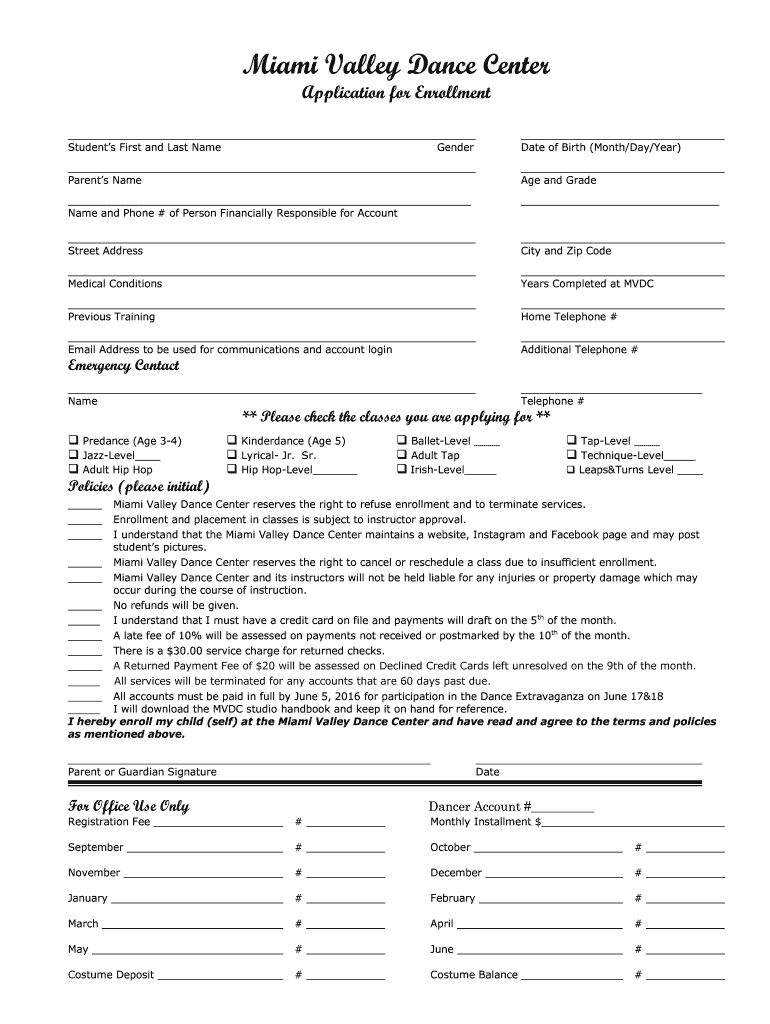
Enrollment form - Miami Valley Dance Center 2026

Get Form
Enrollment form - Miami Valley Dance Center Preview on Page 1

Here's how it works

01. Edit your form online
Type text, add images, blackout confidential details, add comments, highlights and more.
02. Sign it in a few clicks
Draw your signature, type it, upload its image, or use your mobile device as a signature pad.
03. Share your form with others
Send it via email, link, or fax. You can also download it, export it or print it out.

How to use or fill out Enrollment form - Miami Valley Dance Center with our platform

Form edit decoration
9.5
Ease of Setup
DocHub User Ratings on G2
9.0
Ease of Use
DocHub User Ratings on G2
  1. Click ‘Get Form’ to open the Enrollment form in the editor.
  2. Begin by entering the Student’s First and Last Name, followed by their Gender and Date of Birth. This information is crucial for class placement.
  3. Fill in the Parent’s Name, Age, and Grade of the student. Ensure accuracy as this will help in communication regarding your child’s enrollment.
  4. Provide the contact details of the person financially responsible for the account, including their Name and Phone Number.
  5. Complete the address section with Street Address, City, and Zip Code. This is important for correspondence and emergency situations.
  6. Indicate any Medical Conditions that may be relevant for instructors to know.
  7. Select the classes you are applying for by checking the appropriate boxes. Be sure to include any previous training or years completed at MVDC.
  8. Review and initial the Policies section to confirm your understanding of terms related to enrollment and payments.
  9. Finally, sign and date at the bottom of the form to complete your enrollment process.

Start filling out your Enrollment form today using our platform for a seamless experience!

See more Enrollment form - Miami Valley Dance Center versions

We've got more versions of the Enrollment form - Miami Valley Dance Center form. Select the right Enrollment form - Miami Valley Dance Center version from the list and start editing it straight away!
Versions Form popularity Fillable & printable
2016 4.8 Satisfied (132 Votes)
be ready to get more

Complete this form in 5 minutes or less

Get form

Got questions?

We have answers to the most popular questions from our customers. If you can't find an answer to your question, please contact us.
Contact us
Juilliard School of Dance - United States Because of its prestige, it is one of the most popular dance studios in the world. The Juilliard School of Dance also proudly lists Robert Battle, a renowned American dancer, and choreographer, as one of its alumni.
I know many studios say three years of age is the average age to start a student in dance class. I agree if you are looking to start a traditionally structured ballet, tap, or hip hop class. However if you are looking for a class that simply introduces movement, music and fun start them early!
Your dance studio registration form should: Ask for students preferred names and pronouns. This information helps you address each student correctly. Ensure caregivers view and agree to studio policies. Ask for students relevant personal information. Leave space for caregivers to add additional pertinent information.
Participate in Local Events: Set up booths at community fairs, parades, and festivals to showcase your studio. Free Workshops: Offer free workshops or demos at community events to attract attention. Newsletters: Send regular newsletters with updates, success stories, promotions, and dance tips.
With AidaForm, you can create fully customizable free registration pages in just minutes no coding skills needed.

Security and compliance

At DocHub, your data security is our priority. We follow HIPAA, SOC2, GDPR, and other standards, so you can work on your documents with confidence.

Learn more
ccpa2
pci-dss
gdpr-compliance
hipaa
soc-compliance
be ready to get more

Complete this form in 5 minutes or less

Get form

People also ask

How to create a registration form in 7 steps Determine form length. Set clear fields. Set up a confirmation message. Add a payment option (if applicable) Check for accessibility. Embed the form for easy completion. Create your own registration form with SurveyMonkey.
To make a form, you should do the following: Gather personal information like date of birth, phone number and mailing address. Describe the application process and any membership requirements. Provide information about membership levels. Tell them all about membership benefits. Explain membership fees and payment options.

Related links