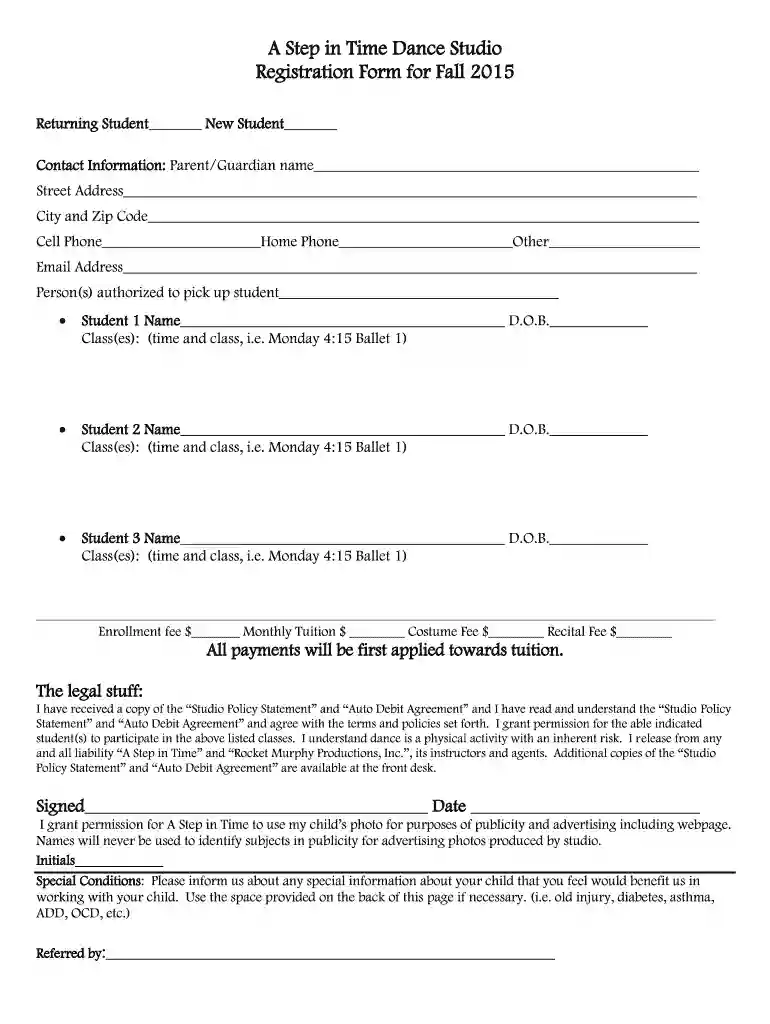
A Step in Time Dance Studio Registration form 20151pdf - astepintime 2026

Get Form
dance studio registration form Preview on Page 1

Here's how it works

01. Edit your dance studio registration form online
Type text, add images, blackout confidential details, add comments, highlights and more.

02. Sign it in a few clicks
Draw your signature, type it, upload its image, or use your mobile device as a signature pad.

03. Share your form with others
Send dance class registration form via email, link, or fax. You can also download it, export it or print it out.

How to use or fill out A Step in Time Dance Studio Registration form 20151pdf - astepintime

Form edit decoration
9.5
Ease of Setup
DocHub User Ratings on G2
9.0
Ease of Use
DocHub User Ratings on G2
  1. Click ‘Get Form’ to open the A Step in Time Dance Studio Registration form in our editor.
  2. Begin by selecting whether you are a returning or new student. This helps the studio understand your registration status.
  3. Fill in the contact information section with the parent or guardian's name, address, phone numbers, and email address. Ensure all details are accurate for effective communication.
  4. List the names and dates of birth for each student enrolling, along with their respective classes. Be specific about class times to avoid any confusion.
  5. Complete the payment section by entering the enrollment fee, monthly tuition, costume fee, and recital fee as applicable.
  6. Review and acknowledge the legal statements regarding studio policies and liability by signing and dating where indicated.
  7. If applicable, provide any special conditions that may assist instructors in working with your child. Use additional space if necessary.
  8. Finally, indicate how you were referred to the studio before submitting your completed form.

Start filling out your registration form today for free using our platform!

See more A Step in Time Dance Studio Registration form 20151pdf - astepintime versions

We've got more versions of the A Step in Time Dance Studio Registration form 20151pdf - astepintime form. Select the right A Step in Time Dance Studio Registration form 20151pdf - astepintime version from the list and start editing it straight away!
Versions Form popularity Fillable & printable
2015 4 Satisfied (30 Votes)
be ready to get more

Complete this form in 5 minutes or less

Get form

Got questions?

We have answers to the most popular questions from our customers. If you can't find an answer to your question, please contact us.
Contact us

Yes, you can utilize DocHub for signing any business and private paperwork, including your dance school registration form template free. All eSignatures you generate with our tool are legally binding and court-admissible, as DocHub complies with standards required by ESIGN and UETA. Save your completed form with a detailed Audit Trail if necessary.

You need only an internet connection and a web browser to fill out your dance class registration form template by using an iOS phone. Open the DocHub website and authenticate. Then, add your file or select it from the list in your dashboard. Then use our editing instruments to fill out your form and save all your modifications. You may also send it to a dedicated recipient immediately.

Participate in Local Events: Set up booths at community fairs, parades, and festivals to showcase your studio. Free Workshops: Offer free workshops or demos at community events to attract attention. Newsletters: Send regular newsletters with updates, success stories, promotions, and dance tips.
To make a form, you should do the following: Gather personal information like date of birth, phone number and mailing address. Describe the application process and any membership requirements. Provide information about membership levels. Tell them all about membership benefits. Explain membership fees and payment options.
Your dance studio registration form should: Ask for students preferred names and pronouns. This information helps you address each student correctly. Ensure caregivers view and agree to studio policies. Ask for students relevant personal information. Leave space for caregivers to add additional pertinent information.

Security and compliance

At DocHub, your data security is our priority. We follow HIPAA, SOC2, GDPR, and other standards, so you can work on your documents with confidence.

Learn more
ccpa2
pci-dss
gdpr-compliance
hipaa
soc-compliance
be ready to get more

Complete this form in 5 minutes or less

Get form

People also ask

How to create a registration form in 7 steps Determine form length. Set clear fields. Set up a confirmation message. Add a payment option (if applicable) Check for accessibility. Embed the form for easy completion. Create your own registration form with SurveyMonkey.
With AidaForm, you can create fully customizable free registration pages in just minutes no coding skills needed.