Transcript Request - Chattahoochee Technical College - chattahoocheetech 2026

Get Form
chattahoochee tech transcript Preview on Page 1

Here's how it works

01. Edit your chattahoochee tech transcript online
Type text, add images, blackout confidential details, add comments, highlights and more.

02. Sign it in a few clicks
Draw your signature, type it, upload its image, or use your mobile device as a signature pad.

03. Share your form with others
Send chattahoochee technical college transcript request via email, link, or fax. You can also download it, export it or print it out.

How to use or fill out Transcript Request - Chattahoochee Technical College - chattahoocheetech with our platform

Form edit decoration
9.5
Ease of Setup
DocHub User Ratings on G2
9.0
Ease of Use
DocHub User Ratings on G2
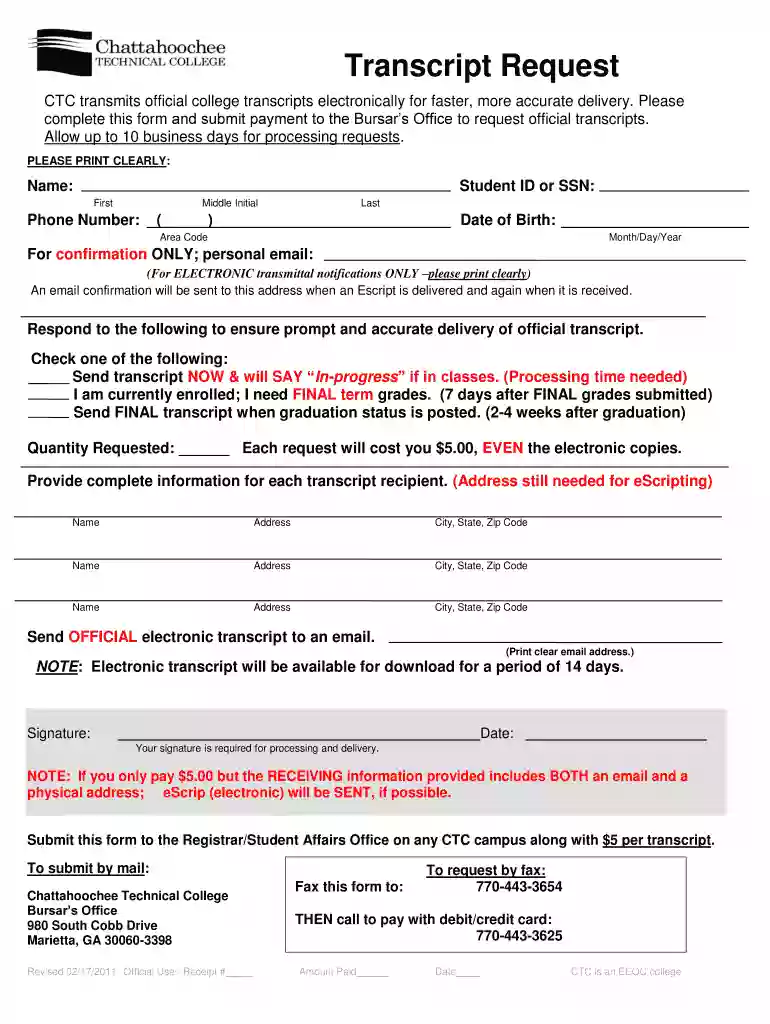
  1. Click ‘Get Form’ to open the Transcript Request form in the editor.
  2. Begin by entering your full name, student ID or SSN, and phone number. Ensure all information is printed clearly for accurate processing.
  3. Provide your date of birth in the specified format (Month/Day/Year) and include a personal email address for electronic transmittal notifications.
  4. Select one of the options regarding transcript delivery: whether you want it sent now, after final grades, or post-graduation. This ensures prompt and accurate delivery.
  5. Indicate the quantity of transcripts requested, noting that each request incurs a $5.00 fee.
  6. Fill in the recipient details for each transcript, including name and address. If sending electronically, provide a clear email address.
  7. Sign and date the form to authorize processing. Your signature is essential for delivery.
  8. Submit the completed form along with payment to the Bursar’s Office either in person or via mail as instructed.

Start using our platform today to streamline your transcript request process effortlessly!

See more Transcript Request - Chattahoochee Technical College - chattahoocheetech versions

We've got more versions of the Transcript Request - Chattahoochee Technical College - chattahoocheetech form. Select the right Transcript Request - Chattahoochee Technical College - chattahoocheetech version from the list and start editing it straight away!
Versions Form popularity Fillable & printable
2013 4.8 Satisfied (136 Votes)
2011 4 Satisfied (58 Votes)
be ready to get more

Complete this form in 5 minutes or less

Get form

Got questions?

We have answers to the most popular questions from our customers. If you can't find an answer to your question, please contact us.
Contact us
Transcript Request Letter Guide [Recipients name], I was a student at [name of institution] from [mention period]. It was an honor and a privilege to be a part of this institution owing to the high-quality education I received here. I am writing to request my transcript, which I need to apply for higher education.
Go to to order a transcript. Once your order has been placed, you will receive email notifications from Parchment Exchange updating you of the status of your order. If you experience any problems, please contact the Georgia Tech Registrars Office at comments@registrar.gatech.edu.
Official transcripts must be ordered online through Parchment. Coastline will no longer accept orders through the mail. Students wanting to order a transcript while on campus will have access to computers for online ordering. Note: Zero-unit courses will not appear on transcripts.
If you do not have an academic transcript you will need to contact your previous institution to request one. A transcript from a professional body will list all the units completed, grades achieved and confirmation of any exemptions.
A score in the range of 910 - 1100 on the SAT exam, or 17 - 21 on the ACT exam is among the 25th - 75th percentile range among admitted students. Based on sampled GPA data collected and applied, it is estimated that the College of Coastal Georgia average GPA range for accepted students is around 2.80 - 3.04.

Security and compliance

At DocHub, your data security is our priority. We follow HIPAA, SOC2, GDPR, and other standards, so you can work on your documents with confidence.

Learn more
be ready to get more

Complete this form in 5 minutes or less

Get form

People also ask

Unofficial transcripts are available through your me@ChattTech Student Portal for current students only. Former students can only obtain official transcripts. Locate the Current Student Forms card. Click View Unofficial Transcript.
REQUESTING A TRANSCRIPT Transcripts may be ordered online through the Credentials icon located in the MyCCGA Portal or through the TranscriptsPlus website. Students should allow 24 hours for transcripts to be processed.
You can order official transcripts online through Parchment or My Canyons. You will need to log into your student account via PortalGuard. If you have trouble logging in thru PortalGuard, please contact Admissions Records. This will eliminate the need to come to the College, stand in line, or mail in a request.

Related links