Type text, add images, blackout confidential details, add comments, highlights and more.

02. Sign it in a few clicks
Draw your signature, type it, upload its image, or use your mobile device as a signature pad.

03. Share your form with others
Send dentistry pediatric via email, link, or fax. You can also download it, export it or print it out.

How to Use or Fill Out Chart Growth with Our Platform
Ease of Setup
DocHub User Ratings on G2
Ease of Use
DocHub User Ratings on G2
Click ‘Get Form’ to open the chart growth document in the editor.
Begin by entering the patient’s name and date of birth in the designated fields at the top of the form. This information is crucial for accurate tracking.
Next, locate the growth measurement section. Here, you will input height and weight data. Ensure that you use consistent units (e.g., centimeters and kilograms) for accuracy.
In the following section, select the appropriate growth percentile from the provided charts. This helps in assessing whether the child's growth is on track compared to peers.
Finally, review all entered information for completeness and accuracy before saving or sharing your completed chart growth document.
Start using our platform today to streamline your document editing and form completion process for free!
Using corrected age provided a better representation of the plotted growth measures on the growth chart curves for weight, length and head circumference. These results confirm the need for age correction through 36 months of CA for children born extremely and very preterm to achieve accurate growth assessments.
What is the corrected age CDC?
Corrected (or gestation-adjusted) age is determined by subtracting the number of weeks of prematurity from the infants chronological age. Guidelines for calculating an infants corrected (or gestation-adjusted) age are provided in the Overview of the CDC Growth Charts.
What is the growth chart?
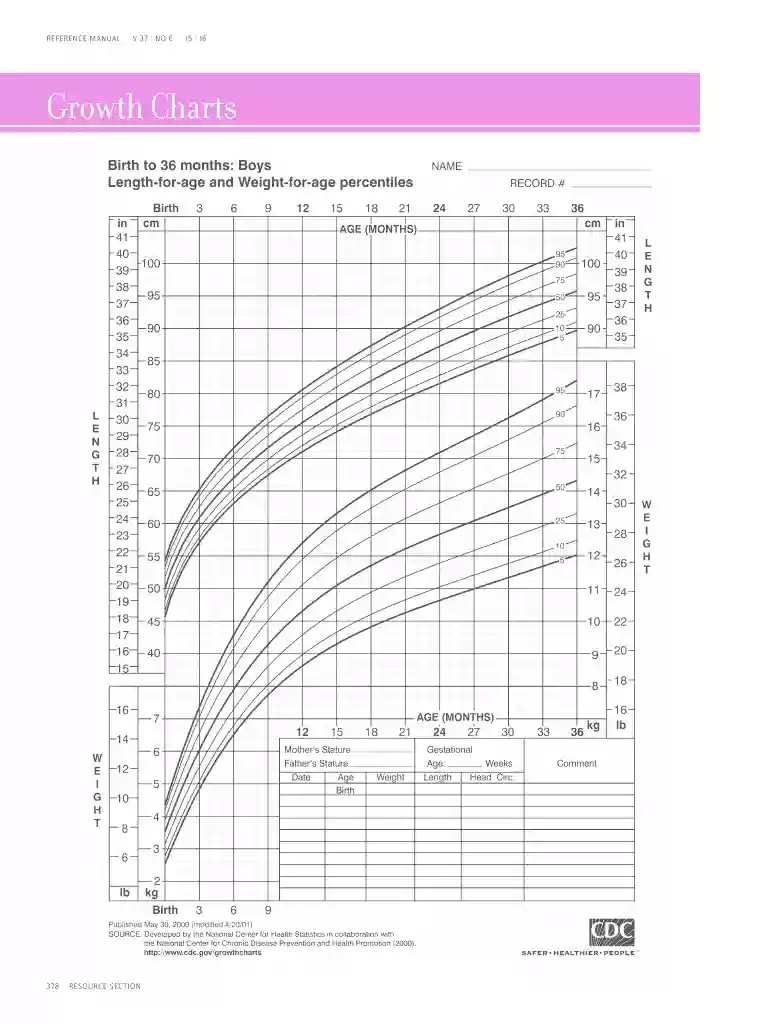
Growth charts are used to compare your childs height, weight, and head size against children of the same age. Growth charts can help both you and your health care provider follow your child as they grow. These charts may provide an early warning that your child has a medical problem.
What is charting growth?
Growth charts are percentile curves showing the distribution of selected body measurements in children. Growth charts are used by pediatricians, nurses, and parents to track the growth of infants, children, and adolescents.
What age is the who growth chart for?
The World Health Organization (WHO) released a new international growth standard statistical distribution in 2006, which describes the growth of children ages 0 to 59 months living in environments believed to support what WHO researchers view as optimal growth of children in six countries throughout the world,
Corrected age is your babys age after accounting for how many weeks or months they were born premature. Chronological age is how many weeks or months since your baby was born. Corrected age is used to monitor that your babys growth and development is on track.
What is the best chart to show growth?
What is the best way to show trends over time? A line chart is the best way. Many data analysts prefer line charts to other graphs. This is because line charts show differences in variables.
Who growth chart corrected age?
WHO growth charts should be used for preterm infants who are corrected to term age. Corrected age is used to describe the childs age from the original due date. When plotting a babys growth, it is recommended to use corrected age through 2 years from the original due date.
infant growth charts
Use and Interpretation of the WHO and CDC Growth Charts
by CDC Recommendation 1997 Cited by 5 Background. The WHO growth charts are international standards that show how healthy children should grow. The standards describe the growth of children
2 to 20 years: Boys Stature Weight-for-age percentiles
by M Stature Cited by 5 y the National Center for Health Statistics in collaboration with the National Center for Chronic Disease Prevention and Health Promotion.
This site uses cookies to enhance site navigation and personalize your experience.
By using this site you agree to our use of cookies as described in our Privacy Notice.
You can modify your selections by visiting our Cookie and Advertising Notice.... Read more...Read less