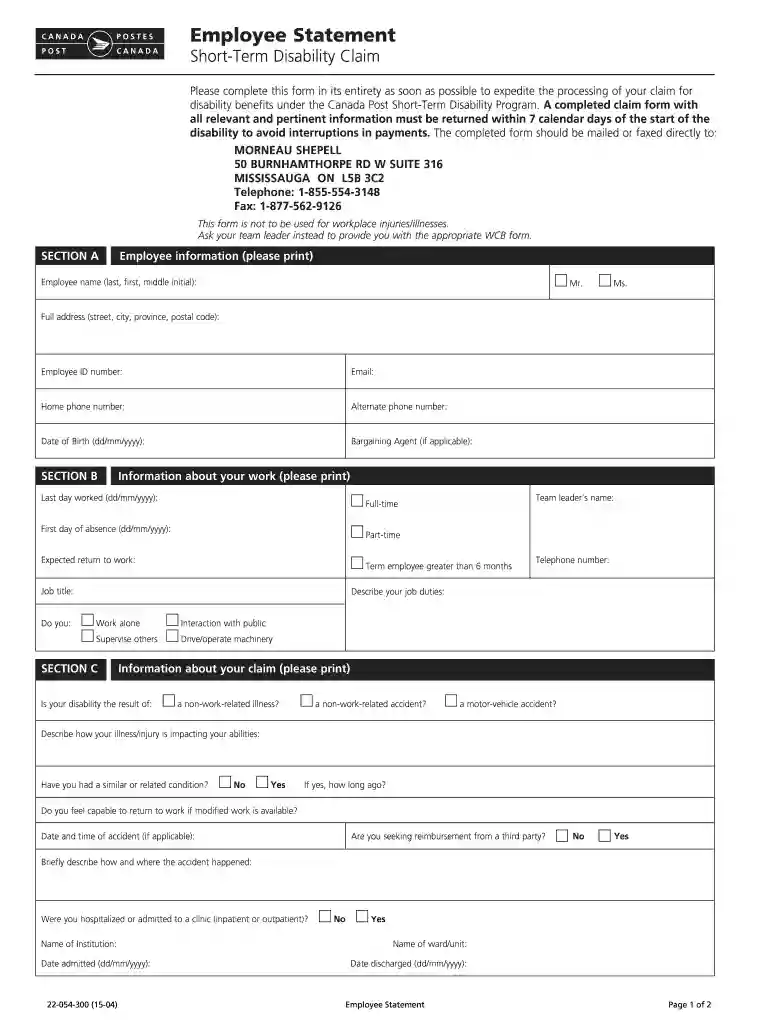
Employee Statement Short-Term Disability Claim - cupw-vancouver 2026

Get Form
cupw vancouver Preview on Page 1

Here's how it works

01. Edit your cupw vancouver online
Type text, add images, blackout confidential details, add comments, highlights and more.

02. Sign it in a few clicks
Draw your signature, type it, upload its image, or use your mobile device as a signature pad.

03. Share your form with others
Send it via email, link, or fax. You can also download it, export it or print it out.

How to use or fill out Employee Statement Short-Term Disability Claim - cupw-vancouver with our platform

Form edit decoration
9.5
Ease of Setup
DocHub User Ratings on G2
9.0
Ease of Use
DocHub User Ratings on G2
  1. Click ‘Get Form’ to open it in the editor.
  2. Begin with Section A, where you will input your personal information. Fill in your name, address, employee ID number, and contact details. Ensure accuracy as this information is crucial for processing your claim.
  3. Move to Section B to provide details about your work. Indicate your last day worked, first day of absence, job title, and any relevant duties. This section helps clarify your employment status.
  4. In Section C, describe the nature of your disability. Specify if it resulted from an illness or accident and detail how it affects your abilities. This information is vital for assessing your claim.
  5. Proceed to Section D to disclose any income or benefits you are receiving. List all applicable sources and their amounts; this ensures transparency in your financial situation during the claim process.
  6. Finally, complete Section E by providing information about your healthcare professional. Include their name, specialty, and contact details to facilitate communication regarding your treatment.

Start filling out your Employee Statement Short-Term Disability Claim today using our platform for a seamless experience!

See more Employee Statement Short-Term Disability Claim - cupw-vancouver versions

We've got more versions of the Employee Statement Short-Term Disability Claim - cupw-vancouver form. Select the right Employee Statement Short-Term Disability Claim - cupw-vancouver version from the list and start editing it straight away!
Versions Form popularity Fillable & printable
2018 4.8 Satisfied (71 Votes)
2017 4.3 Satisfied (217 Votes)
2015 4 Satisfied (48 Votes)
be ready to get more

Complete this form in 5 minutes or less

Get form

Got questions?

We have answers to the most popular questions from our customers. If you can't find an answer to your question, please contact us.
Contact us

Sign in to your DocHub account and import your Employee Statement Short-Term Disability Claim - cupw-vancouver to our editor using one of its upload methods - from your device, cloud storage, protected URL, or your DocHub folders if you have already managed your document before. Open our editor, click the Sign key in the upper toolbar, and decide on your signing method. You can upload a picture of your handwritten signature, draw it, enter your name, or utilize a QR code instead.

In case your go-to electronic mail service is Gmail, it is simple to incorporate your DocHub editor in your work. Modify your Employee Statement Short-Term Disability Claim - cupw-vancouver with DocHub tools and connect it to your drafts in Gmail. See how easy it can be to exchange documents and work together having a swift PDF editing solution at hand.

be ready to get more

Complete this form in 5 minutes or less

Get form