Type text, add images, blackout confidential details, add comments, highlights and more.
02. Sign it in a few clicks
Draw your signature, type it, upload its image, or use your mobile device as a signature pad.
03. Share your form with others
Send da form 3822 via email, link, or fax. You can also download it, export it or print it out.
How to use or fill out DA Form 3822 with Our Platform
Ease of Setup
DocHub User Ratings on G2
Ease of Use
DocHub User Ratings on G2
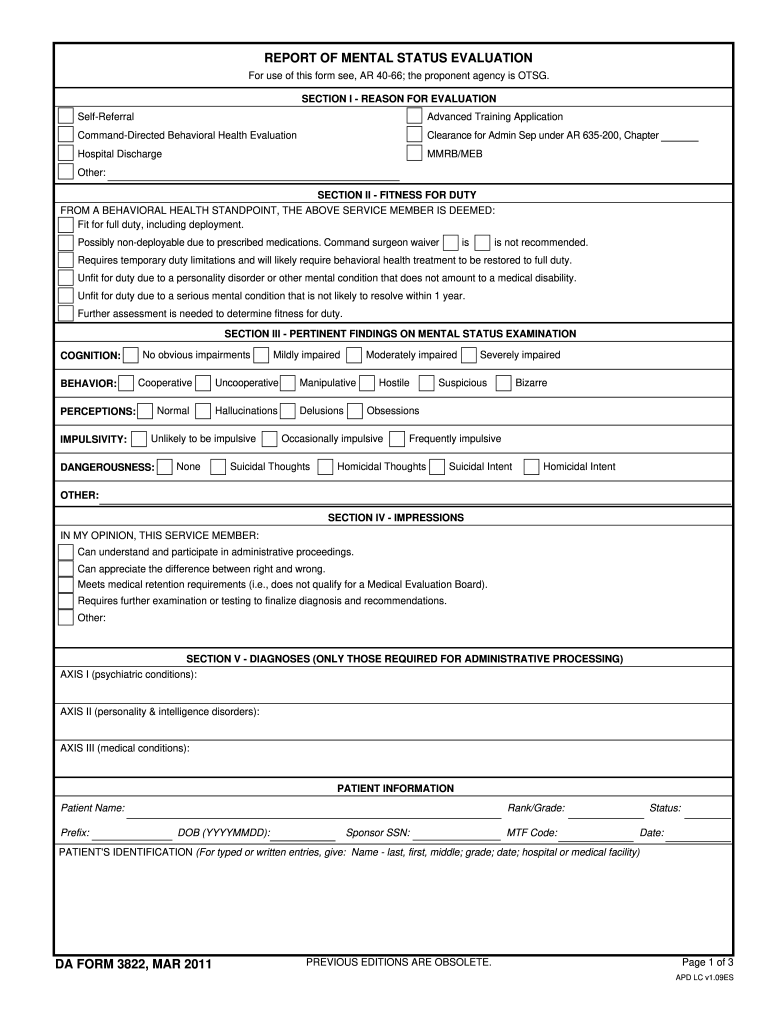
Click ‘Get Form’ to open DA Form 3822 in the editor.
Begin with SECTION I - REASON FOR EVALUATION. Select the appropriate reason for evaluation, such as 'Self-Referral' or 'Command-Directed Behavioral Health Evaluation'.
Move to SECTION II - FITNESS FOR DUTY. Indicate the service member's fitness status by selecting one of the options provided, ensuring clarity on any necessary waivers or limitations.
In SECTION III - PERTINENT FINDINGS ON MENTAL STATUS EXAMINATION, assess and document cognition, behavior, perceptions, impulsivity, and dangerousness based on your observations.
Proceed to SECTION IV - IMPRESSIONS. Provide your professional opinion regarding the service member's understanding of administrative proceedings and their medical retention requirements.
Complete SECTION V - DIAGNOSES by filling in any required psychiatric conditions under AXIS I, II, and III.
Fill out SECTION VI - PROPOSED TREATMENTS by indicating follow-up appointments or referrals as necessary.
In SECTION VII - RECOMMENDED PRECAUTIONS, specify any precautions that should be followed until deemed unnecessary by a Behavioral Health Provider.
Finally, add any additional comments in SECTION VIII that may be relevant to the service member's evaluation and treatment plan.
Start using our platform today for free to streamline your form completion process!
A Readers Comment Form is at the back of this publication. If the form has been removed, address your comments to I BM Corporation, Publications,. DepartmentRead more
DA FORM 3822, JUN 2019. SECTION VI - RECOMMENDATIONS AND COMMENTS FOR COMMANDER. SMs behavioral health condition was likely a mitigating factor in theRead more
Jun 15, 2021 Guidance Counselor will ensure that Prior Service (PS) applicants enlisting for any MOS, option, or assignment that requires security clearance,Read more
Cookie consent notice
This site uses cookies to enhance site navigation and personalize your experience.
By using this site you agree to our use of cookies as described in our Privacy Notice.
You can modify your selections by visiting our Cookie and Advertising Notice.