Mifab mc 31 2026

Get Form
mifab mc 31 Preview on Page 1

Here's how it works

01. Edit your form online
Type text, add images, blackout confidential details, add comments, highlights and more.
02. Sign it in a few clicks
Draw your signature, type it, upload its image, or use your mobile device as a signature pad.
03. Share your form with others
Send it via email, link, or fax. You can also download it, export it or print it out.

How to use or fill out mifab mc 31 with our platform

Form edit decoration
9.5
Ease of Setup
DocHub User Ratings on G2
9.0
Ease of Use
DocHub User Ratings on G2
  1. Click ‘Get Form’ to open the mifab mc 31 in the editor.
  2. Begin by entering the Job Name, Section No, Schedule No, Contractor, and Purchase Order No at the top of the form. These fields are essential for identifying your project.
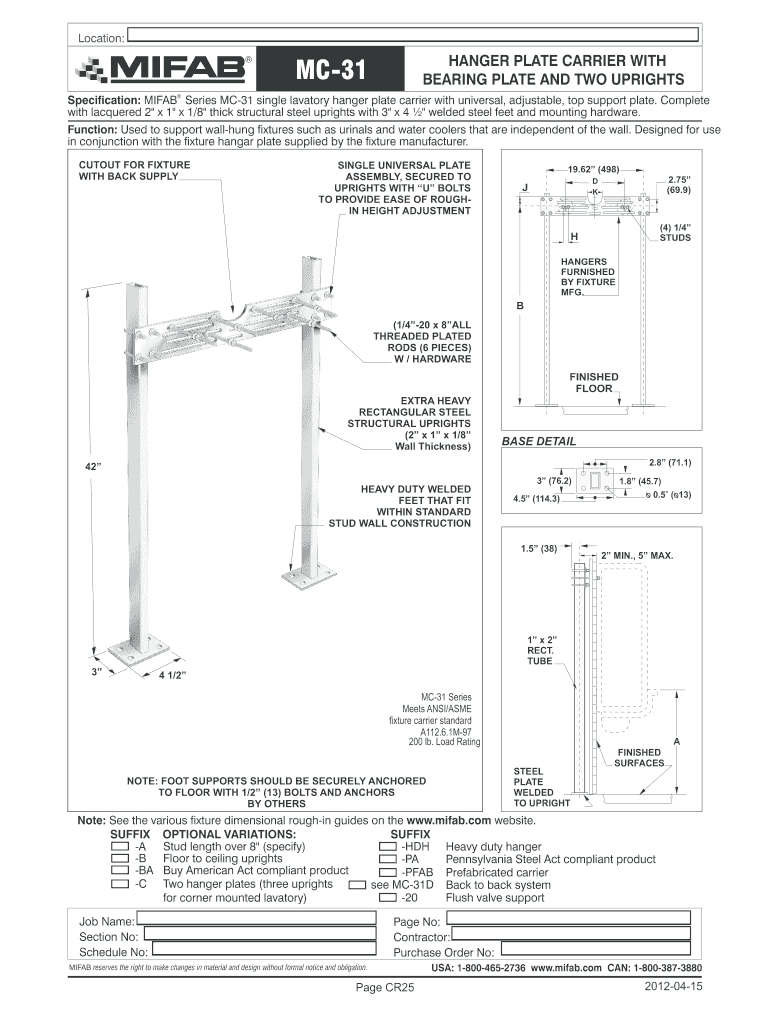
  3. Review the specifications section carefully. Ensure that you understand the components listed, such as the structural steel uprights and mounting hardware, which are crucial for installation.
  4. If applicable, select any optional variations by adding suffixes to indicate specific requirements like heavy-duty hangers or compliance with local regulations.
  5. Finally, ensure all details are accurate before saving or exporting your completed form. Utilize our platform’s features to sign and share your document seamlessly.

Start using our platform today for free to streamline your document editing and completion process!

See more mifab mc 31 versions

We've got more versions of the mifab mc 31 form. Select the right mifab mc 31 version from the list and start editing it straight away!
Versions Form popularity Fillable & printable
2020 4.8 Satisfied (32 Votes)
2017 4.2 Satisfied (37 Votes)
2012 4.4 Satisfied (117 Votes)
be ready to get more

Complete this form in 5 minutes or less

Get form

Got questions?

We have answers to the most popular questions from our customers. If you can't find an answer to your question, please contact us.
Contact us

Upload your mifab mc 31 to DocHub (once you’ve set up an account for this). If you need to complete fields in it, use appropriate tools from the top pane. For example, drop Signature Fields, assign each to specific party, and click on Sign → Request signatures from others. Change your message for your recipients and click Send Request. You can also send your document by fax or as a Signing link instead of using email (you’ll locate these options by navigating to the Menu → Send)

If you want to edit your mifab mc 31 on the internet quickly, it does not matter what internet browser you use. DocHub’s straightforward editing instruments are available using any internet browser. Just open the appropriate tab in the editor, add your file, and fill it out without stress.

be ready to get more

Complete this form in 5 minutes or less

Get form