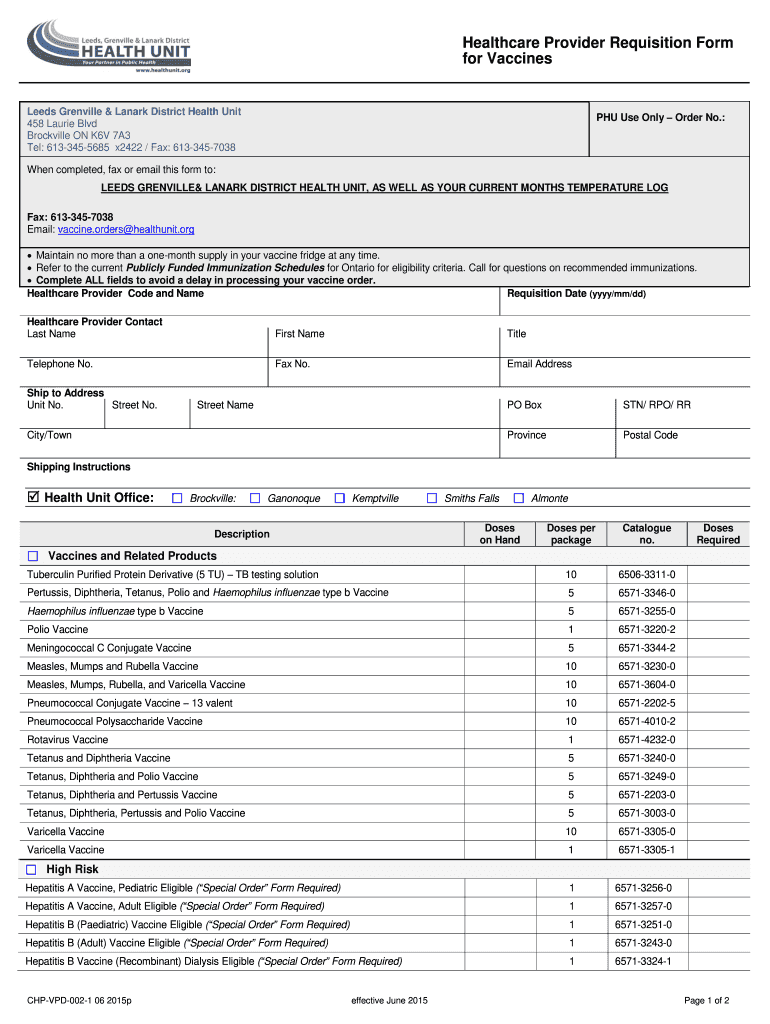
Health Unit Vaccine Order Form - Leeds Grenville and Lanark 2026

Get Form
Health Unit Vaccine Order Form - Leeds Grenville and Lanark Preview on Page 1

Here's how it works

01. Edit your form online
Type text, add images, blackout confidential details, add comments, highlights and more.
02. Sign it in a few clicks
Draw your signature, type it, upload its image, or use your mobile device as a signature pad.
03. Share your form with others
Send it via email, link, or fax. You can also download it, export it or print it out.

How to use or fill out Health Unit Vaccine Order Form - Leeds Grenville and Lanark with our platform

Form edit decoration
9.5
Ease of Setup
DocHub User Ratings on G2
9.0
Ease of Use
DocHub User Ratings on G2
  1. Click ‘Get Form’ to open the Health Unit Vaccine Order Form in the editor.
  2. Begin by filling in your Healthcare Provider Code and Name, along with the Requisition Date. Ensure all fields are completed to avoid processing delays.
  3. Provide your contact information, including Last Name, First Name, Title, Telephone No., Fax No., and Email Address.
  4. Enter the Ship to Address details accurately, including Unit No., Street No., Street Name, City/Town, Province, and Postal Code.
  5. Indicate the Shipping Instructions by selecting from the available Health Unit Office locations.
  6. In the Vaccines and Related Products section, specify the Doses Required for each vaccine listed. Be sure to check your current stock before ordering.
  7. Finally, review your entries for accuracy. Sign and date the form at the bottom before submitting it via fax or email as instructed.

Start using our platform today for free to streamline your vaccine order process!

See more Health Unit Vaccine Order Form - Leeds Grenville and Lanark versions

We've got more versions of the Health Unit Vaccine Order Form - Leeds Grenville and Lanark form. Select the right Health Unit Vaccine Order Form - Leeds Grenville and Lanark version from the list and start editing it straight away!
Versions Form popularity Fillable & printable
2017 4.8 Satisfied (132 Votes)
2015 4.4 Satisfied (229 Votes)
be ready to get more

Complete this form in 5 minutes or less

Get form

Got questions?

We have answers to the most popular questions from our customers. If you can't find an answer to your question, please contact us.
Contact us

Sure, and it’s really easy! DocHub is an online PDF editor with advanced document processing functions that allow you promptly edit your documents, fill out empty fields and drop new ones for other people to fill out, and create eSignatures in several ways. Add your Health Unit Vaccine Order Form - Leeds Grenville and Lanark, provide information as required, and decide how you want to eSign your template - by typing your name, drawing your signature, uploading its picture, or utilizing a QR code.

It is a no-brainer on a computer or via a mobile device to complete a Health Unit Vaccine Order Form - Leeds Grenville and Lanark with DocHub. All you need to do is open any installed browser on your smartphone and go to the DocHub website. Once authenticated, add your file and open it in editing mode. Use our toolbar to make your edits and save changes. Optionally, keep your document in your files or send it to a recipient on the spot.

There must be a hospital policy and procedure approved by the medical staff which allows Influenza and Pneumococcal Vaccines to be given without a physicians order.
Getting a vaccine at a doctors office or health department does not require a patient-specific prescription from another health care provider.
All vaccines administered should be fully documented in the patients permanent medical record. Health care providers who administer vaccines that are covered by the National Vaccine Injury Compensation Program are required by law to ensure the permanent medical record of the recipient indicates: Date of administration.

Security and compliance

At DocHub, your data security is our priority. We follow HIPAA, SOC2, GDPR, and other standards, so you can work on your documents with confidence.

Learn more
ccpa2
pci-dss
gdpr-compliance
hipaa
soc-compliance
be ready to get more

Complete this form in 5 minutes or less

Get form

People also ask

If an unvaccinated patient would pose docHub risk to other patients in the practicefor example, if physicians patients are immune-compromised or cannot be vaccinated for medical reasons, it may be ethically justifiable to refuse an unvaccinated individual, the more so the greater the risk of severe disease for

Related links