imm5753e Preview on Page 1

Town of Stowe Special Event Permit Application 2026

Here's how it works

  • 01. Edit your imm5753e online

    Type text, add images, blackout confidential details, add comments, highlights and more.

  • 02. Sign it in a few clicks

    Draw your signature, type it, upload its image, or use your mobile device as a signature pad.

  • 03. Share your form with others

    Send it via email, link, or fax. You can also download it, export it or print it out.

How to use or fill out Town of Stowe Special Event Permit Application with DocHub

Form edit decoration
9.5
Ease of Setup
DocHub User Ratings on G2
9.0
Ease of Use
DocHub User Ratings on G2
  1. Click ‘Get Form’ to open the Town of Stowe Special Event Permit Application in our editor.
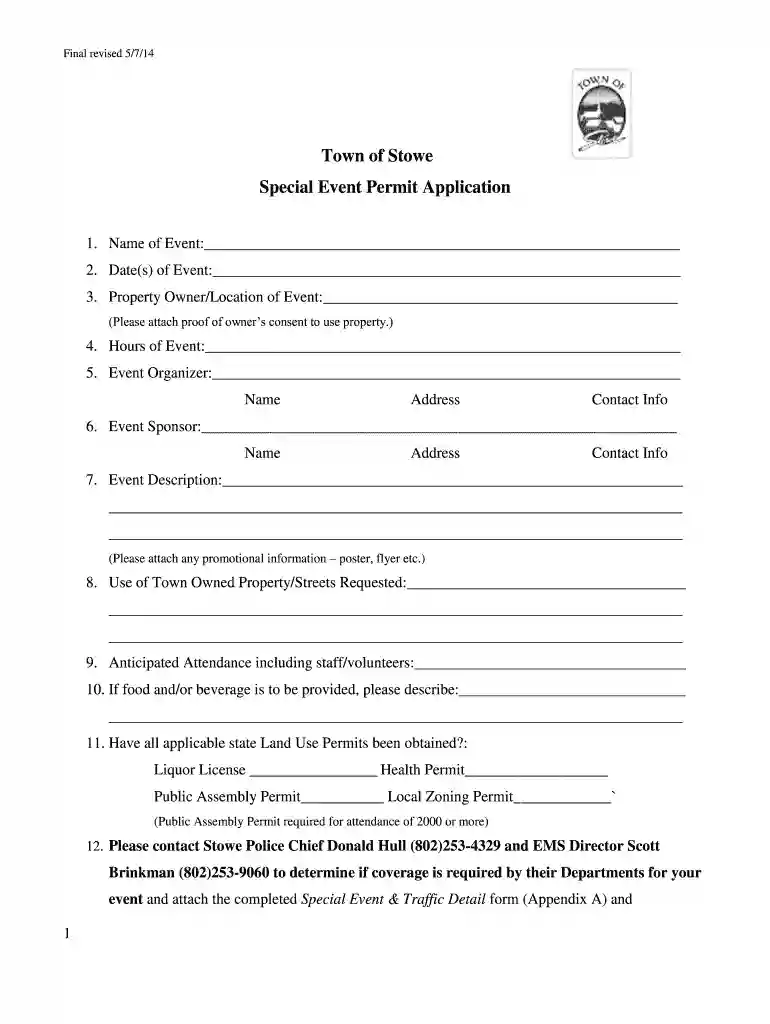
  2. Begin by entering the 'Name of Event' and 'Date(s) of Event' in the designated fields. Ensure accuracy as this information is crucial for your application.
  3. Fill in the 'Property Owner/Location of Event' section, attaching proof of owner’s consent if applicable. This step is essential for compliance.
  4. Complete the 'Hours of Event', 'Event Organizer', and 'Event Sponsor' sections with relevant details including names, addresses, and contact information.
  5. Provide a detailed 'Event Description' and attach any promotional materials like flyers or posters to enhance your application.
  6. Indicate if you will be using town-owned property or streets, and provide anticipated attendance numbers including staff and volunteers.
  7. If food or beverages are provided, describe them clearly. Also, confirm whether all necessary state Land Use Permits have been obtained.
  8. Contact local authorities as instructed to determine if police coverage is required for your event, attaching any necessary forms.
  9. Finally, review all entered information for accuracy before signing and dating the application. Submit it at least twenty-one days prior to your event along with the application fee.

Start filling out your Town of Stowe Special Event Permit Application today using our platform for free!

See more imm5753e versions

We've got more versions of the imm5753e form. Select the right imm5753e version from the list and start editing it straight away!

VersionsForm popularityFillable & printable
20164.8 Satisfied (82 Votes)
20144.3 Satisfied (69 Votes)

be ready to get more

Complete this form in 5 minutes or less

Got questions?

We have answers to the most popular questions from our customers. If you can't find an answer to your question, please contact us.

Electronic document approval requires a software solution that works in compliance with data protection and eSignature regulations. DocHub is an excellent tool for that, as it meets all the previously mentioned requirements. Whatever method you like to sign your Town of Stowe Special Event Permit Application in DocHub, your electronic signature will be legally binding and court-admissible.

As a comprehensive document modifying platform, DocHub is accessible on mobile devices. Open DocHub in your choice of mobile internet browser and employ our intelligent mobile-friendly toolset to complete your Town of Stowe Special Event Permit Application.

Security and compliance

At DocHub, your data security is our priority. We follow HIPAA, SOC2, GDPR, and other standards, so you can work on your documents with confidence.

Related links

beacon college catalog 2011-2012

Access Grant Application (FRAG) form can be downloaded from the Beacon College website. The College may also sponsor special event meals or cook-outs at theRead more

Learn more
Special Event Permit | Town of Stowe

Applications must be submitted no later than 30 days prior to the date of an event. Persons organizing outdoor events in Stowe with over 300 expected attendeesRead more

Learn more
Naturalistic Study of Level 2 Driving Automation Functions

As part of the consent process, potential participants were instructed that they alone (as consented drivers) were authorized to drive the study vehicle.Read more

Learn more
If you believe that this page should be taken down, please follow our DMCA take down process here