The parent rosaweb form 2025

Get Form
chclc Preview on Page 1

Here's how it works

01. Edit your chclc online
Type text, add images, blackout confidential details, add comments, highlights and more.

02. Sign it in a few clicks
Draw your signature, type it, upload its image, or use your mobile device as a signature pad.

03. Share your form with others
Send rosaweb via email, link, or fax. You can also download it, export it or print it out.

How to use or fill out the parent rosaweb form

Form edit decoration
9.5
Ease of Setup
DocHub User Ratings on G2
9.0
Ease of Use
DocHub User Ratings on G2
  1. Click ‘Get Form’ to open it in the editor.
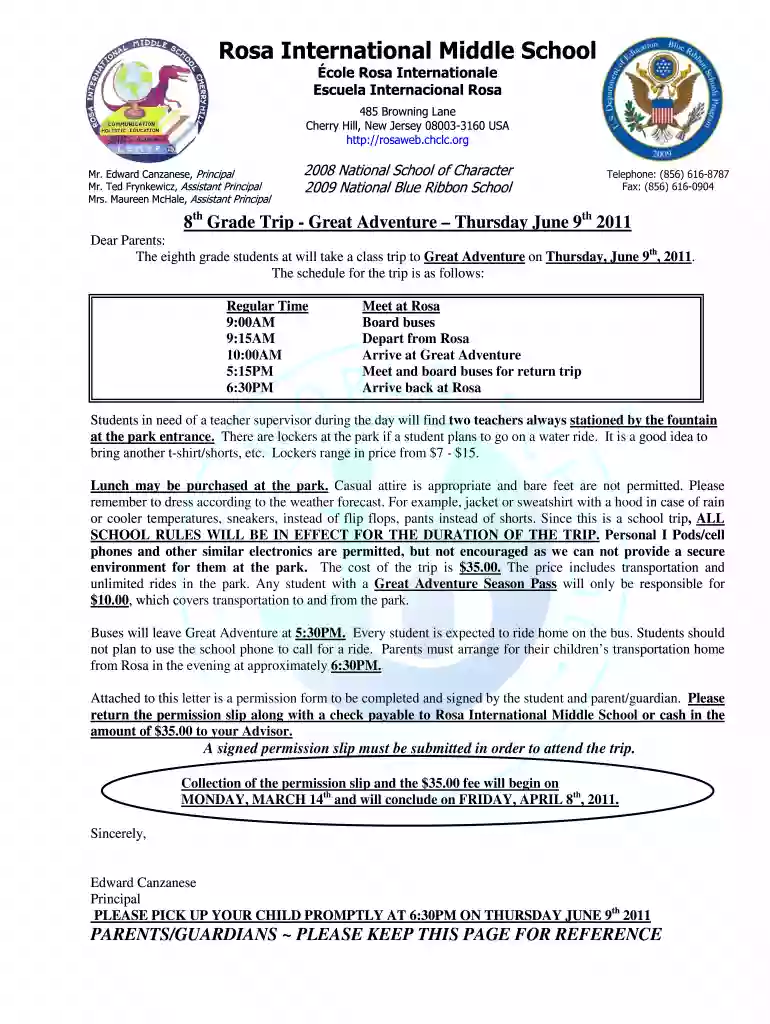
  2. Begin by entering your child's name in the designated field labeled 'Student’s Name (please print)'. This ensures that the form is correctly associated with your child.
  3. Next, fill in the 'Advisor' section with your child's advisor's name. This helps school staff identify who your child is assigned to.
  4. Select one of the two options regarding authorization for your child to attend the trip by checking the appropriate box. Make sure to review this carefully.
  5. Sign and date the form where indicated for both student and parent/guardian signatures. This confirms consent and understanding of school rules during the trip.
  6. Provide a home phone number and two emergency contact numbers in case you cannot be reached during the trip. Fill these out accurately for safety.
  7. Finally, ensure that you submit this completed form along with the $35 fee by April 8th, 2011, as instructed at the bottom of the form.

Start filling out your parent rosaweb form today using our platform for free!

See more the parent rosaweb form versions

We've got more versions of the the parent rosaweb form form. Select the right the parent rosaweb form version from the list and start editing it straight away!
Versions Form popularity Fillable & printable
2011 4.8 Satisfied (121 Votes)
be ready to get more

Complete this form in 5 minutes or less

Get form

Got questions?

We have answers to the most popular questions from our customers. If you can't find an answer to your question, please contact us.
Contact us

Of course, electronically drawing your signature is appropriate, but only if you use a tool that complies with industry regulations and policies. Try DocHub, which guarantees eSignature validity under ESIGN and UETA requirements. All you need to eSign your rosawebc is an account with DocHub and an internet connection. Once you open your document in our editor, click Sign and select the Draw option.

With DocHub, there are several convenient ways to edit your the parent rosaweb form online. You can drag and drop the form and modify it directly at the DocHub website or use our browser extension to fill out your form immediately. Additionally, you can modify your PDF on your smartphone, as DocHub is compatible with all the accessible mobile platforms.

To support a dependency claim for a parent, the following documentation is required by DFAS: completed DD Form 137-3 and DD Form 1172; relationship documents (birth certificate, marriage certificate, divorce documents, etc.); documentation verifying all gross income; identification; social security card; proof of
No. Your dependents are spouse and minor kids. Adding a parent as a secondary dependent is very hard, usually takes a couple of years, and even if it does happen, secondary dependents do not get the same Tricare as primary ones. Its, at best, Medicaid/ Medicare level coverage.
To enroll a Parent/Parent In-Law into DEERS, the following documentation is required: 1. Defense Finance Accounting Services (DFAS) Approval of Dependency Determination (DD 1172 and DD 27-88) 2. Parent/Parent In-Laws original Social Security Card (original, not laminated) 3.
be ready to get more

Complete this form in 5 minutes or less

Get form

People also ask

Parents feedback Feedback helps to inform the inspection process and support improvement in service provision. As a parent/guardian you can express your satisfaction or dissatisfaction with the early years service your child attends by completing our parent/guardian feedback form.
A DD 137-3 is a form developed by the US Department of Defense, which is officially known as a Dependency Statement Parent. Logically, it should be used by military members who want to make their parent a dependent.
To seek dependent status for an adult family member, such as a father, mother, father-in-law, mother- in-law, stepparent, or someone in loco parentis, DFAS will apply a financial test to determine whether the family member receives over half of his/her income from the Servicemember.

Related links